
femhimekihpocbkdfimhojklmhkniami

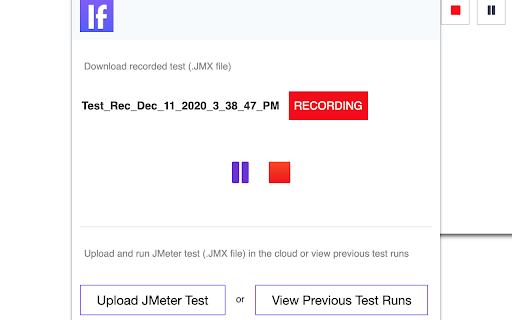


Record JMeter tests while browsing, upload JMX files to the cloud, and run load tests with thousands of users. Instant JMeter Test Recording and Cloud Load Testing at Your Fingertips. The LoadFocus JMeter testing extension lets you effortlessly record JMeter tests while browsing your website and run cloud-based load tests with thousands of virtual users—all with just a few clicks. Boost your website and API performance testing strategy with key features, including: Automatic JMeter script generation Cloud-based load tests with virtual users Detailed performance metrics Easy file uploads and downloads In-depth reports and insights on modern metrics FEATURES: 📋 Automatic JMeter Test Recording Simply navigate your website, and the extension captures your actions into a JMeter script (JMX) for seamless testing. ☁️ Cloud-Based Load Testing Run large-scale performance tests with thousands of users from multiple cloud locations, no coding needed. 📊 Detailed Performance Metrics Analyze key metrics like Response Time, Latency, Hits/second, and Percentiles with live charts to uncover performance issues. 📂 Easy Uploads and Downloads Upload your JMeter files to the cloud or download test results locally for further inspection. 📑 In-Depth Reports & Modern Insights Get comprehensive performance reports that include modern metrics such as error rates, response times, and percentile breakdowns. These insights help you identify bottlenecks and optimize your application’s performance.

Loadster Recorder Extension
The Loadster Recorder is a helper extension that enables you to easily record test scripts for Loadster from your Chrome browser. Loadster is a load testing platform for websites, web applications, and APIs. Load testing is a way to ensure that the websites and apps you are building remain fast and responsive under heavy load. With Loadster, you can create test scripts simulating real user behavior, and then play them back with hundreds or thousands of concurrent simulated users. You can also use Loadster for 24x7x365 Site & API Monitoring with the same scripts. Site monitoring makes the job of maintaining a high availability web application much easier, and ensures you'll be the first to know if anything breaks. This Chrome extension works by observing your browsing activity (only when recording is enabled), and sharing it with the Loadster script editor for creating a script. This extension can be disabled when you're not recording scripts. To learn more about Loadster and script recording, check out https://loadster.com. To review the extension source code, go to https://github.com/loadster/loadster-browser-extension.

TestCase Studio - Selenium IDE
TestCase Studio record the user actions performed on a web application in English Sentences. Best alternative for Selenium IDE TestCase Studio is a platform to record and replay the user actions performed on a web application in English Sentences. This recorder plugin also records screenshots. It will also generate the XPath and Automation Code for every user action. User can save or copy these recorded steps as a Test case. Watch this video tutorial to make the best use of TestCase Studio. https://www.youtube.com/watch?v=Gcofn71bJdo New Features: Screen Recording, Customise Command, Record TestCase in any Language and BDD Format Support. Very simple steps to use the tool- 1. Click on the TestCase Studio logo in the tool bar. 2. It will open the TestCase Studio window. 3. Now keep performing your steps, it will automatically write english sentence for every user action. 4. You can download the written steps by clicking on download button. Upgrade to Pro version for more advanced features. Compare the Pro version features here- https://selectorshub.com/testcase-studio-pro/plans/

Katalon Recorder (Selenium tests generator)
Selenium IDE alternative to record and export Selenium scripts. With reports & screenshots. Fast & open-source. Katalon Recorder is a free, lightweight web extension that serves as an alternative to Selenium IDE. Designed for automating browser actions and tests, Katalon Recorder is available on Chrome. With Katalon Recorder, you can: Ensure quality by testing your work before passing it on to the QA team. Maintain end-to-end software quality through automated testing. Monitor web application functionality using synthetic testing. Track testing activities with shareable reports, complete with visual dashboards and charts. Save time by automating repetitive browser tasks such as generating reports, filling out forms, and even automating web-based games. Privacy notice: Katalon Recorder is designed with user privacy in mind. Your test artifacts are securely stored on your local machine, ensuring no data is transmitted to our servers. To learn more about Katalon Recorder, visit https://docs.katalon.com/katalon-platform/plugins-and-add-ons/katalon-recorder-extension/get-started/katalon-recorder-overview

TestCraft
Introducing TestCraft, a free and open-source browser extension with the power OpenAI LLMs, designed to be a companion to your software testing. AI-Powered Test Idea Generation: Leverage the power of OpenAI to generate comprehensive test ideas based on webpage elements. Automated Test Creation: Generate ready-to-run test scripts for popular automation frameworks, Playwright, Selenium, and Cypress, in your preferred programming language: JavaScript, TypeScript, Python, C#, and Java. TestCraft eases your test creation process and saves time. Accessibility Checks: Empower your web applications to be inclusive for all users. TestCraft identifies accessibility issues and provides actionable insights to improve. Test Idea to Automated Tests: Seamlessly convert your AI-generated test ideas into automated test scripts. Additionally, you can edit the test ideas to improve them before generating automation tests. Unlock the full potential of your testing process with TestCraft. Download it now and experience the future of software testing!
