
edaoeijmonejblfggfjkobcijmfeoape
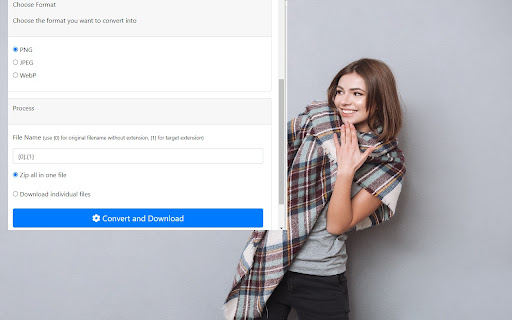
Convert multiple images at the same time. Need a quick and easy method to convert your images in bulk? Use our custom image converter extension today. With this extension, you can convert all your images with a simple click of the mouse button. If you wish to test the mass image converter after installation, here is what you need to do. Close all browser windows Open a new browser tab Click on our extension icon. Write down the image format you wish to convert the images to, we support jpg, gif and other common image formats Choose the images you wish to convert from your computer If you need to convert more then 5 images, its smart to download our extension and just convert your images using our software extension. This way, you wont need to do the image conversion manually.

Image Converter
Try different file formats with Image Converter. The smart picture converter tool for formats like JPG to PNG, JPG to WEBP and more. Say goodbye to complicated tools and endless online searches. The Image Converter is here to simplify your life, allowing you to transform the format of pictures in just a few clicks. Whether you’re dealing with PNGs, JPGs, WEBP or other formats, this tool makes converting images seamless and efficient. 💡 Why Choose the Image Converter? ◾ Fast and Easy: Convert images without delays. This extension is designed for speed and simplicity. ◾ Multiple Formats Supported: Whether you need an image converter to JPG, or even other formats this tool has you covered. ◾ User-Friendly Interface: A straightforward design ensures anyone can use it, from professionals to casual users. ◾ Secure and Private: Your pictures remain on your device, ensuring privacy and security. 💻 Key Features of the Image Converter ➤ Convert visual file to JPG with just one click. ➤ Change any format to PNG effortlessly. ➤ Use the Image Converter for quick format switching to WEBP. 🚀 Batch Processing: Work with multiple images at once with the visual file converter, saving you time and effort. With the power to convert a wide range of file types, this tool is invaluable for both professionals and casual users. No more opening different programs or dealing with complicated settings — everything you need is available at your fingertips. ▸ Turn a photo into a JPG format in seconds. ▸ Need to transform to PNG? Done in no time. ▸ Use the image converter for all your needs. ⚙️ Who Can Benefit From the Image Converter? ➡ Photographers and Designers: Use the photo converter to JPG to optimize your portfolio. ➡ Office Professionals: Quickly convert files for presentations or reports. ➡ Casual Users: Simplify tasks like turning a pic into a compatible format for uploading or sharing. 💼 How to Use the extension 1️⃣ Install the Extension: Find it in the Chrome Web Store and add it to your browser. 2️⃣ Upload Your File: Drag and drop or select from your device. 3️⃣ Choose Your Format: Select options like image convert JPEG, or convert image to PNG, etc. 4️⃣ Download Your File: Your newly converted file is ready to go. ⚫ Image to image converter for seamless format changes. ⚫ Convert file formats like PNG, JPG, and WEBP. ⚫ Photo converter for various uses, such as resizing or optimizing. ⚫ Pic converter that keeps quality intact. 📈 This extension is the ideal solution when you need to switch between file formats quickly and efficiently. Whether you’re transforming photos for social media posts, preparing design files for your website. It supports a wide range of formats and is easy to use, making it the go-to tool for individuals and professionals who deal with images regularly. ➽ It’s perfect for social media uploads. Some platforms only accept specific formats like JPG. ➽ Convert image files to reduce file size for faster website loading. ➽ The tool helps maintain high quality for professional use. ◼️ Bloggers can optimize pictures for web publishing using the converter. ◼️ E-commerce sellers can convert JPG to png for product listings. ◼️ Graphic designers can utilize the JPG converter to manage creative assets. 🔷 One-Click Conversion: No need for complex settings. Just select and convert your image. 🔷 Drag-and-Drop Interface: Makes the process even faster. 🔷 Multiple Output Formats: Choose from JPG, PNG, and more. - Never struggle with PNG, JPG image formats again. - Save storage space with the convert to JPG feature. - Enjoy high-quality results with the photo converter to JPG. ✅ Install the tool today and transform the way you manage files. Whether it’s image to JPEG, or anything else, this tool has everything you need. Don’t miss out on the ultimate solution for image file converter tasks. Start converting now and make every file format transition effortless. ❔ What does the extension do? ✔️ It allows you to convert various file formats quickly and easily. ❔ Can I convert from PNG to JPEG? ✔️ Yes, you can easily convert images from PNG to JPEG and vice versa. ❔ How many formats can I convert? ✔️ The extension supports many formats, including PNG, JPEG, WEBP, and more. ❔ Does the tool maintain file quality after conversion? ✔️ Yes, the conversion preserves the quality of your files.

WebP / Avif image converter
Convert Webp, Avif and other types of image before saving. WebP / Avif image Converter: convert, download and store images from the web just the way you want. How does it work? After downloading the extension you get a new button *Convert and Save image as* in the image context menu (When you right click on an image). Now the image is being processed and downloaded based on your preferences. Conversion to JPG, PNG and WebP are supported. These preferences can be set in the option menu that you can reach by clicking on the extensions’ browser button located on the top right of your browser next to the address bar. Note that the "browser button" may be hidden. If you want to quickly change the settings pin it to your extension bar. This can be done by clicking on the "extension" (looks like a puzzle piece) next to the hamburger menu / user login. Find the button and click on "pin". What can you configure? * Image conversion types For each image type you can select if and to what image type it is supposed to be converted to. (JPG, PNG or WebP). * Download location To keep downloads sorted you can specify your preferred download location and filename. The Download location and filenames can include information of the time and date of downloading, image origin and image format. The exact details can be found in the extension. Note that download locations are always relative to your download folder. * Actions (Advanced section) You can change the default autodetect behavior into a fixed task without changing your autodetect settings. This can be useful when you temporarily only want to download images without converting them yet but still want to store them on the specified location. Or if you only want to download PNG files for example. * Popup layout (Advanced section) For quick access specify which tab you want to open by default. * Generic (Advanced section) To optimize your workflow you can turn off the popup that suggests download location and filename. * The image that was downloaded and converted did not converted to the intended filetype. Webp /Avif image converter uses the actual file data to determine the file type not the url. Therefor, you may experience that a conversion may be different than what you may expect if you look at the url. Also file extensions are corrected to the appropriate extension in these cases if you turned off conversion for the specific file type. * The extension does not converts the image but gives back a .htm file and/or filenames that do not reflect the original filename. Please make sure other extensions are not intervening with the download process, for example download managers. Webp /Avif image converter uses a different route to download the (converted) image than the regular "save as" function. This route may lead to conflicts with some download managers and producing unexpected results. Permission justification * storage: Allows the extension to save your settings. * downloads: Allows the extension to initiate a file download for the converted image. * contextMenus: Allows the extension to add the "convert and save" button to the image contextmenu * : Allows the extension to download the image before converting the it.

Download All Images
Easily save images with a wide range of customization features, such as file size, dimensions, and image type. This is a bulk image downloader to extract all photos from the current web page. This online image downloader provides highly customizable filters based on file size, image size, and more! Features: 1. Detects all images loaded on the current web page (even if they're nested iframes) 2. Filters images by file size, dimension, URL or type 3. Finds images in links, background scripts, and CSS files 4. Displays images in a gallery view before downloading 5. Download blob-type images even if the source is dead Filters: 1. Filter by file size 2. Filter by image dimension 3. Filter by image type 4. Filter by image URL (regular expression matching) 5. Filter by same-origin policy 6. Detect image width and height by downloading only the header section of the image Features: 1. Bulk download images 2. Filter based on file properties 3. Filter based on image properties such as width and height 4. Deep image search (extract images from the current page and subsequent pages) 6. Can detect single image path 7. Can download photos in ZIP format 8. Can detect the original image size from thumbnail Download location: By pressing the "Save" button, the extension downloads all selected images in the default download directory or a specified subfolder. Change Log: Version 0.1.1 1. The extension now stores images in a sub-folder (the default sub-folder name is the domain's name) 2. One security bug is fixed. Version 0.2.0 1. Images are now saved in a zip archive to prevent multiple downloads and better file-naming 2. The image detection algorithm is improved. Version 0.2.1 1. User preferences are now persistent. It is still possible to reset them from the UI 2. It is now possible to ask for "Save Dialog" from the UI 3. There is progress indicating how many images proceed 4. UI closes itself when all images are downloaded. Version 0.2.2 1. Deep image searching through all links (up to two levels) 2. Updates JSZip library Version 0.3.4 1. You can now open "Gallery View" in a new browser tab 2. You can now click on a single image in the "Gallery View" 3. It is possible to download images from multiple tabs at once Version 0.3.7 1. Two new filters: remove identical images and remove images with forbidden keywords 2. It is now possible to stop the image spider from the UI without closing it Version 0.5.6 1. Deeps search level 3 (search for both links and images in the destination HTML pages) 2. Custom RegExp filters to increase the searching speed. Version 0.9.0 1. Moves to manifest v3 2. Internal module to detect image width and height only by downloading the header section 3. Detects images first, then detects other mime types 4. The extraction of hard-coded image links is improved

Image Editor & Tools - iLoveIMG
Easily edit, convert or download web page images and screenshots with iLoveIMG iLoveIMG makes image editing quick and effortless. Whether you're preparing visuals for work, web, or everyday use, everything you need is in one place. With the iLoveIMG Chrome Extension, you can resize, compress, convert, crop, and edit images directly from your browser. Trusted worldwide for speed and ease of use, iLoveIMG delivers powerful image tools in a clean, intuitive experience. OPTIMIZE IMAGES • Compress Image: Reduce image file size without losing quality. Perfect for faster uploads, sharing, and saving storage space. •Resize Image: Resize images to exact dimensions or percentages. Ideal for social media, websites, or email attachments. CONVERT IMAGE FORMATS •JPG Converter: Convert images to JPG format for smaller file sizes and better compatibility across platforms. •PNG Converter: Convert images to PNG for higher quality and transparency support when needed. •WebP Converter: Convert images to WebP for modern web optimization with smaller sizes and high quality. EDIT IMAGES •Crop Image: Crop images to focus on key areas or fit specific formats like social media posts or thumbnails. •Rotate Image: Rotate images to the correct orientation in seconds. Fix sideways or upside-down photos easily. •Add Watermark: Add text or logos to images. Protect your content or reinforce your brand identity. ADVANCED TOOLS •Meme Generator: Create memes quickly by adding text to images. Customize captions and share instantly. •Image Upscaler: Increase image resolution while preserving quality. Improve clarity for prints or digital use. •Remove Background: Automatically remove backgrounds from images. Create clean visuals for products or presentations. Why Choose iLoveIMG? ● All-in-one image toolkit in your browser ● Fast, simple, and easy to use ● High-quality results with minimal effort ● Clean, intuitive interface ● Trusted by millions worldwide Install the iLoveIMG Chrome Extension and simplify the way you work with images—resize, compress, convert, and edit in just a few clicks.
