
pbcfbdlbkdfobidmdoondbgdfpjolhci


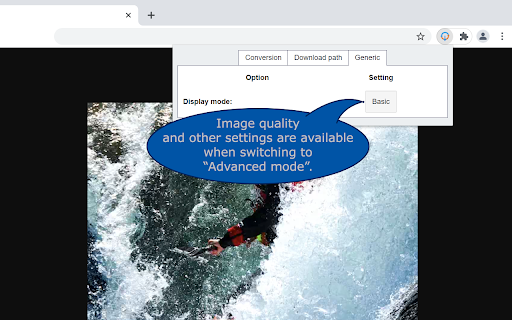
Convert Webp, Avif and other types of image before saving. WebP / Avif image Converter: convert, download and store images from the web just the way you want. How does it work? After downloading the extension you get a new button *Convert and Save image as* in the image context menu (When you right click on an image). Now the image is being processed and downloaded based on your preferences. Conversion to JPG, PNG and WebP are supported. These preferences can be set in the option menu that you can reach by clicking on the extensions’ browser button located on the top right of your browser next to the address bar. Note that the "browser button" may be hidden. If you want to quickly change the settings pin it to your extension bar. This can be done by clicking on the "extension" (looks like a puzzle piece) next to the hamburger menu / user login. Find the button and click on "pin". What can you configure? * Image conversion types For each image type you can select if and to what image type it is supposed to be converted to. (JPG, PNG or WebP). * Download location To keep downloads sorted you can specify your preferred download location and filename. The Download location and filenames can include information of the time and date of downloading, image origin and image format. The exact details can be found in the extension. Note that download locations are always relative to your download folder. * Actions (Advanced section) You can change the default autodetect behavior into a fixed task without changing your autodetect settings. This can be useful when you temporarily only want to download images without converting them yet but still want to store them on the specified location. Or if you only want to download PNG files for example. * Popup layout (Advanced section) For quick access specify which tab you want to open by default. * Generic (Advanced section) To optimize your workflow you can turn off the popup that suggests download location and filename. * The image that was downloaded and converted did not converted to the intended filetype. Webp /Avif image converter uses the actual file data to determine the file type not the url. Therefor, you may experience that a conversion may be different than what you may expect if you look at the url. Also file extensions are corrected to the appropriate extension in these cases if you turned off conversion for the specific file type. * The extension does not converts the image but gives back a .htm file and/or filenames that do not reflect the original filename. Please make sure other extensions are not intervening with the download process, for example download managers. Webp /Avif image converter uses a different route to download the (converted) image than the regular "save as" function. This route may lead to conflicts with some download managers and producing unexpected results. Permission justification * storage: Allows the extension to save your settings. * downloads: Allows the extension to initiate a file download for the converted image. * contextMenus: Allows the extension to add the "convert and save" button to the image contextmenu * : Allows the extension to download the image before converting the it.

Convert WEBP to JPG
Convert WEBP to JPG images locally without losing quality. No server upload, keeping your data private 🚀 Convert WebP to JPG with Ease Tired of dealing with WebP images that won’t open on your device? With our WebP to JPG Converter, you can instantly transform WebP files into universally compatible JPG format. Whether you’re sharing, printing, or editing, our extension makes it simple and fast. 💫 Why Choose Our WebP to JPG Converter? ✔️ Unlimited Conversions — Convert as many files as you need, without restrictions. ✔️ Batch Processing — Convert multiple WebP images to JPG in one go. ✔️ High-Quality Output — Preserve the original quality of your images. ✔️ Lightning-Fast Performance — Get your JPG files in seconds. ✔️ Offline Conversion — No internet connection required; all processing happens locally. ✔️ Drag-and-Drop Simplicity — Easily upload files with a simple drag-and-drop interface. 👥 Built for You We’re constantly improving our extension based on user feedback. Your suggestions help us make the conversion process even better! 🖼 How to change WebP to JPG? 1️⃣ Install the extension and click its icon in your browser. 2️⃣ Drag and drop WebP files or select them from your computer. 3️⃣ The extension instantly converts them to JPG and saves them to your Downloads folder. 🧐 FAQs ❓ How do I convert WebP to JPG? Simply install the extension, upload your WebP files, and let the converter do the rest. ❓ Can I convert multiple WebP files at once? Yes! Our extension supports batch conversion for multiple files. ❓ Is it safe to use? Absolutely! All conversions happen offline, so your data stays private and secure. ❓ What formats are supported? Currently, the extension converts WebP files to JPG. ❓ Where are the converted files saved? All JPG files are saved to your Downloads folder for easy access. 🌟 Why convert WebP to JPG? ▶ Universal Compatibility: JPG works on all devices and platforms. ▶ Easier Sharing: No more compatibility issues when sharing images. ▶ Practical Use: Perfect for printing, editing, or sharing on social media. 💡 Tips for Efficient Conversion 🔹 Use batch processing to save time when converting multiple files. 🔹 Ensure your images retain their original quality by adjusting settings if needed. 🔮 Exciting Features Coming Soon 🔸 Instant previews for converted images. 🔸 Optional compression to reduce file size without losing quality. 🔸 Your ideas! Share your feedback with us at 💌 wondercat0778@outlook.com. 📜 Simplify Your Workflow Our WebP to JPG converter is the ultimate tool for managing WebP files. Enjoy fast, high-quality conversions without compatibility issues. Try it today and make your image management effortless!

WebP to PNG Converter
Easily convert WebP to PNG with this Chrome extension! With just a few clicks quickly to convert to PNG and download any pictures. ✨ WebP to PNG Converter is an invaluable tool that allows you to save WebP images in PNG format. This extension is especially crucial for users dealing with compatibility issues as WebP is a newer file format that may not be supported by older browsers or certain image editing software without additional plugins or updates. ⚡ Our extension supports various file convert image to PNG types: beyond WebP, such as JPG and GIF, making it a comprehensive image converter tool. 🔥 This flexibility ensures that users can manage almost any image format they encounter on the web. 🔃 Whether you need to convert to png for a presentation, website upload, or just for storage, this tool has you covered. How to Use 1️⃣ Install the Chrome extension from the Web Store. 2️⃣ Navigate to any web page and right-click on a WebP or JPG, GIF image. 3️⃣ Select our extension from the context menu. There will be an instant conversion to PNG format. 4️⃣ Choose the destination folder and confirm the download. ⏱ Instant Automated Conversion: The extension allows for immediate actions to convert image to png, saving precious time especially when handling large batches of images. 🌐 Wide Range of Applications: As an image to png converter, it caters to various professional needs from digital marketing to graphic design, ensuring that all images meet the technical requirements of different platforms. 👍 User-Friendly Interface: The simple right-click and convert method to change to png offers a user-friendly interface that even beginners can navigate with ease. 🖼️ Image Downloader Feature: This feature not only saves time but also maintains the high quality of the images, which is crucial for professional portfolios and commercial projects. 💥 Technical Advantages of PNG Over WebP WebP was created to meet the increasing demand for effective image compression that does not sacrifice quality. This format employs both lossy and lossless compression methods to perfectly balance reducing file size with maintaining image fidelity. Despite the advantages of WebP, the nearly universal support for PNG across all major platforms and browsers makes it a steadfast option for web visuals. Its widespread compatibility ensures PNG remains vital in the digital realm, especially for images where maintaining high quality and transparency is critical. 🔸 Therefore, the ability to change webp to png, using tools like a WebP to PNG Converter, is invaluable. 🔸 This ensures that users can rely on our tool to seamlessly webp convert png, enhancing accessibility and usability across diverse digital environments. ✅ Compatibility with Software: Many graphics editing programs do not fully support the WebP format. Converting WebP to PNG allows users to manipulate these images in popular editing software without any limitations. ✅ High-Quality Outputs: When converting images, maintaining the highest quality is imperative. WebP to PNG Converter ensures a lossless conversion, retaining the original image quality, which is critical for professional uses. ✅ Ease of Use: The extension simplifies the process of conversion and automatically save image as PNG format. This feature is particularly beneficial for those who frequently work with images and require quick format changes. ✅ Editing and Enhancement: Unlike WebP, PNG files can be easily edited, modified, or enhanced using any standard image software, providing greater flexibility in graphic design. ✅ Social Media Sharing: PNG is widely supported across various social media platforms, making it the preferred format for distributing images. Converting from WebP to PNG ensures your images are viewable by the largest possible audience. 🔷 The extension from Google Chrome “WebP to PNG Converter” is designed to provide a lossless conversion, which is vital for maintaining the quality of the original picture. 🔷 Additionally, using our webp png converter simplifies the transition between these formats, allowing for greater flexibility in how images are used and shared online. 🔷 With such a tool, users can easily adapt their content for platforms that may not support WebP natively. Who Can Benefit from WebP to PNG Converter? ▸ Designers who need to ensure their images are compatible with various editing tools. ▸ Photographers looking to share their work on multiple platforms. ▸ Developers who require images in PNG format for web development. ▸ Anyone needing to convert WebP images to a more flexible and widely supported format. Conclusion 💫 In conclusion, the WebP to PNG Converter is an essential tool for anyone working with images in different formats. 💪 It provides a reliable, user-friendly solution for converting WebP files to PNG, ensuring maximum compatibility and quality. 💯 Whether you're a professional photographer, a graphic designer, or just someone who needs to manage image files efficiently, this extension is designed to meet your needs. 🌟 Empower your digital imagery with WebP to PNG Converter—where every pixel matters!

Save WEBP as JPG/PNG
Gives the option to save WEBP images to JPG/PNG A new "Save Image As..." with the icon of the extension will appear when you right-click an image. You need to use this, because it's not possible to modify the behavior of chrome's native "Save image as..." context menu option. .webp images can be a nuisance to deal with, here you're given an option to save the image as either a JPG or PNG instead. Conversion is done for you, directly.

Save image as Type
Save Image As Type - Save any image on the web as JPG, PNG, or WebP format. The application allows downloading images in a custom format quickly. Right-click on the image and select Download, the image will be stored in the downloaded folder on your computer. Right-click on any image and choose "Save as JPG...", "Save as PNG...", or "Save as WebP..." to convert and download it in your preferred format. Features: • Convert images between JPG, PNG, and WebP formats • Simple right-click context menu integration • Choose save location with Save As dialog • Smart filename detection from image URL • No data collection — runs entirely in your browser
