
jhpidehlbchkinmhojpfdejmnndagjdi
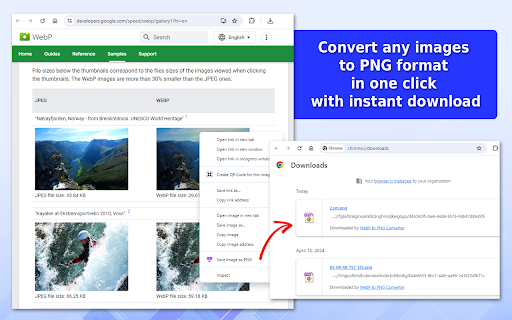
Easily convert WebP to PNG with this Chrome extension! With just a few clicks quickly to convert to PNG and download any pictures. ✨ WebP to PNG Converter is an invaluable tool that allows you to save WebP images in PNG format. This extension is especially crucial for users dealing with compatibility issues as WebP is a newer file format that may not be supported by older browsers or certain image editing software without additional plugins or updates. ⚡ Our extension supports various file convert image to PNG types: beyond WebP, such as JPG and GIF, making it a comprehensive image converter tool. 🔥 This flexibility ensures that users can manage almost any image format they encounter on the web. 🔃 Whether you need to convert to png for a presentation, website upload, or just for storage, this tool has you covered. How to Use 1️⃣ Install the Chrome extension from the Web Store. 2️⃣ Navigate to any web page and right-click on a WebP or JPG, GIF image. 3️⃣ Select our extension from the context menu. There will be an instant conversion to PNG format. 4️⃣ Choose the destination folder and confirm the download. ⏱ Instant Automated Conversion: The extension allows for immediate actions to convert image to png, saving precious time especially when handling large batches of images. 🌐 Wide Range of Applications: As an image to png converter, it caters to various professional needs from digital marketing to graphic design, ensuring that all images meet the technical requirements of different platforms. 👍 User-Friendly Interface: The simple right-click and convert method to change to png offers a user-friendly interface that even beginners can navigate with ease. 🖼️ Image Downloader Feature: This feature not only saves time but also maintains the high quality of the images, which is crucial for professional portfolios and commercial projects. 💥 Technical Advantages of PNG Over WebP WebP was created to meet the increasing demand for effective image compression that does not sacrifice quality. This format employs both lossy and lossless compression methods to perfectly balance reducing file size with maintaining image fidelity. Despite the advantages of WebP, the nearly universal support for PNG across all major platforms and browsers makes it a steadfast option for web visuals. Its widespread compatibility ensures PNG remains vital in the digital realm, especially for images where maintaining high quality and transparency is critical. 🔸 Therefore, the ability to change webp to png, using tools like a WebP to PNG Converter, is invaluable. 🔸 This ensures that users can rely on our tool to seamlessly webp convert png, enhancing accessibility and usability across diverse digital environments. ✅ Compatibility with Software: Many graphics editing programs do not fully support the WebP format. Converting WebP to PNG allows users to manipulate these images in popular editing software without any limitations. ✅ High-Quality Outputs: When converting images, maintaining the highest quality is imperative. WebP to PNG Converter ensures a lossless conversion, retaining the original image quality, which is critical for professional uses. ✅ Ease of Use: The extension simplifies the process of conversion and automatically save image as PNG format. This feature is particularly beneficial for those who frequently work with images and require quick format changes. ✅ Editing and Enhancement: Unlike WebP, PNG files can be easily edited, modified, or enhanced using any standard image software, providing greater flexibility in graphic design. ✅ Social Media Sharing: PNG is widely supported across various social media platforms, making it the preferred format for distributing images. Converting from WebP to PNG ensures your images are viewable by the largest possible audience. 🔷 The extension from Google Chrome “WebP to PNG Converter” is designed to provide a lossless conversion, which is vital for maintaining the quality of the original picture. 🔷 Additionally, using our webp png converter simplifies the transition between these formats, allowing for greater flexibility in how images are used and shared online. 🔷 With such a tool, users can easily adapt their content for platforms that may not support WebP natively. Who Can Benefit from WebP to PNG Converter? ▸ Designers who need to ensure their images are compatible with various editing tools. ▸ Photographers looking to share their work on multiple platforms. ▸ Developers who require images in PNG format for web development. ▸ Anyone needing to convert WebP images to a more flexible and widely supported format. Conclusion 💫 In conclusion, the WebP to PNG Converter is an essential tool for anyone working with images in different formats. 💪 It provides a reliable, user-friendly solution for converting WebP files to PNG, ensuring maximum compatibility and quality. 💯 Whether you're a professional photographer, a graphic designer, or just someone who needs to manage image files efficiently, this extension is designed to meet your needs. 🌟 Empower your digital imagery with WebP to PNG Converter—where every pixel matters!

Free VPN for Chrome - VPN Proxy VeePN
Fast, ultra secure, and easy to use VPN service to protect your privacy online. Enjoy Unlimited Traffic and Bandwidth! VeePN: unblock access to websites. Enjoy your favorite services, media, and games fast and safe, no matter where you are! Get the VeePN FREE VPN Chrome extension and ensure your freedom. Get yourself the necessary resource access and total protection of the Internet connection. Use our servers and assign yourself a new IP address. Then, enjoy your privacy. The VeePN extension guards you against frauds and hackers. It hides your location and secures your personal data. Our main features are: ✔ 2600+ servers all over the world ✔ High-speed server network ✔ Block ads, trackers, malware ✔ Spoof location, time and browser language ✔ Bypass & auto-protect websites custom list ✔ User-Agent Switcher ✔ Strict No Logs policy ✔ 24/7 customer service ✔ Windows, MAC, iOS, Android apps + we are available on smart TVs, routers and Linux The VeePN free VPN browser extension is a simple solution. Still, it fixes all the potential troubles with an Internet connection. It copes with all the burning obstacles. Access to the blocked or restricted content under safe IP-protection. Surf the Web safe from any location. More Information about the VeePN Advantages: ✦ Full Access to Blocked Websites and Applications Unblock the restricted access to resources. VeePN is equally effective for both government censorship and geo-based limitations. These free Chrome VPN extensions make it possible to ignore any bans. Enjoy your favorite social media and any other web resources you'd like to access. ✦ Unlimited Traffic and Bandwidth. Don't be concerned about the bandwidth and traffic available through the free VPN for Chrome. There are no restrictions on traffic. Watch your favorite video content, listen to the music in HQ, or play games with the VeePN mediator. ✦ Anonymity and Privacy Protection Use the secured VeePN connection to hide your activities on the Web. Protect yourself from any tracking attempts, and secure your Chrome browser. Install and apply the Chrome extension instead of installing Incognito browsers. There is no use to tinker with several apps at once. ✦ One-click Setup No need to waste your time messing around with the settings. Connect to free unlimited VPN Proxy service with one click. The configuration is automatic – VeePN chooses the best options for you. If you want to change them – do it any moment manually. ✦ Secure Web Access in HotSpots Protect your device and activities with a free unlimited VPN Proxy. If you connect to the Internet in public spots – get rid of any dangers. The Chrome extension secures all your sensitive data. Keep the passwords, personal details, and any other information under the safe lock. ✦ Accelerated Speed of Surfing More than 2600 proxy servers in 85+ countries are at your service. VeePN connects you automatically to the nearest one. The secured channel is robust and ensures high-speed surfing. The extension blocks the pop-ups and ads on webpages too. This Chrome extension makes the pages lighter! Load the information faster and get rid of annoying banners. ✦ High-class Encryption All your Internet traffic stays encrypted. Select an encryption protocol from many supported by the service. Note the Smart VeePN encryption protocol too. It is the custom military-level option developed by our specialists. With your unlimited free VPN, conceal your actions and exclude any trackers. ✦ No Activity Logs Don't be concerned if the service collects or stores your data. Your visits and download history, location data, and IP addresses stay secret. The free VPN access via VeePN ensures your anonymity and hides all your actions. They are invisible to everyone, including us! ✦ Cross-Platform Solution The VeePN is available in many forms besides the Chrome browser extension. The service allows up to ten simultaneous connections from different devices under one account. Connect to the Web freely from your laptop and smartphone. On the smart TV, bypass the geographical restrictions. Ensure yourself full access to all the content you need. ✦ Disable Other Proxy Extensions – Automatically resolves conflicts with other proxy extensions to keep your VPN connection stable and secure The best free Chrome VPN extension must meet many technical criteria to please the user. The primary demands are still the same. VeePN allows you to surf safely what you want, wherever you are, and whenever you wish. Add the VeePN extension to your Chrome browser, and the service does the rest itself. Now you can connect to the Internet via the dedicated proxy servers. Make it fast and mask your location, queries, and surfing routes. Let yourself stay protected in any area, even in the public airport WiFi hotspot! The Privacy Policy Notes Your privacy and safety are the primary values of our company. VeePN does not collect or store your data. You can ensure it by checking the No Log policy – all the details are there for your information. If we get access to your data in the service delivery process, we don't share it with any third-party. We are also firmly against putting ads into our applications.

WebP to PNG
Easily convert webp to png. Fast and efficient webp to png converter. The extension to save webp as png from the right-click menu. Meet your ultimate digital sidekick: the webp to png converter! Converting images just got easier. ✅ Drag-and-Drop: You can use drag-and-drop to convert images. ✅ Right-Click: Adds "Save image as PNG" to the right-click context menu. ✅ Batch Convert: You can upload and convert multiple images to useful format. ✅ Compatibility with all devices: Converted images are supported on all platforms. ✅ One-click workflow: Simplify image conversion to enhance your workflow. Tired of broken images showing up uninvited? Our webp file to png tool ensures that your image conversion problems are a thing of the past. 🖱️ Right-Click and Save No complexity here! Our tool adds a right-click menu to your browser, letting you directly save any image as a png. 👉 One-click conversion ⚡ Instant results ☕ More time for coffee breaks! Whether it's a single webp file to png or a bustling bunch, this nifty converter has got your back. Simply select, convert, and voilà—your images are ready to rock in a good format. Let's change webp to png seamlessly and efficiently with the extension to save webp as png. 🔐 Conserve Quality and Clarity Worried about losing image quality? Fret not! Our webp to png converter preserves every pixel's pizzazz, ensuring your images look as stunning as ever. When webp convert to png, they maintain crisp detail and vibrant colors—because quality is our middle name, if only names had middle names. All conversions happen locally on your computer when you upload the image without sending them to external servers. Privacy matters! Although WebP files provide better compression and smaller file sizes, they don’t guarantee compatibility across all platforms. As a result, the quality might be improved. However, certain browsers and image editing tools might not support WebP. That’s where our converter becomes useful! It allows you to convert images to the widely accepted format, ensuring broad accessibility. 👉🏻 Click the "Add to Chrome" button (located on the right side above the text). 👉🏻 Confirm the installation by clicking "Add extension" in the pop-up. 👉🏻 Wait a few seconds for the extension to download and install. 👉🏻 That's all! The extensions is placed in your Chrome toolbar. 🎉 Features You’ll Love Explore a world where webp into png is as simple as pie. No more having to explain .webp to .png conversion methods over and over. Use our webp converter to png. Your one-stop solution for image conversions: be it posting on social media, designing an invite, or just tinkering with photo filters, this webp to png convert tool is indispensable. It’s like giving your favorite images a personality upgrade from webp to png. 🛠️ Perfect for Creatives Be you a graphic designer, marketing maven, or a meme enthusiast, change webp to png is a task you can now delegate to the convert from webp to png extension. 🔥 Webp convert to png with the flick of a wrist—or, at least, a flick of a right-click menu. 🔥 Control your browsing experience and save every beautiful image as you see fit. 🔥 webp in png where you need it! For the professionals who need seamless integration between various formats, our webp-to-png solution promises reliability. You can convert wepb to png in one click. What makes this webp converter tick? It’s the simple, user-focused interface that ensures a stress-free conversion experience. Convert .webp to png without a hitch, sail through the steps with grace. Free up precious time with our converter’s magics. It's super quick to convert to png file. 🎈 Set Free Your Images Free those trapped pixels with our .webp to png converter. Unleash image potential for viewing, editing, and sharing laughter with loved ones, all by changing to png. wedp to png converter can help you with that. 📑 Knowing the Creative Difference Dive into the deep end with a webp into png transformation that gives you full access to robust, editable image files. Create without bounds using a png file converter. No more search for webptopng. Whether you need to change to png for a presentation, a blog post, or your grandma’s scrapbook, this .webp to png tool covers everything. Experience a consistent webp vs png conversion adventure. Need physical prints? Switch from webp to pnb formats with no qualms about the output. With the right click you can save as png not webp.

JPG to WebP
Convert JPG to WebP without losing quality! With just one click, convert to WebP format and easily process multiple images in bulk. 🚀 Boost your website performance with JPG to WebP — a Chrome extension that lets you convert JPEG, PNG, and WebP images effortlessly right in your browser. Convert any of these formats into another, fine-tune image quality, and resize to the exact dimensions you need — turning heavy files into lightweight, web-optimized images in seconds. 🌟 Key benefits of converting jpg to webp 💠 Reduce file sizes by up to 35% compared to jpg format 💠 Maintain crystal-clear image quality during conversion 💠 Boost website loading speed dramatically 💠 Improve SEO rankings with faster page performance 💠 Save bandwidth and storage space effortlessly 📲 How to convert jpg to webp in seconds 🔘 Option 1: Use the popup 🖼 Click the converter icon in your browser 📂 Drag & drop files into the popup 💾 Choose where to save — get optimized results instantly 🔘 Option 2: Use the context menu 🖱️ Right-click any compatible file on a website ➡️ Select “Convert to WebP” from the menu 💾 Save it locally — done in seconds! 🌐 Universal compatibility ◆ Works with all JPG/JPEG images online ◆ Supports bulk jpg to webp conversion ◆ Seamless integration with your workflow 💎 Advanced features of our converter 🔺 Batch processing for multiple images simultaneously 🔺 Drag-and-drop interface for local files 🔺 Conversion history tracking for reference 🔒 Why choose WebP format? 🔹 Superior compression technology developed by Google 🔹 Smaller file sizes than jpg while maintaining quality 🔹 Faster website loading times improve user experience 🔹 Better SEO performance with optimized images 🔹 Growing industry standard for web optimization 🔄 Bulk conversion capabilities 1️⃣ Convert entire galleries with our jpg to webp bulk converter 2️⃣ Process multiple files simultaneously without quality loss 3️⃣ Save hours of manual conversion time 4️⃣ Apply consistent settings across all files 5️⃣ Download as individual files or in a convenient zip package 📈 Perfect for professionals 🔸 Web developers seeking to optimize site performance 🔸 Digital marketers improving SEO metrics 🔸 E-commerce owners enhancing product galleries 🔸 Content creators managing large image libraries 🔸 Bloggers looking to speed up their websites 📑 Simple conversion process ♦️ No technical knowledge required to convert jpeg to webp ♦️ Intuitive interface designed for users of all skill levels ♦️ One-click operation for instant results ♦️ Consistent quality across all conversions ♦️ Seamless integration with your Chrome browser 🌍 Versatile jpg converter functionality 🌐 Convert image from jpg to webp without losing quality 🌐 Process images directly from websites 🌐 Handle local files from your computer 🌐 Manage batch conversions efficiently 🌐 Apply custom settings per image or globally 🔝 Quality preservation technology ➤ Advanced algorithms to maintain visual fidelity ➤ Lossless conversion options available ➤ Adjustable compression levels to suit your needs ➤ Smart analysis of image content for optimal results ➤ Compare before/after with our preview feature 🚀 Technical specifications ① Supports all JPG/JPEG file formats for conversion ② Multiple quality settings from 0-100 ③ Batch processing of unlimited images ④ Metadata preservation options ⑤ Custom naming conventions for saved files ⚡ Fast, lightweight, and always ready 🚀 Runs instantly inside your browser — no waiting, no loading screens 💻 Designed for speed, even on low-powered devices 📴 Works seamlessly offline — ideal for travel, remote work, or limited connectivity 🧩 No extra software or extensions required 🔐 Private by design, secure by default 🛡️ Your files never leave your computer — conversions happen 100% locally 📦 No cloud uploads, no tracking, and no hidden data collection 🔏 Perfect for professionals handling confidential or sensitive content 🧘 Peace of mind with every use — what you convert stays with you 🎉 Get started with our jpeg to webp converter today! Install our Chrome extension and experience the power of converting jpg to webp without losing quality. Optimize your web images, improve your site performance, and enhance your SEO rankings with just a few clicks! 🧐 FAQs about extension 🔒 How does converting jpeg to webp improve my website? 🔹 WebP images are typically 25-35% smaller than equivalent JPG files 🔹 Smaller images load faster, improving user experience and SEO rankings ✨ Can I convert image to webp in bulk? 🔹 Absolutely! Our jpg to webp bulk converter handles multiple images simultaneously 🔹 Perfect for processing entire galleries or product collections at once 📲 Will I lose quality when I convert? 🔹 Not with our converter! We use advanced algorithms to preserve visual quality 🔹 You can adjust quality settings to find your perfect balance of size and clarity ⏳ How long does it take to convert? 🔹 Most single images convert in under a second 🔹 Bulk conversions process multiple images quickly and efficiently

WebP to JPG
Quickly Convert WebP to JPG with this free WebP to JPG converter in just 1-Click! Looking for a fast, easy way to change file formats in your browser? Our free image converter makes it simple to convert WebP, JPG, PNG, GIF, and more with just a click. Whether you’re a designer, blogger, or just need a quick solution, this tool gives you the best experience for managing images in different formats. 🌟 Why Choose This Extension? Here’s why you’ll love it: 1️⃣ Speedy Conversion – Get your files converted in seconds. 2️⃣ Multiple Formats – Convert WebP, JPG, PNG, GIF, PDF, and more. 3️⃣ Quality Preserved – Keep your files looking sharp, even after format changes. 4️⃣ Easy to Use – A simple interface that works for everyone, no experience needed. ➤ Quickly Convert WebP to JPG with this JPG to WebP converter! Webp Image files are becoming common on the web, but not all platforms can handle them. Our free image converter lets you easily turn WebP into JPG or JPEG in just a few steps, ensuring your files work on any device or platform. How to Use the WebP to JPG Converter: 1️⃣ Upload or drag the WebP file into the extension. 2️⃣ Choose the format, like .webp to jpg or another option. 3️⃣ The conversion starts automatically, and you can download the new file instantly. We’ve got you covered. This tool works seamlessly to give you the format you need. ▸ Handle Multiple File Formats at Once Our extension doesn’t stop at WebP and JPG. You can also: - Convert JPG to PNG for better quality. - Convert PNG to JPG to reduce file sizes. - Convert GIFs into JPGs for easier sharing. - Make PDFs into JPGs for simpler image handling. This tool covers all your format needs, and you can even create PDFs from images to keep things organized. 🚀 Boost Your Productivity with Batch Conversion Working with many files? Our batch processing feature is perfect for converting several images at once, like turning PNG to PDF or GIF or changing WebP to JPG in just One Click. This feature lets you process multiple files simultaneously, speeding up your workflow and making your life easier. ➤ Works on Any Device Whether you’re on a Mac or Windows PC, this tool works flawlessly. Since it’s a Chrome extension, it runs on any device that supports Chrome, without extra downloads or setup. - From your desktop or laptop. - Across different operating systems. - No bulky software required – everything happens in your browser. - Forget about large programs! Our image convertor extension gives you the power of professional software in a lightweight, fast package. Ideal for quick tasks or working with large batches of photos/images. 🌐 Convert WebP to JPG and More Formats Need help figuring out how to handle WebP files? Wondering how to convert WebP to JPG? Our tool makes it easy to convert WebP to any format. Just pick the one you need and let the extension do the work. - WebP to PNG converter for more compatibility. - JPEG to WebP converter for smaller, efficient file sizes. - PNG to PDF converter for professional documents. - PDF to Image converter if you need individual files from a PDF. 🖼️ Advanced Format Support In addition to WebP to JPG, you can: 1) Easily switch WebP to JPEG converter. 2) Change .PNG to JPG or any other format you prefer. 3) Convert GIF files to JPG to get compact picture size. For more flexibility, the tool lets you adjust settings like resolution and photo size for all your images. ➤ FAQs Q: How do I change PNG to JPG/JPEG? A: Simple! Just upload your file, choose PNG to JPG, and download the new image. Q: Can I convert WebP images to JPEG? A: Yes! Just select the Convert WebP pictures to JPEG option and you're good to go. Q: Does the tool support PNG - GIF? A: Absolutely! You can switch PNG - WebP, GIF - JPG, and more. Q: Can I turn PDFs into images? A: Yes, you can easily change PDFs to JPG or other image formats in just seconds. 📂 Ideal for All Users Whether you’re a professional photographer, a content creator, or a student, this tool is perfect for everyone. It supports a wide range of image types and ensures fast, reliable conversions for any project. - Convert PDF > JPG and JPG or even PNG to WebP or Convert PDF to WebP to reduce image sizes for faster website performance. - Fast conversion to keep up with deadlines. - Works on both Mac and Windows, offering cross-platform support. - Easy interface with no need for technical skills. - Completely free with no hidden charges. - Quick and convenient – just one click to convert. ➤ Try the Best File Format Tool Today! With so many features and a free webp to jpg converter, there’s no reason not to give it a try. Whether you need to change WebP to JPG, manage GIFs, or convert PDF to images or handle any other picture type, this extension has you covered. Download our Free Image Converter now and see how easy it is to convert your pictures in just 1-Click!
