
ecpkkfgllianigfeoonafccgbfeglmgb

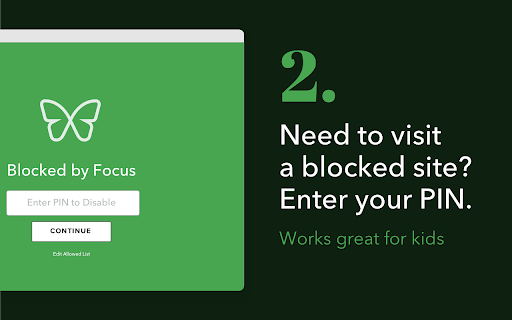
Focus blocks websites so you can focus on schoolwork. Focus blocks non-educational websites, so students focus on success. Focus by Freedom helps you stay focused on your work or schoolwork. Focus blocks distracting websites, while allowing you access to the sites you need. Focus lets you do better work in less time. THE CHALLENGE Do you work or study on your computer? Then you’ve been distracted by news, social media, shopping, email. These distractions lead you to drift off-task, waste time, and end up unproductive and unfulfilled. We’ve all been there. The temptation of opening a new browser tab to find a new distraction is strong and the action is often compulsive. We all have specific sites that are our go-to distractions, but we also know that anything we click has the potential to become a distraction. except for the tools we’re using to get our work or studying done. THE ANSWER Focus by Freedom blocks only those distracting websites so that you can focus on your work or studies. You tell Focus what sites you do need for work or schoolwork, and it will block everything else. You’ll stay focused and on-task, while doing high quality work because of your sustained attention. What’s more, you’ll find you can get more done in less time without those constant online interruptions! EASY SETUP – create a PIN (a password) and decide which websites should be allowed CUSTOMIZABLE - Focus comes pre-populated with an Allow List of common work and learning sites. You can customize as needed. ACCOUNTABILITY - A parent can set the PIN for children, or you can have your spouse or friend set the PIN for you - Remote workers, from home or in hybrid working situations - Students doing homework - Students with online or remote learning - Writers, Teachers, Entrepreneurs, Editors, Researchers, Journalists, and Developers all use Focus to get their work done! Focus is a product of Freedom Labs, where we develop new ways to meaningfully interact with technology. Like our other extensions, Focus is highly privacy-conscious. None of your data is sent anywhere (the cloud, our servers, etc.) It remains secure on your own device. You can learn more about Freedom here: https://freedom.to - Sometimes, the extension disables itself automatically and bypasses the green screen when visiting a blocked website - Sometimes, when adding a new website to the allowed list, it does add it, but it's not shown in the list Please send us your feedback at support@freedom.to and we'll continue to improve Focus. Thank you!

one sec | Website Blocker, Screen Time, Digital Detox, ADHD, Block Websites
one sec gives you the chance to think twice – before you get sucked into an endless loophole designed to draw you in for hours. one sec forces you to take a deep breath whenever you open social media or other distracting websites. It’s as simple as effective: You will reduce your social media usage just by becoming aware of it. one sec is the focus app that tackles the problem of unconscious social media use at its root. It is designed to change your habits on a long-term basis. You just wanted to check that one message – and ended up scrolling for 30 minutes on Instagram? Social media companies use psychological traps to keep you hooked and spend as much time on their apps as possible. Time that could be spent so much better – with your family and friends, getting work done or for your hobbies and wellbeing. Many apps and tools block social media for a limited amount of time to help you focus. This might increase your productivity for the moment, but the real problem – your habitual urge to check apps and websites to get that dopamine boost – stays. The one sec Chrome Extension is designed from ground up to keep your information private and secure. All usage data is stored offline, on-device, and only you can access it. I make money selling apps and subscriptions, not your data! one sec is also available for iPhone, iPad, and Android Devices to block native apps and websites. More info on my website.

Insight - Track and Optimize Your Time Online
Know how you spend your time online. Insight by Freedom tracks the time you spend on websites, so you can improve your habits. We built Insight to be a lightweight, privacy-conscious time tracker that helps you understand how you spend your time online. Insight tracks the time you spend on websites in Chrome, and provides a simple report so you can see where you're spending your time. You can drill down into individual sites and see your daily time on each site. - See time spent by day, week, or set a custom time window for any calendar period - Drill down on each site to see time spent each day of time period - Exclude any site from being tracked We've built Insight to be privacy-conscious. None of your data is sent anywhere (the cloud, our servers, etc.) It remains secure on your own device. If you want to become more productive, you have to first understand how you're currently spending your time, and Insight helps you do just that. With this insight, you can be more mindful about how you spend your time. Thank you for giving Insight a try. Insight is a product of Freedom Labs, where we develop new tools to help you balance your relationship with technology. Like our other extensions, Insight is highly privacy-conscious. Learn more about Freedom here: https://freedom.to Please note: Insight 1.0.0 is our initial release with Manifest 3 compatibility. You may experience slight differences in behavior due to the significant changes required to comply with Manifest V3. Please send us your feedback at support@freedom.to and we'll continue to improve Insight. Thank you!

Web Activity Time Tracker - Block Websites, Pomodoro & Web Analytics
Track time of your web activity, limit and block distracting websites. Monitor your web usage. Web Activity Time Tracker keeps track of how you spend time on the web and presents the stats in a useful and intuitive way. Take control of your online time! Tracking and limiting your use of any website helps you stay productive and focused. Stay focused and maximize your productivity. Whether you're managing work projects, studying for exams, or simply want to understand your browsing habits better, this tool is your go-to companion. Web Activity Time Tracker is a powerful Chrome extension designed to help you monitor and optimize your online productivity. Effortlessly track the time you spend on each website, set goals, and get detailed reports to boost efficiency and focus. With a sleek, user-friendly interface and real-time insights, this tool empowers you to make the most of your web browsing. You can set a daily visit limit for sites and block them after the expiration of the limit. Alternate work and rest times with Pomodoro Mode. ✅ Real-Time Tracking: Get instant insights into the time spent on each website you visit. ✅ Daily and Hourly Reports: Receive summary reports that highlight your browsing habits and patterns. Comparison of time by day. ✅ Limit and Block Distracting Websites: Set daily time limits for specific websites to help you stay focused. ✅ Usage Statistics: Effortlessly monitor the time you spend on different websites. ✅ Notifications for Websites and daily summary notification. Set goals and receive notifications to stay on track. ✅ Pomodoro Mode ✅ Track files in the browser, including .pdf, .png, .json and so on ✅ Export Data to CSV Web Activity Time Tracker helps you: 🍀 Stay focused 🧠 Understand how you use the internet 👀 Reduce distraction 🍅 Overcome web addiction ⏲️ Self-control 💯 Boost productivity 🚀 Increase your digital wellbeing 💪 Reduce wasted time This version introduces an OPTIONAL banner widget powered by Media IntelliView. When enabled by the publisher of a participating website, the extension may display a small contextual banner on that website's page. What is sent over the network when the widget is enabled: - The page origin (e.g. "https://example.com") — never the full URL or page content - A randomly generated per-install identifier (no personal data, no account, no login) - Banner display/click/dismiss event timestamps The widget is fully described in our prominent disclosure shown on install AND update (Welcome page), and you can disable it at any time in the Options page. Local time tracking and blocking features continue to work exactly as before — they do NOT depend on the widget. Take control of your online habits and make every minute count with Web Activity Time Tracker.

Pause - Stop Mindless Browsing
Pause distracting websites before they open. Be mindful and intentional with your browsing using this simple extension. Pause breaks the cycle of distraction and mindless browsing and helps you be more focused, productive, and intentional with your technology use. When you open a distracting website, Pause creates a gentle interruption by displaying a calming green screen. After pausing for five seconds (adjustable), you can choose to continue to the site, remain on the green screen with the site temporarily blocked, or close the tab. The interruption created by Pause gently nudges you to make informed, intentional decisions about how you are spending your time. - Pause comes pre-seeded with a list of 50 top distracting websites, which you can add to or edit as needed. - You can also adjust the length of the Pause time (5 seconds is the default.) Keep Pause enabled in your browser. It’s a simple and powerful tool to help you control distraction and create more mindful browsing habits that will help you stay focused. Pause is a product of Freedom Labs, where we develop new ways to meaningfully interact with technology. Like our other extensions, Pause is highly privacy-conscious. None of your data is sent anywhere (the cloud, our servers, etc.) It remains secure on your own device. Learn more about Freedom here: https://freedom.to
