
ecblfcmjnbbgaojblcpmjoamegpbodhd


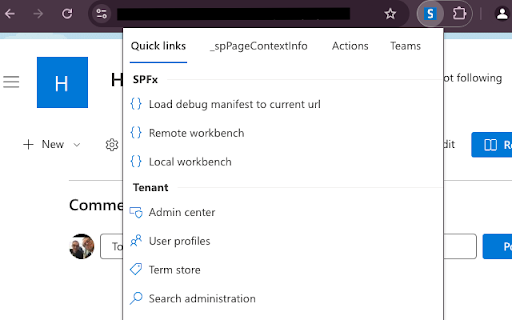


A Google Chrome Extension for creating and updating files (js, css), injecting files to sites, modifying web/list propertybag values (add, edit, remove, index) and creating webhook subscriptions, edit/add/remove webparts from publishing pages and run sp-pnp-js typescript snippets in SP2013, SP2016, SP2019 and SharePoint Online from Chrome Developer Tools. This tool will help you create amazing SharePoint applications fast from your browser from any computer which runs Chrome!

Live editor for CSS, Less & Sass - Magic CSS
Run this extension and start writing your CSS/Less/Sass code which gets applied immediately. The code you write will be saved in the browser extension's storage space or the site's local storage. ✓ Live editor for CSS/Less/Sass code - Preview changes as you write code ✓ Autocomplete ✓ Live edit CSS files and auto-save on file system ✓ Open code editor in external window ✓ CSS reloader ✓ Option to reapply styles automatically ✓ Syntax Highlighting ✓ Auto-generate CSS selectors with point-and-click ✓ Emmet support ✓ Color picker ✓ Convert code from Less/Sass to CSS ✓ Beautify / Format code ✓ Minify code ✓ Highlight DOM elements matching the CSS selectors ✓ Option to load this extension in iframes as well ✓ Get SVG icons ✓ Lint CSS code This extension is available for: You might want to use it for: ➤ No need to refresh pages to test your CSS/Less/Sass code ➤ Auto-save your changes to filesystem as you write the code ➤ Reload CSS resources without refreshing the page ➤ Speed-up development by writing code directly on your page ➤ Develop and test your code before finalizing your changes ➤ Apply some temporary styles (like hiding some components) ➤ Do CSS changes on any website ➤ The CSS/Less/Sass code you write gets applied as you write it ➤ The CSS reloader watches CSS files and live updates them immediately ➤ You can develop the code and see the output at the same time ➤ The code is saved in file/browser as soon as you write it ➤ The code editor is draggable and resizable ➤ Use code editor in external window for developing responsive pages ➤ The code you write is auto-saved for the site ➤ You can use "TAB" key to indent your code ➤ Running Magic CSS again, while it is already loaded, disables the code ➤ Press "Esc" or click on close to hide it ➤ The code is added at the bottom of the tag ➤ It includes CSS/Less/Sass beautifier ➤ It includes CSS minifier ➤ It highlights the DOM elements matching the CSS selectors ➤ Use it along with Chrome/Edge/Firefox/Opera Developer tools ➤ You might find it useful in creating your custom themes for websites based on Stylish / Stylist ➤ This extension was previously known as "MagiCSS - Live CSS Editor" Security and privacy: ⓘ No permissions approval is required for installing the extension ⓘ For advanced features, like "Apply styles automatically", permissions are requested on-demand ⓘ Mixpanel is used to get anonymized stats for improving UX ⓘ Browser extension's storage, localStorage etc are utilized for the extension's core features. Visit https://webextensions.org/ for further details. Connect with us:

Test & Feedback
Now everyone on the team can own quality. Capture findings, create issues, and collaborate with the team, directly from the browser. Test & Feedback - Now everyone on the team can own quality. Capture findings, create issues, and collaborate with the team, directly from the browser. Everyone in the team, be it product owners, developers, testers, UX designers etc., can now test their web-apps and give feedback, all directly from the browser on any platform: Windows, Mac, or Linux. All kinds of teams will now be able to drive quality in 3 easy steps – capture, create & collaborate. Capture - Take notes, screenshots with annotations, and screen recordings to capture problems. Automatically include rich data like user actions (as an image action log), page load data, and system information. Create - Create bugs, tasks, and feedback response work items to send feedback or report problems. Create test cases quickly based on the image action log while you explore your app. Automatically attach all your captured information. Collaborate - Work offline in standalone mode, then export your session to share findings with your team. For more integrated experiences with end-to-end traceability, connect to Azure DevOps Services or to Team Foundation Server 2015 or later. For example, you can explore user stories directly from the board, manage all feedback requests received, and easily track bugs, tasks and other work-items. To view completed exploratory sessions and get insights across all completed sessions, for example, details about sessions and work items that are created, explored, and weren’t explored, plus other data, go to your exploratory testing insights page. You can use the extension for FREE in these modes: Standalone and Connected Standalone Mode: Available to everyone. Any team, large or small, can use standalone mode to capture issues using screenshots with inline annotations and notes and then share the results using a session report. No connection to Azure DevOps Services or Team Foundation Server required. Connected Mode: Connect to Azure DevOps Services/Team Foundation Server to drive your exploratory testing and feedback flows. - Users with Basic access: Full capture and create capabilities to submit bugs, tasks and test cases. Includes collaboration capabilities like end-to-end traceability, rich insights across completed exploratory sessions, simplified bug/task tracking & triaging, and so on. - Users with Stakeholder access: Full capture and create capabilities, except for test cases, to submit feedback and respond to feedback requests from your team. Feedback experiences are available in Team Services and TFS 2017 or later only. Learn more https://docs.microsoft.com/en-us/azure/devops/test/perform-exploratory-tests?view=vsts

Adopt365 (powered by VisualSP)
Adopt365 is a help assistant that delivers how-to answers and guidance for Dynamics and Microsoft 365 when and where you need them. Adopt365 by VisualSP delivers FREE, in-the-moment help right inside Microsoft 365 apps, helping users solve problems and stay focused at work. Stay Focused & Productive with In-the-Flow Answers Adopt365 is the complimentary, lightweight version of VisualSP. It’s built for Microsoft 365 web apps like Copilot, Dynamics 365, SharePoint, Office on the web and more. With Adopt365, you can ask “how do I…” questions and get instant, step‑by‑step answers right inside your browser — no searching, no waiting, no IT jargon. Why Start with Adopt365? Help at the Moment of Need Answers appear when and where you need them the most i.e. Inside the app you’re already using and at the moment of need Stay in the Flow No switching tabs or digging through manuals — guidance comes to you. Confidence with Microsoft 365 From becoming an AI wizard and making the most of Copilot to learning new skills to enhance your experience using your everyday productivity and collaboration tools such Dynamics 365, Outlook on the web, Planner, Forms, etc., you’ll feel supported every step of the way. A Taste of VisualSP Adopt365 gives you the essentials for free, so you can experience the power of in‑the‑flow guidance before upgrading to the full VisualSP platform to create advanced walkthroughs and custom training content tailored to your organization. How It Works Predefined prompts Choose from a library of common “how do I…” questions for Microsoft 365 web apps from within any web based application. Instant answers Clear, step‑by‑step instructions appear directly on your screen. Trusted sources Content is drawn from Microsoft’s official resources and VisualSP’s proven guidance library. In‑app delivery Everything happens inside your browser — no need to leave your work. What You Get with Adopt365 - Coverage for most Microsoft 365 web apps including Dynamics365, Copilot, SharePoint, Office on the web, etc. - Simple, user‑friendly guidance that helps you learn by doing. - A no‑cost way to experience VisualSP and see how in‑the‑flow support can transform productivity. When You’re Ready for More Adopt365 is just the beginning. With the full VisualSP platform, you can: - Add custom content tailored to your organization. - Provide interactive walkthroughs and deeper training. - Access analytics and insights to measure adoption. - Extend support across all your enterprise web apps.

SP Formatter
Customize your SharePoint Column, View or Form Layout Formatting JSON using a full-featured editor instead of the default one. - Live Preview as you type (no need to click "Preview" button) - Intellisense (suggestions) based on Column or View formatting schema, CSS styles, replaceable tokens (`@currentField`, list fields with `$` based on the context) - JSON validation with error messages in the editor - Help tooltips for JSON properties - Color highlights - Line numbers, brace matching, collapsible regions - Hotkeys: search, replace, format document, go to line and others available for monaco-editor - Easily switch between default and enhanced editor - VSCode integration - Full screen mode - SharePoint Online - SharePoint 2019 (through a separate extension, read more https://github.com/pnp/sp-formatter/blob/master/sp2019/README.md) CHANGELOG: https://github.com/pnp/sp-formatter/blob/master/web-extension/CHANGELOG.md
