
eaalkfagdfokodepkfpcckcfballnedm
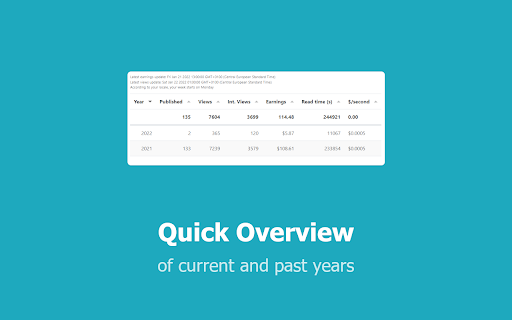


Breaks down all of your earnings on medium.com by providing detailed statistics Medium Earnings Info gives you an in-depth view of your earnings per story over time. Access your earnings information by clicking on the Earnings button on the stats page or use the popup. This will open up a new tab with your data. 🚀FEATURES ⭐️ Earnings per story or per day/week/month money was earned ⭐️ Quick overview of past performance ⭐️ Views and read time per view per day on your stats-page and on a dedicated earnings-page ⭐️ Export your earnings via csv and excel ⭐️ Graphs to explore your earnings even further 🐛 FEATURE REQUESTS AND BUG REPORTS It's probably easiest to shoot me a message at medium: https://muffinimal.medium.com/ if you want to report a bug or request a feature 📅 VERSION HISTORY v0.1 Initial version with basic functionality for beta-testers. v0.2 Revamped the table to include more data and allow interactivity for beta-testers v1.0 Initial version with basic features to analyze and download your earnings v1.1.2 Better filters, added charts, ratios and minor improvements v1.2 a brand new table and some major bug fixes v1.3 New styling and better overview of past years v1.3.1 bugfixes on disappearing summary and earnings/second v1.4 UX overhaul, removal of legacy table. Changed ¢/s to ¢/m, added story-graphs, added help, added link to medium-stats v1.5 Added excel-support, monthly views and human readable read times (again) v1.6 Added earnings-info to stats-page Feedback and feature requests are welcome! ❤️ ATTRIBUTION This extension gets most of its data-acquisition fundamentals from an extension written by Guilherme Brito. Check out his awesome extension here: https://chrome.google.com/webstore/detail/medium-next-generation-st/fhopcbdfcaleefngfpglahlpfhagendo ☕BUY ME A COFFEE Want to buy me a coffee? By all means! Visit https://www.buymeacoffee.com/muffinimal or https://www.patreon.com/muffinimal for a donation. You do want to buy me a coffee, but not like this? Awesome, I hope we meet in real life! Or, if you don't, then it still would be great to meet you. 💕

Medium Next Generation Stats
Take your medium text stats to the Next Generation Take your medium text stats to the Next Generation and get rid of the old fashion dataless default medium. Get larger time range, daily/weekly/monthly read/views/claps, and, specially, describes which article was view in which period. ### Features - Highlight post/publication - Different time ranges: 30/60/120/360/1800 days and current month - Super cool and animated charts - Top articles/publications read/viewed/upvotes/clapped/followed/earned in the time range - Different ranges visualization: daily, weekly and monthly - Download JSON and CSV files ### How to use 1. Go to your medium stats page: https://medium.com/me/stats 2. This is it ### Source Code You can find the source code on the link below: https://github.com/virgs/medium-next-gen-stats ### Development 1. Clone this repo 2. Go to chrome://extensions 3. Enable developer mode 4. Click on `load unpacked extension` and select the `medium-next-gen-stats` folder. ### Acknowledgement Thanks to @tomastrajan and @HcwXd for sharing their ideas and source code. You made my life a lot easier.

Fractions - Medium Partner Dashboard
A Better Partner Dashboard for Medium In this build, you'll find a dark mode for fractions. Note that, this extension can be buggy sometimes as I only have a chance to try it on my own account but no other. Fractions is a fully featured Chrome extension that helps you analyze and visualize your Medium Partner Program earnings. It is way powerful than default Partner Program Dashboard, Medium provides. Using this extension, you can inspect the data about your, - lifetime earnings since you enrolled in to Medium Partner Program, - monthly earnings, - daily total member reading time, - realtime currency conversion, - yesterday's total earnings, - yesterday's top earning post, - estimated earnings by the end of the month---_with a special algortihm_, - daily average earnings, - percent difference from the previous month, - this month's top earning post, - total tax you pay, - monthly predicted tax, - net earnings. In Partner Dashboard, all we get is monthly and referred member earnings. There's no stat about what I earned yesterday, total member time, or the net earnings without taxes. So, I made this Chrome extension as a total replacement for Partner Dashboard. It includes everything Partner Dashboard, but adds more features on top of them, using the data scattered around.

Medium Distribution Info
Shows distribution info about your (and other people's stories) on Medium! Do you feel that Medium.com doesn't provide you with enough information about your stories as you want? Do you want to deep dive into your statistics and analyze which of your stories are doing great? And you want to know why? I decided to create a chrome extension that provides you with a little more detail about your stories by showing just that little extra. This extension shows which of your stories are Chosen for further Distribution (formerly known as Curated) right at your fingertips. Additionally, it tells you what topics the stories of other Medium-authors are distributed in. 🚀 FEATURES ⭐️ Shows which stories are Chosen for further Distribution in the stats-page ⭐️ Shows in which topic an article was chosen for further distribution ⭐️ Show the summary of your stats in a new row ⭐️ Shows additional distribution information in the statistics details of stories ⭐️ Shows the topics for which any story on medium.com was distributed ⭐️ Download your stats, including the primary distribution topic ⭐️ Analysis of distributed stories ⭐️ Compatible with Enhanced Medium Stats ⭐️ Compatible with Medium Next Generation Stats ⭐️ Compatible with Medium Earnings 📅 CHANGELOG The full changelog and all release notes can be found here: https://medium.com/whats-up-m/medium-distribution-info-releases-d6e8c9b3b5b4 🧩 SOURCE CODE The source will be uploaded to github sometime soon. ❤️ ATTRIBUTION The source code for this project was inspired by Enhanced Medium Stats by Tomas Trajan. Check out his extension at https://chrome.google.com/webstore/detail/medium-enhanced-stats/jnomnfoenpdinfkpaaigokicgcfkomjo Some code was inspired by an extension by Guilherme Brito. Check out his awesome extension here: https://chrome.google.com/webstore/detail/medium-next-generation-st/fhopcbdfcaleefngfpglahlpfhagendo 🐛 FEATURE REQUESTS AND BUG REPORTS It's probably easiest to shoot me a message at medium: https://muffinimal.medium.com/ if you want to report a bug or request a feature ☕BUY ME A COFFEE Want to buy me a coffee? By all means! Visit https://www.buymeacoffee.com/muffinimal for a donation. You do want to buy me a coffee, but not like this? Awesome, I hope we meet in real life! Or, if you don't, then it still would be great to meet you. 💕

Medium Blog Summarizer - Summr.io
AI Summary for your Medium Blog Post Are you tired of spending hours reading through lengthy articles on medium.com, trying to get the main points? Do you want a quick and easy way to understand the content of a blog post without having to read through the entire thing? Look no further! Our Chrome Extension for summarizing medium articles - Summr.io - Medium Blog Summarizer is here to help. With this extension, you can get a summary of any medium blog post with just one click of a button. Simply click the "Summarize" button within the Chrome browser and a summary of the blog post will be displayed. This is an incredibly useful tool for busy individuals who want to get information from the blog posts but may not have the time to read through every article in full. Not only is this extension convenient and time-saving, but it's also easy to use. Simply install it on your Chrome browser and you'll be ready to quickly and easily understand the main points of any medium blog post. Don't waste any more time struggling to understand lengthy articles – try our Chrome Extension for summarizing medium blog posts today!
