
ifjjhckanopchafmmiddkkiamjkcngca
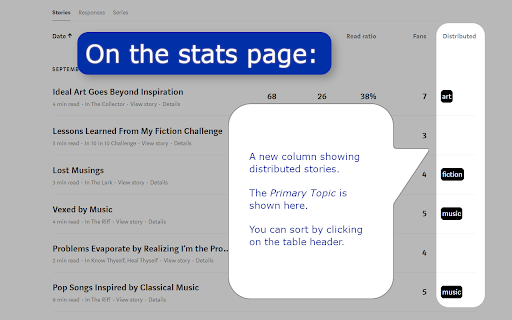


Shows distribution info about your (and other people's stories) on Medium! Do you feel that Medium.com doesn't provide you with enough information about your stories as you want? Do you want to deep dive into your statistics and analyze which of your stories are doing great? And you want to know why? I decided to create a chrome extension that provides you with a little more detail about your stories by showing just that little extra. This extension shows which of your stories are Chosen for further Distribution (formerly known as Curated) right at your fingertips. Additionally, it tells you what topics the stories of other Medium-authors are distributed in. 🚀 FEATURES ⭐️ Shows which stories are Chosen for further Distribution in the stats-page ⭐️ Shows in which topic an article was chosen for further distribution ⭐️ Show the summary of your stats in a new row ⭐️ Shows additional distribution information in the statistics details of stories ⭐️ Shows the topics for which any story on medium.com was distributed ⭐️ Download your stats, including the primary distribution topic ⭐️ Analysis of distributed stories ⭐️ Compatible with Enhanced Medium Stats ⭐️ Compatible with Medium Next Generation Stats ⭐️ Compatible with Medium Earnings 📅 CHANGELOG The full changelog and all release notes can be found here: https://medium.com/whats-up-m/medium-distribution-info-releases-d6e8c9b3b5b4 🧩 SOURCE CODE The source will be uploaded to github sometime soon. ❤️ ATTRIBUTION The source code for this project was inspired by Enhanced Medium Stats by Tomas Trajan. Check out his extension at https://chrome.google.com/webstore/detail/medium-enhanced-stats/jnomnfoenpdinfkpaaigokicgcfkomjo Some code was inspired by an extension by Guilherme Brito. Check out his awesome extension here: https://chrome.google.com/webstore/detail/medium-next-generation-st/fhopcbdfcaleefngfpglahlpfhagendo 🐛 FEATURE REQUESTS AND BUG REPORTS It's probably easiest to shoot me a message at medium: https://muffinimal.medium.com/ if you want to report a bug or request a feature ☕BUY ME A COFFEE Want to buy me a coffee? By all means! Visit https://www.buymeacoffee.com/muffinimal for a donation. You do want to buy me a coffee, but not like this? Awesome, I hope we meet in real life! Or, if you don't, then it still would be great to meet you. 💕

Medium Enhanced Stats
Your total reach & summary of your articles and responses stats with a single click and many improvements of the Medium stats page! ⚠️ Please keep in mind, this extension works only if you have and are logged into your Medium.com account, without that, the extension can NOT retrieve your Medium stats 📊 Get overview about your total Medium reach and stats for articles and responses! ☕ Do you like this extensions? 🤝 Get me a coffee to show your appreciation and provide fuel for new features 😉 🔗 https://www.buymeacoffee.com/tomastrajan 📦 EXTENSION POPUP (in Chrome Toolbar) ✔️ Total reach indicator and milestones ✔️ Milestone reached celebration animation ✔️ Summary article and responses table ✔️ Total article count, views, reads, fans, claps and claps per fan ✔️ User / publication selector (click user avatar in popup) ✔️ Download as an image and share with friends ✔️ Export and download stats as csv file 📦 MEDIUM STATS PAGE ✔️ Bar chart article and response markers ✔️ Bar chart article contribution to daily total ("Show in chart" button) ✔️ Claps per article and claps per fan for every article ✔️ Summary row with total article count, views, reads, ... 📦 MEDIUM PARTNER PROGRAM EARNINGS PAGE ✔️ Total payed out earnings ✔️ Breakdown of earning types ✔️ Breakdown of withheld earnings ⚠️ TROUBLESHOOTING 🔥 Sometimes, using extension can cause NOT being able to log into your Medium account, in that case you can disable / remove the extension, log into your Medium account on that device and install extension again 📖 ARTICLE 🤝 Introduction: https://medium.com/free-code-camp/medium-hates-him-see-how-he-improved-their-stats-page-with-this-one-simple-trick-1ce0898381a8 🐳 In-depth guide: https://medium.com/1-one-infinity/medium-statistics-medium-enhanced-stats-extension-for-chrome-1357baaf20ac v7.0.1 - Remove redundant permission (activeTab) v7.0.0 - NEW MAJOR FEATURE - Total earnings (an breakdown of earned / withheld earnings) v6.1.0 - Handle additional notification types v6.0.0 - Use new Chrome Extension manifest v3, fix notification layout & add missing type v5.6.0 - Handle new "email subscribers" & "referred users" notifications v5.5.1 - Fix "Today" stiles in the summary row on the stats page v5.5.0 - New "Today" sortable column for the Medium stats page, thx @Nilmadhabmondal v5.4.5 - Medium notification API fix, buy me a coffee link in popup v5.4.3 - Enable followers resolution using new Medium GraphQL API v5.4.2 - Remove unnecessary permission v5.4.1 - Disabled followers resolution (Medium removed REST endpoint) v5.4.0 - Add support for more than 100 articles ( or responses ) v5.3.0 - Add "Export and download as csv" button to extension popup v5.2.0 - Add "Fans per Reads ratio" to stats page (based on user feedback) v5.1.6 - Add missing notification type v5.1.5 - Fix initial notification popup position on macOS v5.1.4 - Fix unknown notifications by adding another follower notification type v5.1.3 - Refresh notification popup on page navigation v5.1.2 - Fix notification popup location on windows resize and navigation v5.1.1 - Refresh notifications when navigating to various Medium pages v5.1.0 - Refresh notifications after opening of the notifications list v5.0.0 - Add notifications count popup v4.10.4 - Fix "Download as an image" scaling on various monitors / resolutions v4.10.3 - Fix "Download as an image" for some users (tainted canvas) v4.10.2 - Fix critical bug with overwriting functions in global scope v4.10.1 - Fix "Download as an image" for macOS Chrome v4.10.0 - Add popup "Download as an image" and share functionality v4.9.0 - New Claps per Views ratio in stats table (claps column) v4.8.0 - Increase popup number precision v4.7.0 - Membership indicator and requests performance logging v4.6.0 - Add milestone description tooltip in the total reach indicator v4.5.0 - Show date of publishing when hovering over article title v4.4.0 - Add feedback form v4.3.1 - Add anonymous remote error logging v4.2.0 - Add followers count to total reach popup v4.1.1 - Fix various stats calculations for missing or zero values v4.1.0 - Add claps per fan in the stats table and total reach popup v4.0.0 - Add toggle for article contribution to total daily views in bar chart v3.3.0 - Add milestone reached animation v3.2.0 - Add additional milestones v3.1.0 - Update marketing assets v3.0.1 - Support for publications v2.4.5 - Show article markes in the bar chart v2.3 - Show claps in stats table, show user info in popup, fix popup animation v2.2 - Add reach indicator and milestones v2.1 - Various small UI improvements and fixes v2.0 - Show total articles and responses stats in popup and bottom of the stats page v1.4 - Total articles count stats tracking v1.3 - Extension popup with open stats button and total stats when applicable v1.2 - Total stats for additional (syndicate) views of the Responses v1.1 - Total stats for Responses and Series v1.0 - Initial Release 🤲🏻 OPEN SOURCE 👨🏻💻️ Did you know that the Medium Enhanced Stats is open source project? ⌨️ Check out source code - https://github.com/tomastrajan/medium-enhanced-stats 🔀 Check out latest changes - https://github.com/tomastrajan/medium-enhanced-stats/commits/master 👨💻️ CONTRIBUTORS Nil Madhab @Nilmadhabmondal - "Today" column idea and initial implementation 🎉 On-demand confetti ⭕ Works in Opera too! 📦 With the help of this amazing addon https://addons.opera.com/en/extensions/details/install-chrome-extensions/

Medium Next Generation Stats
Take your medium text stats to the Next Generation Take your medium text stats to the Next Generation and get rid of the old fashion dataless default medium. Get larger time range, daily/weekly/monthly read/views/claps, and, specially, describes which article was view in which period. ### Features - Highlight post/publication - Different time ranges: 30/60/120/360/1800 days and current month - Super cool and animated charts - Top articles/publications read/viewed/upvotes/clapped/followed/earned in the time range - Different ranges visualization: daily, weekly and monthly - Download JSON and CSV files ### How to use 1. Go to your medium stats page: https://medium.com/me/stats 2. This is it ### Source Code You can find the source code on the link below: https://github.com/virgs/medium-next-gen-stats ### Development 1. Clone this repo 2. Go to chrome://extensions 3. Enable developer mode 4. Click on `load unpacked extension` and select the `medium-next-gen-stats` folder. ### Acknowledgement Thanks to @tomastrajan and @HcwXd for sharing their ideas and source code. You made my life a lot easier.

Medium Scheduled Stories
Shows whether your story is scheduled for publication Did you ever submit that great article to that awesome publication? After submitting you dream about all the views, the comments and all the great things that this new story will bring. Except… The publication does not publish your masterpiece. What's going on? There are publications out there that schedule stories to be published later. This little extension shows you whether that's going on with your article. It actually also tells you if you have delayed publishing yourself. This extension adds a message to the edit-story-page if your story is scheduled for publication. Nothing is displayed if it's not scheduled. 🚀 FEATURES ⭐️ Shows if your story is scheduled, either by you or a publication 🧩 SOURCE CODE The source code is available on https://github.com/muffinimal/medium-story-scheduled-for-publication 🐛 FEATURE REQUESTS AND BUG REPORTS It's probably easiest to give shoot me a message at medium: https://muffinimal.medium.com/ if you want to report a bug or request a feature

Medium Topic Insights
Get insights into the topics for your article; find the widest audience; let your voice be heard. 🎯🔥Target the Medium.com topics so that your article gets the most readership🔥🎯 “Make the most of your writing on Medium by knowing which topics you should choose to target the exact audience with the most readership.” 🏆Become a well-read writer on Medium🏆 🏆Gain more followers by writing for topics that the largest number of people are reading🏆 🎯Find the best topic 🎯See inspiration for topics that are growing, or need more writers (professional version) 🎯Browse the best topics - see the related topics 🎯See #️followers, #️writers, #️stories 🎯Get recommendations for the topics that have the most reach 🎯Up-to-date topic statistics Ensure that you are choosing the most suitable and widely followed topics. On the story settings page, it will tell you your potential audience reach and suggest related tags. Regular version (FREE FOR LIFE): Contains 84 topics - all topics with over one million followers, and those that were previously marked as 'Top Writer' topics. ⭐Upgrade to the Professional version! ⭐ You have invested in the Medium platform, and now you can invest in ensuring that you have exactly the right topics for your story. Covering more than 800 topics so you can pinpoint the exact audience that you are looking for. ⚠️⚠️⚠️ Please be aware that the evaluation of the topics will only work if you are logged into your Medium.com account, AND you are on the Story's settings page. On any other page, you may browse and research the list of available topics. ⚠️⚠️⚠️ FEATURES: 〰️ Regular version 〰️ ✅ A list of the 'Top Writer' topics and topics with over 1,000,000 followers containing details of the number of followers, stories, and writers. ✅ Search, filter, and sort topics so that you can choose the correct one. ✅ Evaluate the topics that you have added to your story to see what the possible audience reach would be. ✅ Browse and filter related and recommended topics based on the current topics on your page. ⭐ Professional version ⭐ In addition to the regular version… ✅ Contains over 900 topics - all the topics with over 1,000 followers containing details of the number of followers, stories, and writers. ✅ For topics that have less than 1000 followers - suggestions are made for better topics ✅ See inspiration for your writing, targeting topics that have the greatest growth, or need more stories or writers. 🛠️ VERSION HISTORY 1.5.3 Updated topic statistics - additional topics - now over 900 topics 1.5.2 Updated topic statistics, redesigned inspiration section. 1.4.2 Added in the inspiration section for topics: greatest percentage month on month growth, not enough writers, and not enough stories (professional version only). Minor tweaks to formatting and display. Added in copy to clipboard for displayed topics. 1.3.1 Added sorting options and suggestions for topics which have few followers (professional version only). Added in a warning for having fewer than 5 topics assigned. 1.2.0 Added in quick look-up of related tags as the list is browsed, added new topics 1.1.1 Updated styling of components to make it clearer, ⭐added new topics with over 2k followers⭐ 1.1.0 Added in-app purchase for the 'Professional' version. Refactored code to implement ReactJS making it cleaner and easier to update. 1.0.2 Added filtering for the topic browser and the recommended and related topics. Updated the styling. 1.0.0 Initial development release
