
dppbeenbobngogcdfnocicajiegcofmo
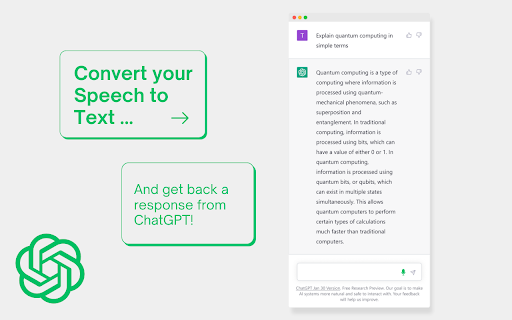
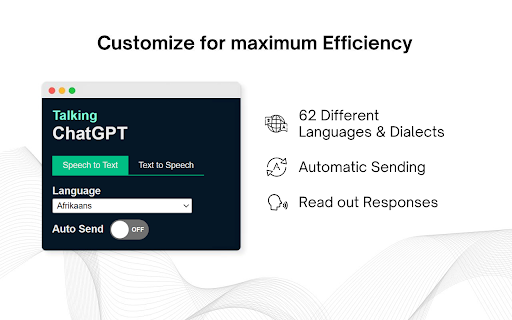
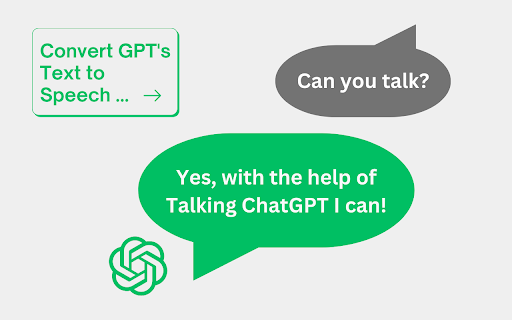
Convert your speech into text so you can have a real conversation with (a talking) ChatGPT. This extension is ideal for anyone who needs to quickly and efficiently convert spoken words into written text. With the 62 different language and dialect options, you can easily choose your preferred language and accent for transcription. Whether you're speaking in English, Spanish, French, German, or any other language, ChatGPT Speech-to-Text will accurately transcribe your words with the appropriate dialect. With the new speech to text functionality, you can now have a talking ChatGPT! The extension will now read out the responses off ChatGPT, at least if you want to. This project is also available on Github: https://github.com/0xBitBuster/talking-chatgpt-extension

Vocha | Voice for ChatGPT
Voice for ChatGPT Meet Vocha: Your Voice, Your Message! Voice-type your messages for ChatGPT with the Vocha extension. This tool adds a microphone button to the message field which you can activate easily with the SPACE shortcut or a click. Why Vocha? • Privacy First: We value your privacy. Vocha is designed with a strict no user data collection policy. • Clean Design: Its minimalistic design blends perfectly with the ChatGPT interface, providing you a smooth user experience. • Easy to Use: Vocha requires minimal setup. 🔥Top Features: • Effortless Usage: “SPACE” shortcut for start/stop recording. • Multi-Language Support: If you communicate in multiple languages, Vocha supports easy switching between them. • Editable Message Option: After your recording has stopped, you can choose to send, edit, or resume recording your message. • Support 30+ languages Quick Start Tips: 1️⃣ A mic button will show in the message field after installation. 2️⃣ If you want to change language of speech recognition click the flag icon near microphone button and choose another one. 3️⃣ Accept access to the microphone when prompted. 💡 Important notes 1. Make sure to reload/refresh the webpage after installing the extension to ensure its proper functionality. 2. Access to the microphone when prompted.

SonicGPT, Talk to ChatGPT in MultiLanguage
Talk and listen to ChatGPT in your language! --------------------ENGLISH-------------------- Immerse yourself in the revolutionary experience of artificial intelligence with SonicGPT, an innovative Chrome plugin for voice to text and text to voice. Specifically designed to enhance the interaction between humans and the AI of ChatGPT in versions 3.5 and 4, this plugin provides an efficient and dynamic user experience. Why choose SonicGPT? With SonicGPT, you can: Speed up your interaction with ChatGPT: Avoid typing and quickly convert your voice to text and vice versa. Effectively practice languages: Listen and speak in the language you are learning to improve your language skills. Request tasks easily: Ask ChatGPT to perform tasks simply by speaking to it. And that's not all. SonicGPT is a digital polyglot, compatible with 40 languages, including the most popular ones like English, Spanish, French, Italian, Russian, and Portuguese. Ideal for students, professionals, AI enthusiasts, and anyone looking to enhance their interaction with ChatGPT, SonicGPT is the perfect tool to turn your AI exploration into an effortless and enriching journey. Try SonicGPT today and discover the smoothest and most efficient way to interact with ChatGPT. Keywords: SonicGPT, Chrome plugin, voice to text, text to voice, human interaction with ChatGPT, AI, artificial intelligence, language learning, ChatGPT version 3.5, ChatGPT version 4, English, Spanish, French, Italian, Russian, Portuguese.

Talk with ChatGPT
Interact with ChatGPT, use it to improve your vocabulary, or prepare for an interview or just have fun. Introducing ChatGPT Companion, your virtual conversation companion right in your browser! Whether you're gearing up for an interview, aiming to enhance your vocabulary, or simply seeking a friendly chat, this extension is your go-to tool. Talk Anytime, Anywhere: Start natural language conversations without leaving your current tab. Seek information, assistance, or just enjoy a friendly chat seamlessly. Productivity Boost: Draft emails, brainstorm ideas, or gather quick information—all within your browser for enhanced productivity. Customizable Settings: Tailor your experience. Adjust conversation styles, themes, and language settings to make it truly yours. Secure and Private: Benefit from ChatGPT while prioritizing your privacy. Your interactions are secure, ensuring the safety of your sensitive information. Seamless Integration: Whether you're a developer, student, or professional, ChatGPT Companion effortlessly integrates into your daily workflow, proving to be an invaluable tool for various tasks.

Two Way Voice for ChatGPT
This extension for ChatGPT allows you to ask using voice and listen to response. Discover the convenience of voice interactions with ChatGPT. This extension for ChatGPT website allows you to have conversations using your voice. Ask questions using your voice and you can listen to response, making it easy and convenient to get the information you need hands-free. Perfect for anyone who prefers to talk to ChatGPT using their voice. It can be your voice assistant. Get answers, discuss ideas, and explore topics with ease. Simply start the conversation mode. The extension will automatically manage turns between asking question and listening to the response once you've started the conversation mode. There are three conversation modes available: 1. Two-way conversation (Default) - You can ask question using voice and ChatGPT will respond with voice. 2. You talk & ChatGPT text response - You can ask question using voice and it will respond with text. Useful if you want to just read. 3. You type & ChatGPT voice response - You can ask question using typing and it will respond with voice. Useful if you want to listen on headphone and cannot speak out loud in quite place. The extension enables voice-based questions in various languages like Nepali, Chinese, and Korean. For instance, speaking in Nepali or Chinese generates the respective characters. Our extension utilizes your browser's built-in voice-to-text API, which may automatically download additional voices for text-to-speech. Download times vary based on your system and network conditions. Voice-to-text accuracy and performance rely on your machine's resources, which can decrease during high CPU usage. Please contact us if you've any questions or feedback. Note: The popup displayed for the extension has link. The link is https://linktr.ee/dhunju. This is link to similar extension that is created by us for similar AI site. The link is to the page that has list of extensions created by us for Edge and Chrome browser. Disclaimer: This extension is developed independently and is not affiliated with or endorsed by OpenAI in any way. "ChatGPT" is a trademark of OpenAI, and its use is subject to OpenAI's permission. Any references are solely for the purpose of describing the functionality of this extension. For official information, please visit OpenAI's website.
