
agciioechifjhhkcaaejddhibamepgnb
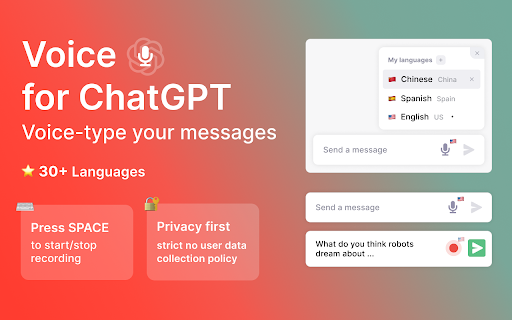
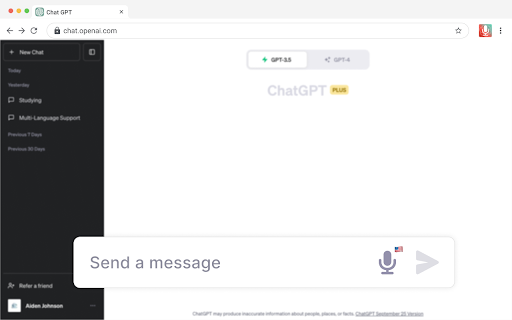

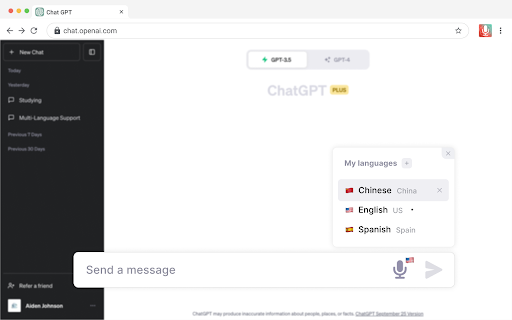

Voice for ChatGPT Meet Vocha: Your Voice, Your Message! Voice-type your messages for ChatGPT with the Vocha extension. This tool adds a microphone button to the message field which you can activate easily with the SPACE shortcut or a click. Why Vocha? • Privacy First: We value your privacy. Vocha is designed with a strict no user data collection policy. • Clean Design: Its minimalistic design blends perfectly with the ChatGPT interface, providing you a smooth user experience. • Easy to Use: Vocha requires minimal setup. 🔥Top Features: • Effortless Usage: “SPACE” shortcut for start/stop recording. • Multi-Language Support: If you communicate in multiple languages, Vocha supports easy switching between them. • Editable Message Option: After your recording has stopped, you can choose to send, edit, or resume recording your message. • Support 30+ languages Quick Start Tips: 1️⃣ A mic button will show in the message field after installation. 2️⃣ If you want to change language of speech recognition click the flag icon near microphone button and choose another one. 3️⃣ Accept access to the microphone when prompted. 💡 Important notes 1. Make sure to reload/refresh the webpage after installing the extension to ensure its proper functionality. 2. Access to the microphone when prompted.

Talk With Me ChatGPT
Enables you to talk to ChatGPT and Automatically reads new paragraphs once it's printed. Introducing "Talk with Me ChatGPT" – Empower Your Conversations with Voice! Are you ready to take your interactions to the next level? Discover the magic of "Talk with Me ChatGPT," a revolutionary Chrome extension that seamlessly integrates voice communication into your chats when using chatgpt. This innovative extension allows you to effortlessly transform your thoughts into text, all while maintaining a natural flow of conversation. 🔴 Turn Your Microphone On and Off with Ease Say goodbye to typing and hello to talking! With just a click, our extension's intuitive interface lets you control your microphone state. Express yourself in real-time using speech recognition technology that translates your voice into text. 📢 Text-to-Speech Delight Experience the power of "Talk with Me ChatGPT's" text-to-speech feature. Engage your audience by turning written content into spoken words. Enrich your discussions, make your messages more accessible, and captivate your listeners with a click of an emoji. 🚫 Pause When Needed Want to take a break from listening? Our extension lets you pause the text-to-speech function at any time. Flexibility is key, and "Talk with Me ChatGPT" puts you in control. 🎙️ Auto-play Latest Paragraphs Stay up-to-date effortlessly! Our extension automatically reads out the latest paragraphs on the page using text-to-speech. Whether it's articles, comments, or updates, you'll always be in the loop. Join the conversation revolution with "Talk with Me ChatGPT." Experience the future of Chatgpt communication by adding this dynamic extension to your Chrome browser. Unlock the power of voice and text, and engage with content like never before. Download "Talk with Me ChatGPT" now and embark on a new era of digital interactions!

ChatGPT Voice Master
Supports English voice engine for chatgpt.com, making conversations more natural and interactions smoother. Our goal: to create the best human-computer communication assistant Version Upgrade: 2.4.3 (2024-04-25) makes opening the panel smoother and supports 47 languages. 🔥 Compared to traditional voice plugins, we offer excellent neural network voice services that allow you to converse with our chatbot as if talking to a real person. Even with prolonged use, you won't feel fatigued. Our product is permanently free to use, but for users seeking a superior experience and personalization, we also offer purchasing options. Focused on enhancing input and output: 🧑💻 Compared to similar high-quality voice plugins, our focus is on optimizing input and output efficiency. Our plugin offers high recognition rate speech recognition, allowing you to interact more efficiently with chatbots. Additionally, you can open the voice assistant on any page through the ChatGPT sidebar. Download and use ChatGPT Voice Master now to boost your productivity! 🖥️ Wide-screen display and optimized code area to help programmers view and copy code. ⬇️ Conveniently export conversation content, save it as an image, PDF, MD format, or generate a sharing link for communication with others. 🌟 Smooth communication mode: Interrupt the robot's speech at any time, issue new instructions without interruption. 🧲 Smart Correction: No need to re-record when making corrections. Simply select the part you want to modify and continue speech recognition. 🔑 Easy Wakeup: Wake up the assistant with simple English word "one", similar to "Hey Siri". 📌 Convenient Sidebar: Easily open the sidebar, interact with icons, and easily copy content or perform actions. 🔒 Secure Record: The local sidebar retains conversation history while protecting your privacy. ✂️ Segment Input: Supports segment input to process large amounts of content, facilitating more question and answer interactions. 🔊 Intelligent Reading: Automatically detect reply language and perform appropriate voice reading. 🌐 Multilingual Support: Supports 70 languages and dialects to meet different language communication needs. 🔄 Automatic Translation: Replies will be automatically translated into your native language to enhance understanding and response efficiency. Text selection also offers translation. 🔤 English Shortcut: Provides shortcuts for English queries to ensure faster and more comprehensive responses. 📋 Chat export: Easily export chat records for communication. 🔍 Quick Search: Quickly search through your chat history using keywords. 🔎 Query Retrieval: Retrieve previous questions using the up arrow to refine your query. 🔊 Speed and volume control: Use the slider to adjust the speed and volume of the voice, personalizing your experience. ⌨️ Keyboard shortcuts: Use keyboard shortcuts for simple voice input, and use the space bar and enter key to initiate recognition and questioning. 💼 Compatible with ChatGPT Plus version: providing unique features and experiences for Plus users. 📌 Download the voice plugin now and easily explore the world of interacting with chatbots! 🚀🚀🚀 When you need to purchase more coins, we offer the option to pay using PayPal. With PayPal, you can securely and conveniently complete the purchase process. Simply select PayPal as your payment method and follow the instructions to make the payment. Thank you for your support! 📒 This extension also supports recording, text editing, notes, messaging, navigation, etc., enhancing usability and richness of use. 🔖 Additionally, we have added options for recording, text editing, searching, note-taking, messaging, navigation, game selection, wallpapers, and themes. 🔍 Our extension is easy to download and compatible with popular browsers such as Google, Bing, Qwant, WeChat, etc. 💬 We've also added the functionality to locally save chat logs, allowing you to easily review past conversations and reference them offline. Just click on the extension icon above.

Voice to Text for ChatGPT
Speak instead of typing. Auto-send on silence, push-to-talk, floating mic panel, and more. Voice to Text for ChatGPT Speak instead of typing. Hands-free dictation with auto-send on silence, push-to-talk, and a floating microphone panel. Turn your voice into text on ChatGPT. This extension adds a floating microphone panel to the ChatGPT interface, letting you dictate messages hands-free. No extra apps or cloud services required — everything runs locally in your browser. Key features: - Real-time speech-to-text in the ChatGPT input field - Auto-send after a configurable silence delay - Push-to-Talk (walkie-talkie) mode — hold a key, speak, release to stop - Collapsible floating panel with drag-and-drop positioning - Adjustable ChatGPT content width - Auto-continue for long responses - Support for multiple recognition languages Your voice data never leaves your device. All processing happens inside the browser using the built-in Web Speech API. **Version 2.3** - Line break support during dictation — press Shift+Enter while the microphone is on to insert a new line and continue dictating on the next line. - Note: for best results, pause briefly before inserting a line break to let the current text finalize. After the line break, you can continue dictating normally. - Fixed duplicate text issue that occurred when rebase happened during ongoing speech recognition. - Improved manual edit preservation during dictation — edits made between speech results are now picked up correctly. - Settings modal redesign: close button (X) in the top-right corner, hotkeys info relocated, and cleaner layout.

Two Way Voice for ChatGPT
This extension for ChatGPT allows you to ask using voice and listen to response. Discover the convenience of voice interactions with ChatGPT. This extension for ChatGPT website allows you to have conversations using your voice. Ask questions using your voice and you can listen to response, making it easy and convenient to get the information you need hands-free. Perfect for anyone who prefers to talk to ChatGPT using their voice. It can be your voice assistant. Get answers, discuss ideas, and explore topics with ease. Simply start the conversation mode. The extension will automatically manage turns between asking question and listening to the response once you've started the conversation mode. There are three conversation modes available: 1. Two-way conversation (Default) - You can ask question using voice and ChatGPT will respond with voice. 2. You talk & ChatGPT text response - You can ask question using voice and it will respond with text. Useful if you want to just read. 3. You type & ChatGPT voice response - You can ask question using typing and it will respond with voice. Useful if you want to listen on headphone and cannot speak out loud in quite place. The extension enables voice-based questions in various languages like Nepali, Chinese, and Korean. For instance, speaking in Nepali or Chinese generates the respective characters. Our extension utilizes your browser's built-in voice-to-text API, which may automatically download additional voices for text-to-speech. Download times vary based on your system and network conditions. Voice-to-text accuracy and performance rely on your machine's resources, which can decrease during high CPU usage. Please contact us if you've any questions or feedback. Note: The popup displayed for the extension has link. The link is https://linktr.ee/dhunju. This is link to similar extension that is created by us for similar AI site. The link is to the page that has list of extensions created by us for Edge and Chrome browser. Disclaimer: This extension is developed independently and is not affiliated with or endorsed by OpenAI in any way. "ChatGPT" is a trademark of OpenAI, and its use is subject to OpenAI's permission. Any references are solely for the purpose of describing the functionality of this extension. For official information, please visit OpenAI's website.
