
dphgbgdjhfjccmmopjhbgfejaipbbgbo
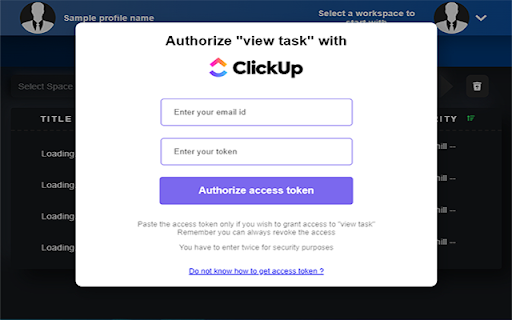


View from and add tasks to all of your ClickUp workspaces in just one place in one click. This extension safe, simple and yet so useful for the click Up users, the way clickUp takes out user's pressure to manage too many productivity apps and lets one work in more organized and well structured manner. This extension is build upon CLickUp official API and maintaing all the purpose the ClickUp should serve. The TaskUp for ClickUp extension extends the productivity and usefullness of the ClickUp app. How ? - say, if you want to take a quick glance at your pending tasks, now you don't have to got to ClickUp.com and look where the task is, with the help of TaskUp you can just do it by one click on the extension and you can continue surfing the browser. - A task is completed ? you can simply delete it from here. - Can look upto all the workspaces > spaces > folders > lists > tasks you have and also the folderless lists as well - say, you remembered something that you need to add as a task to your clickUp well no worries you can just do it from the extension. - Also you can view the available tasks in sorted manner, by priority and by due date. *This extension is in its starting phases, any feedbacks will be welcomed and considered

Clickup Automatic Time Tracking
This extension automatically starts the time tracking notifications and tasks and provides some additional shortcuts for clickup. After installing, make sure to RELOAD CLICKUP for the extension to start working :). This extension is new and free - if you find any bugs, have any feedback or simply want to support its development, please submit them to us at https://forms.clickup.com/9004103430/f/8cazdr6-85675/U45IJBL4PQ0BUALBTN . 🕑 The Clickup time tracking extension starts a timer automatically when a task is opened. 📝 Activating the timer is also linked to clicking through notifications. 📣 You have an option to hide the clickup notification bubble - so you don't get distracted from your focus. ⚙️ Features (like automatically stopping the timer) can be toggled on or off in extension settings. ⌘⇧ Y & ⌘⇧ X are shortcuts for completing/uncompleting tasks and stopping/starting the timer. ➕ More shortcuts and features are planned for future updates. 📦 Check the extension settings regularly for new options.

Clickup File Manager
A simple Extension that allows you to manage files on ClickUp A Simple Chrome Extension that allows users to manage their documents on Clickup, users can upload, download, create and delete folders/documents accordingly which helps in saving them tons of time. This extension also serves as a record keeper, easy to share and simple UI for faster usability.

To-Doist for ClickUp
Building an extension To-Doist for Click Up, is a task manager made on the API's for Click Up. Main features include having track of your spaces, teams, folders and tasks. CRUD operations for tasks on Click Up have been implemented. So have a go at managing your tasks without having to visit Click Up. All you need to do is connect your Workspaces.

ClickUp Track
ClickUp Track is a Chrome extension that boosts productivity by integrating time tracking directly into your ClickUp workflow. 📄 Description: ClickUp Track is a powerful Chrome extension designed to enhance your productivity by seamlessly integrating with ClickUp. With ClickUp Track, you can efficiently manage your time and tasks directly from your browser. This extension provides a streamlined interface for tracking time, switching between tasks, and monitoring your progress. Whether you need to see how much time you’ve tracked, how much time you need to track, or if you’ve gone overtime, ClickUp Track has got you covered. Perfect for freelancers, project managers, and teams, this tool ensures that every minute of your workday is accounted for. ✨ How to Use: 1. Install ClickUp Track from the Chrome Web Store. 2. Click on the extension icon in your browser or use keyboard shortcut. 3. Enter your generated ClickUp API key (how to generate API Key - https://clickup.com/api/developer-portal/authentication/#personal-token) 4. Done, extension is ready to use! ⚡️Features: ➡️Quick Time Tracking: Start and stop time tracking effortlessly with a simple click. ➡️Task Switching: Easily switch between tasks without disrupting your workflow. ➡️Custom Task Periods: Choose specific periods for tasks to tailor your time tracking. ➡️Progress Monitoring: See real-time updates on how much time you’ve tracked. ➡️Goal Setting: Set and view your target tracked time to stay on top of your goals. ➡️Overtime Tracking: Monitor and manage overtime to prevent burnout. ➡️User-Friendly Interface: Enjoy a clean, intuitive design that makes time tracking easy and efficient. ➡️Open Source: All code is open source, secure and transparent ➡️Client-Based Extension: It operates entirely on the client side, with no backend server required, ensuring your data stays private and local. Enjoy a secure and transparent experience with complete control over your usage using your API ClickUp Key. ➡️Seamless Integration: Works directly within your Chrome browser for convenient access. Take control of your time management with ClickUp Track and boost your productivity today! ❕Please consider Action Bar (pinned extension icon progress) is fetching data once per minute. Current Task Time (bottom indicator on what task are you working right now) is fetching data once in 30 seconds. Open Source Project. GitHub: https://github.com/DanRotaru/clickup-track Created with ❤️ by DanRotaru: https://dan13.me/
