
dokpohocljpghkmobklkccilgdiecgok
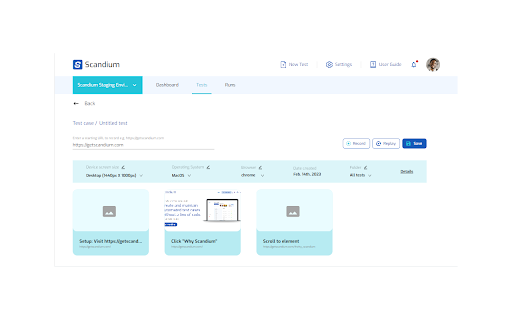

Turn your site interactions into actionable steps that can be repeated Scandium helps testers, and non-technical product owners create test automation of the web apps by recording their site interactions and replaying the recorded steps.

Jam
Jam is the smart screen recorder for software teams. Use the Jam Chrome extension to capture bugs, feedback, feature ideas, and QA notes right from your browser. Every recording is automatically enriched with the visual and technical context engineers and AI agents need to understand what happened and move work forward. - Click the Jam extension to record your screen or take a screenshot - Get an AI summary of the issue with repro steps, plus the option to add voiceover, comments, or visual annotations - Share a link to the Jam with all the visual and technical context your team needs to understand and action the issue ➤ Reduce debugging back-and-forth - Automatically capture console logs, network requests, user actions, device details, and more - Give engineers the context they need to reproduce, triage, and resolve issues faster - Request a recording from customers and teammates with a link - Send Jams to Linear, Jira, GitHub, Asana, ClickUp, Azure DevOps, and more - Create developer-ready tickets with full dev context in one click - Easily share context with teammates in Slack, Notion, and other team workflows ➤ Give agents the full picture - Route Jam context to AI agents like Claude, Codex and Cursor with Jam MCP - Use agents to document issues, analyze what happened, and draft a PR with the fix - Turn Jam context into tickets, specs, docs, QA notes, or code changes Trusted by 200K+ users at teams like Ramp, Drata, Perplexity, ElevenLabs, and Autodesk.

testRigor’s Test Case Recorder
Capture test cases in plain English by recording your interactions with the application. Capture test cases in plain English by recording your interactions with the application. With testRigor, tests are generated in plain English, eliminating reliance on XPath and guaranteeing ultra-stability. Additionally, enjoy a suite of tools provided by testRigor to maintain test cases effortlessly. Elevate your company's testing standards with testRigor - it's easy, fast, and enjoyable.

SelectorsHub
Locators Plugin to Auto Generate and Verify Playwright Locators, XPath & CSS Selectors. SelectorsHub - Auto-generate Playwright Locators, XPath & CSS Selectors SelectorsHub is a powerful developer tool that automatically generates and verifies Playwright locators, XPath, and CSS selectors for web automation testing. Key Features: 1. Auto-generation: Instantly generates multiple selector types including native Playwright locators, XPath, CSS selectors, IDs, names, and more. 2. Advanced element support: Works seamlessly with iframes, Shadow DOM, SVG elements, dynamic elements, dropdowns, and complex UI components. 3. Smart suggestions: Auto-suggests attributes, text values, and occurrences to help you build selectors faster—no more copying and pasting from the DOM. 4. Error detection: Provides clear error messages indicating what's wrong with your XPath or CSS selectors. 5. Element highlighting: Automatically highlights matching elements and scrolls them into view for easy verification. 6. XPath Healing: Verify all the xpath in one shot. 7. Locators Page: Generate Locator Page in one go. How to Use: 1. Open Chrome DevTools (F12 or right-click > Inspect) 2. Navigate to the SelectorsHub tab in the DevTools sidebar, or click the SelectorsHub icon in your browser toolbar 3. Inspect any element to automatically generate all selector types 4. For Playwright locators, click the "Playwright Selectors" button, then inspect the element 5. Type or edit selectors in the input box—smart suggestions will help you complete them quickly 6. Press Enter to verify and highlight all matching elements on the page Perfect for: a) QA Engineers and Test Automation professionals, b) Web developers working with Playwright, Selenium, Cypress, or other testing frameworks c) Anyone who needs reliable, maintainable element selectors

Testim Editor
The simplest and most advanced testing automation tool, using Adaptive Learning and Computer Vision image validation. Testim is the leading AI-based functional and end-to-end UI testing automation solution. Testim Automate uses AI to give you the speed and stability of codeless end-to-end tests, with the flexibility of code. Customers like Microsoft, Salesforce, Wix, and JFrog run millions of tests on Testim each month. Learn more at www.testim.io Quickly record, configure, and customize functional UI tests. Record user journeys that are added to the Testim visual editor as discrete, configurable steps. Create reusable groups, configure validations, add loops, or insert custom JavaScript. Reduce maintenance with AI-based Smart Locators Each element is uniquely identified by analyzing the entire DOM and assigning a score. When element attributes change, the AI-based Smart Locators learn and continue to identify the element and test its functionality. Run parallel, cross-browser tests on our test cloud or Selenium-compatible grids. Integrate with your CI or dev tools to trigger test runs on pull requests or other dev milestones. Quickly identify the root cause of failures with screenshots, console logs, and network info. Capture video or annotate screenshots to send meaningful bug reports. The Testim Chrome extension only used for the purpose of creating and playing-back web application UI tests in Testim. No additional information is captured when not actively using the Testim application.
