
deoegoebpjdcbfmecfjfdihkoncjfmfd
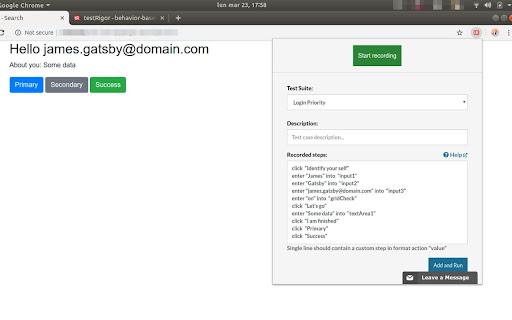
Capture test cases in plain English by recording your interactions with the application. Capture test cases in plain English by recording your interactions with the application. With testRigor, tests are generated in plain English, eliminating reliance on XPath and guaranteeing ultra-stability. Additionally, enjoy a suite of tools provided by testRigor to maintain test cases effortlessly. Elevate your company's testing standards with testRigor - it's easy, fast, and enjoyable.

Testing Daily | The Tester's Home Page
Get the feed of the latest testing news. Testing Daily is the Tester's home page which list down all the latest trending blogs, tutorials and news related to testing in the blank new tab. How to use Testing Daily plugin? 1- Add to Browser. 2- Now open new tab to get the Latest Testing Updates. Wow!! You are all set, Enjoy using the Testing Daily and keep yourself updated with all the latest testing news. If you don't want to see it every time in new tab, you can pause it as well. Why give it a try? Stay up-to-date with zero effort. Free forever. No sign up needed. Active Testing community To learn more about Testing Daily, please checkout product page- https://www.selectorshub.com/testing-daily/ If you have any query, please write us at support@selectorshub.com

TestCase Studio Pro
TestCase Studio Pro record the user actions performed on a web application in English Sentences. TestCase Studio Pro is a plugin to record the user actions performed on a web application along with screenshots and screen recording. User can save or copy these recorded steps and screenshots. Very simple 5 steps to start with Pro Version- 1- Add TestCase Studio Pro to your Chrome Browser. 2- Now pin the extension to tool bar in your browser. TestCase Studio Pro is installed and setup is ready. 3- Now checkout the plans and take the Free trial to experience the new timesaver innovations- Compare and Take the Free Trial from here- https://selectorshub.com/testcase-studio-pro/plans/ 4- After taking a subscription you will get the login credentials. 5- Now Click on the TestCase Studio Pro logo in browser toolbar and here Login with the credentials which you have received in email after taking a subscription. Wow!! You are all set, Enjoy using the Pro version and increase your productivity. For any query please write us to selectorshub@gmail.com

Testim Editor
The simplest and most advanced testing automation tool, using Adaptive Learning and Computer Vision image validation. Testim is the leading AI-based functional and end-to-end UI testing automation solution. Testim Automate uses AI to give you the speed and stability of codeless end-to-end tests, with the flexibility of code. Customers like Microsoft, Salesforce, Wix, and JFrog run millions of tests on Testim each month. Learn more at www.testim.io Quickly record, configure, and customize functional UI tests. Record user journeys that are added to the Testim visual editor as discrete, configurable steps. Create reusable groups, configure validations, add loops, or insert custom JavaScript. Reduce maintenance with AI-based Smart Locators Each element is uniquely identified by analyzing the entire DOM and assigning a score. When element attributes change, the AI-based Smart Locators learn and continue to identify the element and test its functionality. Run parallel, cross-browser tests on our test cloud or Selenium-compatible grids. Integrate with your CI or dev tools to trigger test runs on pull requests or other dev milestones. Quickly identify the root cause of failures with screenshots, console logs, and network info. Capture video or annotate screenshots to send meaningful bug reports. The Testim Chrome extension only used for the purpose of creating and playing-back web application UI tests in Testim. No additional information is captured when not actively using the Testim application.

TestCraft
Introducing TestCraft, a free and open-source browser extension with the power OpenAI LLMs, designed to be a companion to your software testing. AI-Powered Test Idea Generation: Leverage the power of OpenAI to generate comprehensive test ideas based on webpage elements. Automated Test Creation: Generate ready-to-run test scripts for popular automation frameworks, Playwright, Selenium, and Cypress, in your preferred programming language: JavaScript, TypeScript, Python, C#, and Java. TestCraft eases your test creation process and saves time. Accessibility Checks: Empower your web applications to be inclusive for all users. TestCraft identifies accessibility issues and provides actionable insights to improve. Test Idea to Automated Tests: Seamlessly convert your AI-generated test ideas into automated test scripts. Additionally, you can edit the test ideas to improve them before generating automation tests. Unlock the full potential of your testing process with TestCraft. Download it now and experience the future of software testing!
