
dokadmbhepopjfgpmndmbcbgphhedhmg
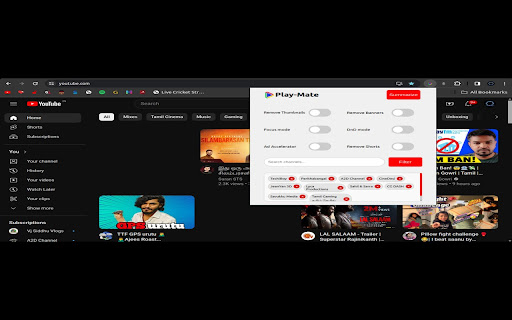
Youtube Extension In the bustling realm of online content, where YouTube stands as an ever-expansive universe, the need for a tool that transforms the platform into a productivity haven has never been more apparent. Enter Play-Mate, a Chrome extension meticulously designed to revolutionize your YouTube experience and elevate it to new heights of efficiency and focus. Play-Mate isn't just another extension; it's a comprehensive toolkit tailored for individuals seeking to harness the potential of YouTube as a tool for productivity. Recognizing the ubiquitous role of YouTube in both leisure and work, Play-Mate offers a suite of features that empowers users to craft an environment conducive to concentration, creativity, and efficient content consumption. Toggle Thumbnail: At the core of Play-Mate's functionality is the ability to toggle thumbnails. This feature is a game-changer, allowing users to declutter their YouTube interface instantly. By toggling thumbnails on and off, users can create a clean, distraction-free space, fostering an environment that promotes focused work or study. Toggle Shorts: YouTube Shorts, while entertaining, might not always align with your productivity goals. With Play-Mate, you have the flexibility to toggle YouTube Shorts on and off, enabling you to curate your content consumption based on your preferences. This ensures that your YouTube experience caters specifically to your work-related needs. DND Mode (Do Not Disturb): For uninterrupted productivity sessions, Play-Mate introduces the Do Not Disturb mode. Activate this mode to temporarily silence notifications, allowing you to dive into your work without external interruptions. Whether you're drafting an important document or immersing yourself in a learning video, the DND mode ensures a focused and interruption-free experience. Focus Mode: Enhance your concentration with Play-Mate's Focus Mode. This feature minimizes unnecessary elements on the YouTube page, creating an immersive environment where the video takes center stage. Ideal for tasks requiring undivided attention, Focus Mode transforms your YouTube sessions into focused work periods. Channel Filtration: Tailoring your YouTube feed is crucial for maintaining a productive workflow. Play-Mate introduces Channel Filtration, enabling you to filter content based on channels. Now, you can curate your feed to showcase videos from your preferred creators while eliminating unnecessary content, ensuring that your YouTube experience aligns with your professional objectives. Summarization: In the fast-paced world of productivity, time is of the essence. Play-Mate addresses this by offering a summarization feature. Quickly grasp the essence of lengthy content with video summarization, allowing you to make informed decisions about what to watch without investing significant time. This feature is a time-saving gem for professionals and students alike. Play-Mate isn't just a collection of features; it's a strategic approach to using YouTube as a productivity tool. By combining the power of customization, focus, and efficiency, Play-Mate empowers users to transform their YouTube experience into a dynamic asset for work and study. The extension's intuitive interface makes it easy for users of all levels to harness its capabilities. Whether you're a content creator seeking a focused editing session or a student preparing for exams, Play-Mate adapts to your needs, offering a tailored and distraction-free YouTube environment. In a world where digital distractions abound, Play-Mate stands out as a beacon of productivity. The ability to toggle thumbnails and shorts, activate DND mode, utilize Focus Mode, apply Channel Filtration, and employ summarization collectively position Play-Mate as an indispensable tool for anyone looking to make the most of their time on YouTube. Getting started with Play-Mate is a seamless process. After installing the Chrome extension, a user-friendly interface guides you through the setup process. Customize your preferences for thumbnail visibility, Shorts, and other features based on your work or study requirements. The extension's settings are designed to be intuitive, allowing users to tailor their YouTube experience with just a few clicks. Once configured, Play-Mate seamlessly integrates into your YouTube interface, enhancing it with a set of tools accessible through an unobtrusive toolbar. Toggle features on and off as needed, enabling you to switch between focused work sessions and more relaxed content consumption effortlessly. The Channel Filtration feature allows you to specify the channels that align with your professional or educational interests. This ensures that your YouTube feed remains curated, providing you with a customized stream of content tailored to your specific needs. The summarization tool adds an extra layer of efficiency, offering quick insights into the content of a video. Save time by deciding whether a video aligns with your objectives without committing to a lengthy viewing session. Professional Work: For professionals, Play-Mate becomes a secret weapon in enhancing productivity. Imagine preparing for an important presentation and being able to toggle off distracting thumbnails and Shorts while summarizing lengthy videos to extract key points quickly. The Focus Mode allows for a seamless transition into a work-focused environment, making Play-Mate an invaluable companion for professionals juggling multiple tasks. Study Sessions: Students can benefit immensely from Play-Mate during study sessions. With the ability to activate Focus Mode and filter content based on relevant channels, Play-Mate creates an environment conducive to effective learning. Summarization becomes a time-saving tool for students looking to grasp the content of educational videos efficiently. Content Creation: Content creators, too, find Play-Mate to be a valuable asset. Toggle thumbnails and distractions off during editing sessions, allowing for undivided attention to detail. The extension's ability to filter content by channels is particularly useful for creators seeking inspiration from specific channels without the clutter of unrelated videos. The Future of Productivity on YouTube: As the digital landscape continues to evolve, tools like Play-Mate represent the future of productivity in online spaces. With a user-centric approach and a focus on customization, Play-Mate adapts to the diverse needs of its users, providing a dynamic and efficient platform for utilizing YouTube as a productive tool. The development team behind Play-Mate remains committed to refining and expanding the extension based on user feedback and emerging trends. Regular updates ensure that Play-Mate stays ahead of the curve, offering cutting-edge features that align with the evolving needs of its user base. In conclusion, Play-Mate is more than just a Chrome extension; it's a paradigm shift in how we approach productivity in the digital age. By empowering users to curate their YouTube experience, Play-Mate becomes an indispensable tool for professionals, students, and content creators alike. Embrace the future of productivity on YouTube with Play-Mate – where efficiency meets customization for a truly transformative experience.

Youtube Likes / Views rating
Calculates the views/likes ratio and displays it in a user friendly way It doesn't serve as a replacement for the dislikes YouTube removed, but it gives a pretty good indication as to whether the audience enjoyed the video. *This extension does not store or send any data to 3rd parties* - This extension reflects how much people like the video and it's creator - It does not reflect the quality of the content in a video. - Views / Likes ratios vary widely based on the type of content you're watching and how engaging the creator of that content is. Therefore some creators might average lower ratings even if their videos are top quality. - As views count goes up, views/likes ratios trend downwards. Once a video reaches hundreds of millions of views it's very likely that the video will display lower ratings even if the video performs well in the previous like/dislike metric that YouTube removed. - It does not work in live streams ------------------------------------- If this small extension gets any traction I will update it to add improve the metrics and allow customization.

YouTube Longener
YouTube shorts have no controls (to rewind, fast-forward, or change the volume). On a PC, there's no reason for us not to have these basic functions. Youtube Longener takes a short and redirects you automatically to the regular video version.

Youtube Chapter Progress
Chrome extension that modifies the youtube video page, placing a progress bar with the remaining time under the active chapter Chrome extension that modifies the Youtube video page, and places a progress bar underneath the active chapter in the Chapters list, displaying the time remaining in that chapter. This way you'll be able to visalize not only the progress of the video in general, but also how much time is left in the chapter on its own. The extension can optionally place a permanent progress bar underneath the main video player that won't disappear when you are not interacting with the video player. You can customise the visibility of the bars, as well as if you prefer to display the chapter bar only while hovering over the active chapter, by clicking on the extension icon. Note: None of the added progress bars are interactive, therefore you can't change the video position by clicking on them. They just display the progress of the video and the chapter independently.

Enlarge Youtube Profile Images
Control size of profile images in the Youtube comment section. - Set preferred profile image size for the Youtube comment section. - Hover zoom on profile images. It's time to appreciate the memes and put a face to the name.
