
pmloeageofhljhdedpfpppjbjblbncbc
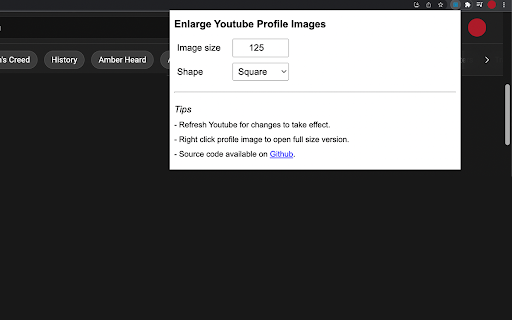

Control size of profile images in the Youtube comment section. - Set preferred profile image size for the Youtube comment section. - Hover zoom on profile images. It's time to appreciate the memes and put a face to the name.

YouTube Full Title For Videos
This extension shows the headlines of the video entirely without hiding them partially, as by default. This extension shows the headlines of the video entirely without hiding them partially, as by default. It add a CSS that change height of title, so it is easier to use YouTube.com, because you can see all title and don't need to hover on a title to see it all. The plugin doesn't have any JS, just simple CSS.

Enlarge Profile Image for YouTube™
A chrome extension that makes it possible to enlarge the profile image in YouTube profiles by clicking on it. Simply go to any YouTube channel or profile and click the profile image to enlarge it! This extension is open-source. https://github.com/eladnava/enlarge-profile-image-for-youtube YouTube™ is a registered trademark of Google. This extension is unaffiliated with Google.

Image Pop Up Zoom
The Image Hover Popup extension is a powerful tool that enhances your browsing experience by allowing you to view images in a… The Image Hover Popup extension is a powerful tool that enhances your browsing experience by allowing you to view images in a convenient and efficient manner. With this plugin, you can effortlessly preview images in a pop-up window simply by hovering over them. Gone are the days of individually opening each image to get a closer look. Now, with the Image Hover Popup plugin, you can easily navigate through image galleries, photo albums, or any web page containing images, without the need for extra clicks.

Image Zoom
Image Zoom is a lightweight, no-fluff Chrome extension that lets you zoom into any image with a simple right-click – no ads, no bloat, just works. 🔍 How it works: Right-click on any image and select "Image Zoom" from the menu. A zoomed view pops up where you can: - Scroll to zoom in/out - Click and drag to pan around - Press Esc to close - Rotate left or right (NEW in v0.0.3) ✅ Features - Zoom with mouse wheel - Rotate images left/right - Drag to pan - Escape to close Works without interfering with site design - 🌀 Rotate image left/right - 🛠️ Fixed CSS conflicts with some sites v0.0.2 - 🖱️ Added mouse wheel support - ⎋ Close with Escape key Perfect for developers, designers, or anyone who constantly works with images online. Try it once – you’ll never go back.
