
aadbfahejpbhdndmnfkimgfilobdbnfo
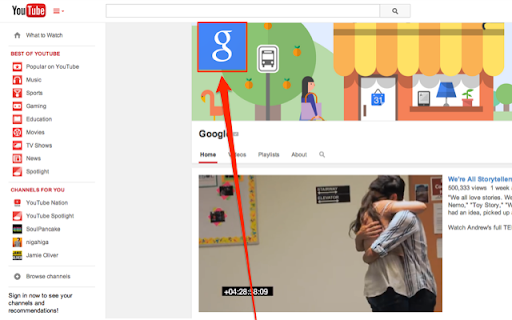
A chrome extension that makes it possible to enlarge the profile image in YouTube profiles by clicking on it. Simply go to any YouTube channel or profile and click the profile image to enlarge it! This extension is open-source. https://github.com/eladnava/enlarge-profile-image-for-youtube YouTube™ is a registered trademark of Google. This extension is unaffiliated with Google.

Quick Search for YouTube™
Quickly search selected text on YouTube™ or launch YouTube™ homepage. This is a simple and clean extension for quickly searching selected text on YouTube™, from any website. Text Selection Search: Highlight any text on a webpage, right-click, and select 'YouTube IT' from your context menu to initiate a Youtube search. Direct YouTube™ Access: Alternatively, right-click anywhere on a page and choose 'YouTube IT' to quickly open the YouTube™ homepage. Disclaimer: This extension is not affiliated with, endorsed by, or sponsored by Google LLC or YouTube™. YouTube™ is a trademark of Google LLC.

YouTube™ Stop Button
Adds a stop button to the player interface to unload the player and stop the video from buffering any time. This extension unloads the YouTube player without affecting the actual page. Removing the player eliminates any network requests to fetch or buffer the video. This is especially useful when you wish to watch the video later without YouTube preloading it and consuming your bandwidth. Key Features: 1. Disables automatic buffering 2. Halts player-related network activities 3. Unloads the player while keeping the page intact The extension introduces a new "Stop" button located next to the "Play" button. Click the "Stop" button whenever you want to unload the player. Additional Notes: 1. This extension exclusively supports the HTML5 player, offering no compatibility with Youtube's old Flash player. 2. Built on manifest v3, this extension adheres to the specified guidelines. 3. It only operates when the "Stop" button is triggered and remains in an idle state at all other times, ensuring no background activities are running.

Tweaks for Instagram
View full-size images and videos on Instagram, and download all images in a post with a single click. View full-size images and videos on Instagram by clicking a thumbnail with Ctrl + Left Mouse Button (by default), and download all images in a post with Shift + Left Mouse Button (by default). Available on Posts, Reels, Tagged, and Explore pages. Tweaks for Instagram is an independent project and it is not affiliated with nor endorsed by Instagram. Go to the previous/next media item (or post) - Mouse Wheel Storage - for storing extension settings Downloads - for downloading photos This extension does not collect personal data from users, and it does not send any user data to a remote server. The only data it collects are extension settings, and this is stored locally on your PC.

Lazy Search on Youtube
Simple and quick way to search for highlighted text on YouTube via right-click context menu or from popup. YouTube Helper. Update: - dark mode - manifest v3 (new browser requirement for all extensions) 📌 The main purpose of the extension is to help you quickly open youtube - with the results according to your search. You can search using: - Highlight text on the page and right-click - Enter text manually in the extension menu 🚀 Features: 1) Search from the context menu (right click) 2) Search from popup menu ( just tap the extension icon or use the keyboard hotkey to open it ) 3) Show search suggestions 4) Keyboard navigation friendly (Arrows or Tabs) 5) Open youtube by clicking on youtube logo in popup menu Privacy Policy: The extension does not collect any user information! ❤️ In case you want to say thank you) https://buymeacoffee.com/e1white
