
amomdnjachcdfjcijmnolpgndbokbeha


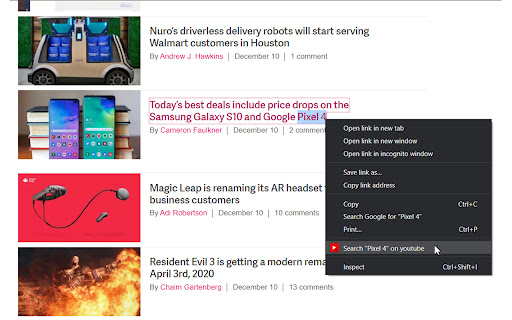


Simple and quick way to search for highlighted text on YouTube via right-click context menu or from popup. YouTube Helper. Update: - dark mode - manifest v3 (new browser requirement for all extensions) 📌 The main purpose of the extension is to help you quickly open youtube - with the results according to your search. You can search using: - Highlight text on the page and right-click - Enter text manually in the extension menu 🚀 Features: 1) Search from the context menu (right click) 2) Search from popup menu ( just tap the extension icon or use the keyboard hotkey to open it ) 3) Show search suggestions 4) Keyboard navigation friendly (Arrows or Tabs) 5) Open youtube by clicking on youtube logo in popup menu Privacy Policy: The extension does not collect any user information! ❤️ In case you want to say thank you) https://buymeacoffee.com/e1white

Simple Translate
Quickly translate selected or typed text on web pages. Supports Google Translate and DeepL API. When you select text, the translation button pops up and the translation is displayed instantly. If you enable "Do not display the button if translation is not required" option, you will not get frustrated by the button appearing when it is not necessary. In the toolbar popup, translate the input text in real time. If you enable "Automatically switch to the second language" option, you can do : When English is input, it is translated into Japanese, and when Japanese is input, it is translated into English. You can also translate from the context menu. You can select "Translate this page", "Translate selected text", and "Translate selected link" from the menu on the page or tab. Supports Google Translate and DeepL API.

Contextual Search for YouTube
Allows the user search YouTube for a term by highlighting text and selecting 'Search YouTube for...' from the right click menu. A very simple extension that allows the user to search for a term in YouTube simply by selecting text, right clicking and selecting "Search YouTube for..." from the contextual menu. Easy to use. Nothing extra.

Youtube select and search
Select text, right click and search it on Youtube directly. Directly find a video from a text on a website with 2 clicks. This extension will add a button when you select and right click on a text. This button will open Youtube to search video from the selected text. No need to copy/paste and waste time.

Search on YouTube
Search for anything on YouTube by selecting the text and right clicking. A simple extension for the Google Chrome browser that allows you to search on YouTube by right clicking highlighted text and using the context menu. Similar to how the built in "Search Google for..." context menu item works. 1) Select some text 2) Right click the mouse to open context menu 3) Select "Search YouTube for [your text]" option Icons and logos done by @liamcaindesigns on Instagram.
