
jjfpbepncodafeimliamngldphkgdmpa
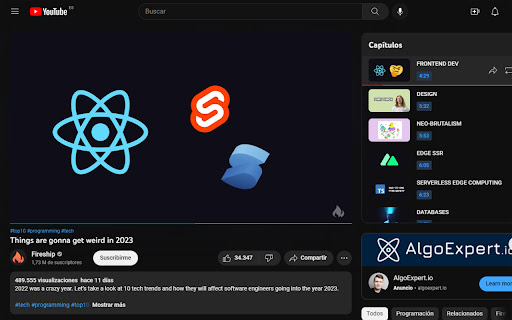
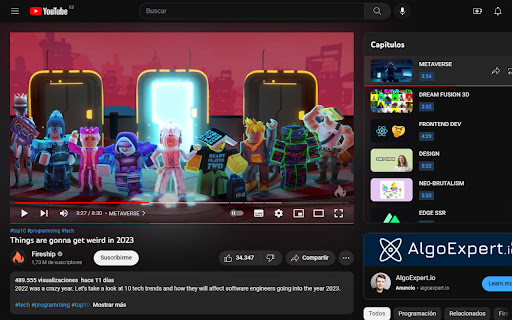

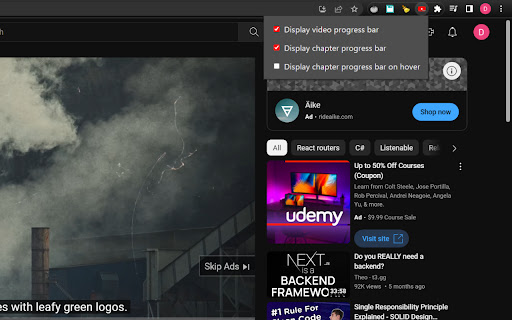
Chrome extension that modifies the youtube video page, placing a progress bar with the remaining time under the active chapter Chrome extension that modifies the Youtube video page, and places a progress bar underneath the active chapter in the Chapters list, displaying the time remaining in that chapter. This way you'll be able to visalize not only the progress of the video in general, but also how much time is left in the chapter on its own. The extension can optionally place a permanent progress bar underneath the main video player that won't disappear when you are not interacting with the video player. You can customise the visibility of the bars, as well as if you prefer to display the chapter bar only while hovering over the active chapter, by clicking on the extension icon. Note: None of the added progress bars are interactive, therefore you can't change the video position by clicking on them. They just display the progress of the video and the chapter independently.

Video Bar
Customizable progress bar for Youtube videos and other web sites Adds a progress bar to YouTube videos and videos on other web sites. This helps, in a non-intrusive way, to keep track of the video progress while all the controls are hidden. The progress bar position, size, colors, timer font and mouse-over behavior can be customized in the options. The page has a live preview of the bar with "Save settings" and "Restore default" buttons. All settings are kept in the local browser's storage. Left mouse click on the extension's icon turns it on/off for each browser's tab.

Video Duration for YouTube™
Adjust YouTube video playback speed, save time, and navigate with ease. Whether you want to speed up a lecture or slow down a tutorial, "Video Duration for YouTube™" gives you full control over your video viewing experience. With this extension, you can easily try out different speeds and see how much time you could save or add based on your selection. Also, the remaining video length is shown so you can plan your viewing time more efficiently. 1. Video Speed - Adjust video playback speed to up to 16x - Jump to 1x speed, then switch back to the previous speed in one click - Set the default speed at which every video starts with - Change speed in smaller or bigger increments 2. Video Duration - Find out how much time will be saved or added compared to watching at 1x speed - See your watch progress in percentage - Know how long it takes to watch the rest of the video at current speed - Know your YouTube Shorts: know video length, change video speed, skip through video 3. Flexibility - Continue using your favorite shortcuts already provided by YouTube - Tailor appearance and functionalities to your liking with settings in the extension popup We respect your privacy and don't collect any data. 💥 Keyboard shortcuts 💥 Works with any keyboard layouts. Here are the QWERTY shortcuts for reference: Change speed: A / D Jump to x1 speed: S Restart video: R Rewind / advance 10 seconds: J / L Play / pause: K Mute / unmute: M Show / hide controller: V Left controller: Z Right controller: X Time to end: E Watch progress: P 😦 Troubleshooting 😦 Refreshing the video page should fix most issues. 🚨 Future Release 🚨 Please use the support form to report problems, request features, and make suggestions. If this extension is helpful to you, please leave a rating or review so more people can find it. Thank you for your support!

YouTube Timestamp Comments
An extension that lists timestamp comments on YouTube. This is a Google Chrome extension that displays timestamp comments on YouTube. The main features are:

Permanent Progress Bar for YouTube
Always display a tiny progress bar with buffer loading on YouTube's player even in the fullscreen mode This extension brings a small, persistent progress bar to the YouTube player, enhancing your viewing experience. You can customize the extension to adjust the bar's height and color on the options page. The beauty of this feature lies in its adaptability ? it remains hidden until the default YouTube progress bar disappears, even in fullscreen mode! The primary goal is to offer a constant visual cue of the player's progress status. If the bar appears too slim for your screen, head to the options page and tweak the height setting. Exciting Features: 1. Keep track of the loaded percentage (buffered video progress). 2. Monitor the current position of the player. 3. Updates of these percentages every 2 seconds (adaptive). 4. Almost all features are fully customizable through the options page. 5. Compatible with the YouTube website and embedded YouTube players on any website. 6. Hides the permanent progress bar on live streams Recent Changes: Version 0.2.0: 1. The extension has been upgraded to manifest v3, ensuring improved functionality and performance.
