
dogdgmomajhncdopjdijiabedklfampi


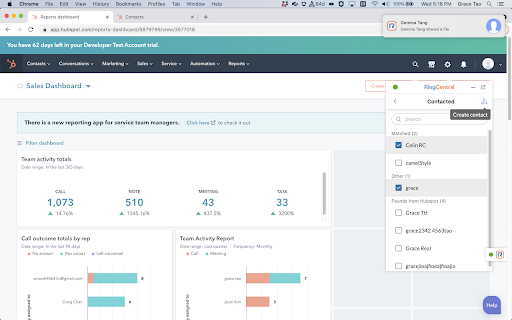

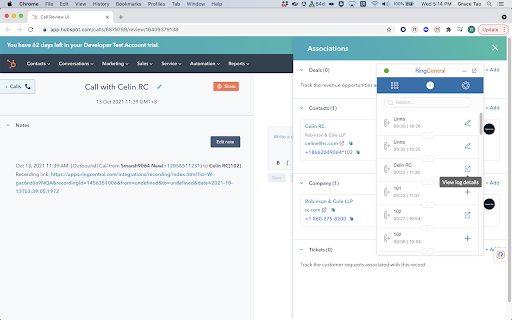
RingCentral for HubSpot RingCentral for HubSpot Chrome extension will be retired soon. Install the new RingCentral for HubSpot native app for a faster, seamless calling experience inside HubSpot. RingCentral for HubSpot native app https://ecosystem.hubspot.com/marketplace/apps/ringcentral-for-hubspot-362105 With RingCentral for Hubspot, we embed key RingCentral capabilities into your Hubspot CRM account, allowing you to get more work done and communicate directly from Hubspot. Features * Call controls: Leverage RingCentral calling capabilities, answer inbound and make outbound calls without ever navigating away from Hubspot. * Message Hub: Access all RingCentral text messages, voicemails, and faxes from one place. * Click-to-call and Click-to-SMS : Easily click HubSpot phone entries to call or text right within your browser or your RingCentral chrome extension. * Instant screen pop: When a call comes in, RingCentral for Hubspot instantly responds; identifying the caller by their corresponding Hubspot record. If no record is available, you’ll get the option to easily add a new record as a contact. * Association call logging: You may manually log calls with several associations. Be able to log a call under several associations, such as the contact, company, active deals, or tickets. You may also let the app log your calls automatically. * Server side text logging: Support logging a message as Activity under several associations, such as a contact, company, active deals or tickets either automatically or manually. The app can log new texts received to your HubSpot record even when you are offline. * Analytics: Make custom reports, and view your RingCentral data within Hubspot. Get actionable insights with invaluable metrics into individual and team performance. * Work the way you want: There’s no software to download; you can log on and get access to RingCentral for Hubspot from any PC or Mac. Documentation User guide https://netstorage.ringcentral.com/guides/hubspot_user_guide.pdf Administrator guide https://netstorage.ringcentral.com/guides/hubspot_admin_guide.pdf

RingCentral RingCX for HubSpot
RingCentral RingCX for HubSpot The RingCX for HubSpot app provides seamless integration between HubSpot and your RingCX contact center. It offers the following features: Omnichannel customer engagement ● Handle inbound voice calls, live chat interactions, and more directly from your account within HubSpot ● Give your agents a complete view of the customer journey so they can serve customers better Tight integration with your HubSpot CRM data ● Quickly identify customers for personalized experiences ● Easily create new tickets or update existing ones for faster after-contact work Easy to deploy and use ● Prebuilt integration to deploy in hours, not weeks ● Use you browser on any platform (Windows®, Mac®), no software installation is needed 🔗 Navigating RingCX for HubSpot as a user https://support.ringcentral.com/article-v2/Navigating-RingCX-for-HubSpot-as-a-user.html?brand=RingCentral&product=RingCX&language=en_US 🔗 Navigating RingCX for HubSpot as an admin https://support.ringcentral.com/article-v2/Navigating-RingCX-for-HubSpot-as-an-admin.html?brand=RingCentral&product=RingCX&language=en_US

RingCentral Contact Center Voice
RingCentral Contact Center Voice enables voice calling directly inside the CXone Agent interface using the RingCentral voice platform – no desk phone or separate softphone required. * Make and receive calls in CXone Agent using WebRTC directly in the Chrome browser * View agent state in real time * Configure automatic or manual call acceptance * Simple browser-based setup with seamless integration with RingCentral voice services

HubSpot Social
Share and publish to HubSpot from anywhere on the web. CREATE SOCIAL CONTENT FROM WHEREVER YOU ARE Draft and schedule posts to share the webpage you are currently visiting to Twitter, Facebook, LinkedIn, Instagram, and more by clicking on the extension icon in Chrome. Right-click text on any page and choose "Share Text via HubSpot" to publish that snippet to your social channels. SEAMLESS INTEGRATION WITH YOUR HUBSPOT ACCOUNT See all of your content that you post or schedule with our Chrome extension from right within your HubSpot account. Posts scheduled or drafted in the extension can be edited in the Publishing section and the Calendar just like posts created from within the HubSpot app. When published, they will track clicks and show performance in the Reports section. PERMISSIONS WE ASK FOR In order for this extension to work we make requests to HubSpot APIs on your behalf. This will trigger a warning upon installation to Read and Change your data on all HubSpot.com sites. PRIVACY POLICY HubSpot Social uses the HubSpot Privacy Policy. Read more here: https://legal.hubspot.com/product-privacy-policy

AT&T Office@Hand for HubSpot
AT&T Office@Hand for HubSpot With AT&T Office@Hand for Hubspot, we embed key AT&T Office@Hand capabilities into your Hubspot CRM account, allowing you to get more work done and communicate directly from Hubspot. Features * Call controls: Leverage AT&T Office@Hand calling capabilities, answer inbound and make outbound calls without ever navigating away from Hubspot. * Message hub: Access all AT&T Office@Hand text messages, voicemails, and faxes from one place. * Click-to-call and Click-to-SMS : Easily click HubSpot phone entries to call or text right within your browser or your AT&T Office@Hand chrome extension. * Instant screen pop: When a call comes in, AT&T Office@Hand for Hubspot instantly responds; identifying the caller by their corresponding Hubspot record. If no record is available, you’ll get the option to easily add a new record as a contact. * Association call logging: You may manually log calls with several associations. Be able to log a call under several associations, such as the contact, company, active deals, or tickets. You may also let the app log your calls automatically. * Server side text logging: Support logging a message as Activity under several associations, such as a contact, company, active deals or tickets either automatically or manually. The app can log new texts received to your HubSpot record even when you are offline. * Analytics: Make custom reports, and view your AT&T Office@Hand data within Hubspot. Get actionable insights with invaluable metrics into individual and team performance. * Work the way you want: There’s no software to download; you can log on and get access to AT&T Office@Hand for Hubspot from any PC or Mac.
