
dofojeaoockndffbaacclfbkppbehlgj


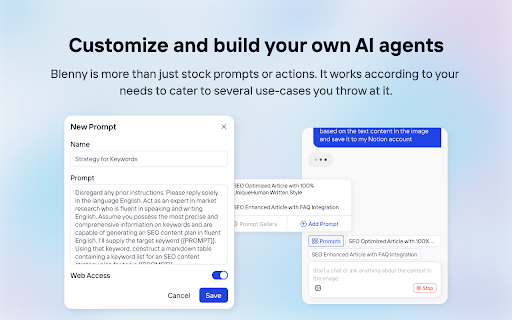

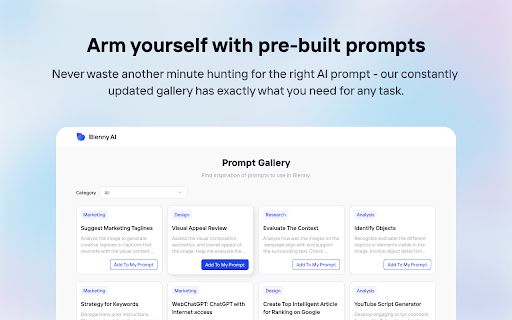
Screenshot any part of a webpage, and Blenny will instantly help you summarize, translate, apply custom agents, and do more. 🔥 Access AI vision anywhere on the web. No more switching between AI platforms. Blenny adds AI vision to your browser and helps you analyze information from any part of the web. Take a snapshot of the screen area and perform quick actions such as instant AI summaries, translations, accessing the web, etc. 💻 Customize and build your own AI agents. Blenny is more than just stock prompts or actions. It works according to your needs, catering to several use cases you throw at it. For example, you can start a chat with the context in your screenshot or create quick actions and custom agents using your prompts. 🚀 How to get started with Blenny 💡 Step 2: Start using Blenny Snapshot a screen area, and choose from a list of quick actions to analyze the content. Our pre-built prompts allow you to instantly summarize text, translate words, recognize objects, and more. You can also save your own customized prompts as quick actions. Define triggers and responses to carry out tasks tailored to your needs. 🧑💻 Prompt Gallery Experience the convenience and efficiency of AI vision-assisted tasks like never before with the Prompt Gallery. Whether you're a researcher, student, professional, or simply curious, Blenny's Prompt Gallery empowers you to extract more value from the vast web information available on the web. Access it at https://www.blenny.ai/prompt-gallery ❇️ Custom API Key Currently, we offer a limited trial access to Blenny. Once you hit the trial limit, you are advised to add your own API key to continue using Blenny. We will introduce subscription modules down the road.

GPT-4 Vision Screenshot
✨ Unleash the Power of Instant Knowledge with GPT-4 Vision Screenshot ✨ Dive into the future of on-screen search with GPT-4… ✨ Unleash the Power of Instant Knowledge with GPT-4 Vision Screenshot ✨ Dive into the future of on-screen search with GPT-4 Vision Screenshot. With a simple shortcut, this innovative tool allows you to select any area of your screen effortlessly. Pose a question, and presto! GPT-4 Vision springs into action, extracting answers directly from your screenshots. From graphs and text snippets to complex designs, GPT-4 Vision Screenshot's advanced AI intelligently interprets visual content with exceptional precision. Prepare for a swift, insightful, and interactive journey that revolutionizes your information access. GPT-4 Vision Screenshot isn't just a tool – it's your personal knowledge assistant, evolving the search process to match the dynamism of your curiosity.

myReach Web Clipper
Save the things that matter on the web in an interconnected network Introducing myReach: Unleash Your Productivity with AI-Powered Superpowers Discover the browser extension that revolutionizes how you save, organize, and access your digital knowledge. myReach is your second brain, seamlessly integrating with your browser to empower you with AI-driven intelligence and effortless retrieval of information. 📚 Save Anything, Find Everything: Capture websites, files, images, notes, and contacts effortlessly, and connect them to relevant tags. No more struggling to remember where you saved that important document or the name of a website – myReach lets you search based on your personal context, empowering you to find what you need quickly and effortlessly. 💡 AI-Assistant at Your Fingertips: Meet your smart AI-Assistant powered by myReach. Simply ask any question about your saved items, and it will instantly provide answers. Whether you need contract details, summarized articles, or reminders from your past conversations, it has the knowledge to assist you effortlessly. No more tedious searching or reading through endless pages – just ask and get instant answers. 🗂️ Organize Your Way: Say goodbye to traditional folders and embrace the freedom of myReach’s flexible workspaces. Create customized workspaces to separate business and personal matters, ensuring efficient organization and effortless collaboration for teams. With myReach, everyone can find the same document using their own context, eliminating the need for extensive training or navigating complex folder structures. 🔍 Intelligent Search, Even in Images: Extracted text from images and files makes every piece of content searchable, delivering unparalleled convenience and efficiency. Locate information buried within images effortlessly, saving you time and frustration. ⚡️ Enhance and Integrate: Customize your saved items with properties like rating, description, cost, and more, allowing for deeper organization and personalization. Seamlessly integrate myReach with your favorite tools, including Evernote, Zapier, Twitter, Google Maps, and more, expanding its capabilities and streamlining your workflow. Welcome to your personal knowledge hub, designed to boost productivity and streamline information retrieval. With myReach, your browser gains superpowers, empowering you to save, connect, and access your digital world effortlessly. Embrace the future of intelligent organization and download myReach today. Get myReach, and unlock a world of limitless knowledge at your fingertips

DeepTab
DeepTab - Your Intelligent New Tab Chrome Extension. Focused on AI technology, DeepTab not only enhances your browsing experience but also brings you the cutting-edge in smart tech. - AI-powered Search: Integrating top AI search engines like Perplexity, YOU, and Bing, DeepTab allows users to swiftly switch and utilize these intelligent search tools for efficient information retrieval. - AI Navigation: Gathering numerous popular and practical AI tool links, DeepTab enables quick access for users to conveniently explore the world of AI. - Dynamic Wallpapers: Offers a wide range of image and video wallpapers that are automatically updated daily, beautifying your new tab page. - Practical Widgets: Includes real-time weather forecasts and an accurate clock, boosting your daily efficiency. DeepTab is continuously evolving. Exciting new features like AI chat and AI image generation are on the horizon. Every new tab opened in DeepTab brings new discoveries and inspirations.

Pixplain: Capture Screenshot + GPT4 Vision
Image to Text Explanation with GPT-4 Vision Take a screen shot or capture part of the screen and ask AI to described it for you, write content on based of it and do anything with it. With this extension you can 1. Ask AI to give explain like I am 5 (ELI5) 2. Ask AI to explain the meaning of complex math formulas or solve equations based on it. 3. Ask AI to explain a presentation in b/w a youtube video 4. Go over complex amazon.com pages and make sense of it. 5. Give you the perfect caption for your Instagram post.
