
doecfodblgfnjmmphbedjgllipnbgbld

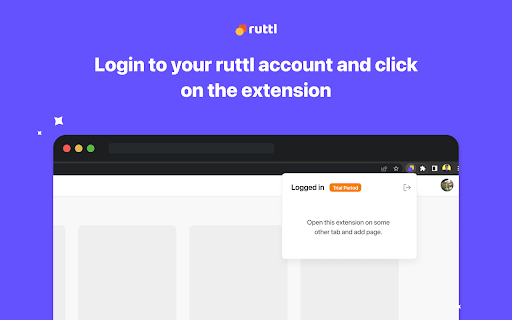
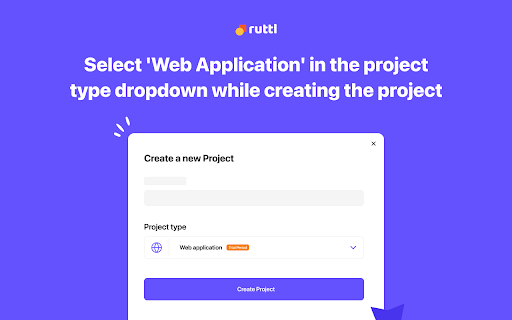

Download this extension and sign-in to to your Ruttl account, and get the ability to review password-protected sites or… Download this extension and sign-in to to your Ruttl account, and get the ability to review password-protected sites or login-based apps on Ruttl. Go through the 3 simple steps explained below to begin reviewing: 1. Download our Chrome extension: Download the extension and pin it for easier access. 2. Click on the extension to login with your Ruttl account: Once you’ve added the extension to your browser, please click on the same to login with your Ruttl account. 3: Open your site or app in a new tab, click on our extension and select the type of project you'd like to create: For website projects - Add new projects, or add new pages to your existing projects & review them quickly. For web apps - Once you open your web app in the logged-in state, scroll to the bottom of the page, click on our extension and add it to your project. For bug tracking - Once you open your site in a new tab, click on our extension, create a new project and you'll be able to instantly see the floating action pill on the bottom-left of your screen. Now create tickets, which will reflect on your project (dashboard/workflow). You can also add tickets to your existing project(s) respectively once you switch the toggle on for that project.

Revo Capture
Screenshot, Annotation and Issue Capture. - Capture and share issues and perfect bug reports in seconds, with all the details your developers need (screenshots, video recordings, replays, element highlights, code, metadata, and more). - Browse and update your issues visually, directly on your UI, for faster collaboration and bug resolution. - View and manage your issues on Revo the AI Agent for Product Teams and get the help of powerful AI agents to execute your tasks. - Effortlessly send your captures to your existing tools such as Jira, Asana or Linear and enhance your current workflow. Designed to keep your data safe and secure, Revo is SOC 2 Type II certified, ISO 27001 certified, ISO 27701 certified, GDPR and CCPA compliant.

MarkUp For Chrome
Visual Feedback for Websites Easily provide and collect feedback on any live website, PDF or image from your browser with the MarkUp chrome extension. MarkUp is the leading visual commenting platform for images, PDFs and live websites. It’s the perfect companion in your creative process to make your life easier. MarkUp ALLOWS YOU TO 1. Turn any website or image into a collaboration workspace 2. Add comments anywhere on your website 3. Share with your team to collect and manage their feedback, all in one place COMMENT ANYWHERE Your whole website becomes a digital canvas ready to collect feedback. Easily navigate your website within MarkUp and add comments to any page. All of your comments are organized by page in your sidebar. Click any comment on your sidebar and MarkUp will bring you right to the page and pin location. INCLUDE SCREENSHOTS WITH COMMENTS The MarkUp Chrome Extension allows you to include automated screenshots with every comment you make, providing an audit trail and allowing your team to see exactly what you were looking at when you made a comment and provided feedback. SEAMLESS SHARING When you’re ready, copy the project invite link and share with clients, colleagues, teammates, or even your friends. When they receive their link, they can seamlessly access the project as a guest (no signup required) or create their own account, quickly reply to and resolve your comments, or create their own. MORE THAN AN EXTENSION Want to try MarkUp, but don’t want to download an extension? No problem, you can use MarkUp without an extension at markup.io.

Marker.io: Visual bug reporting for websites
Report visual bugs directly into your favorite tools, without leaving your website or web app Have you ever felt frustrated with internal testing and bug reporting, either as a reporter or as a developer? So did we, and we created Marker.io to streamline those workflows. Set up Marker.io to integrate with your preferred bug reporting tool (like Jira, Asana, Trello, and many more) and start reporting! Capture a screenshot of the visual bug, highlight, crop, fill in the form to create a ticket/issue/card, and continue browsing, so you never have to leave your website. Want your developers to love you even more? Tickets created through Marker.io are automatically enriched with technical metadata and console logs, making it easier and faster for your developers to recreate and resolve any issue. The forms in Marker.io are deeply connected to your issue tracker. The fields in the form are mirrors of your tickets, so you never miss any information. Need custom forms? No problem! You can change the visible fields for both your team members and your guests and clients. Your sensitive information will remain protected. Marker.io currently integrates with: ✔ And even more project and issue tracking tools! Go to https://marker.io to start your 15-day free trial. Get a free demo for more information or to get started.

Volley extension
Volley lets you give fast, easy feedback for your website. Simply create a project, invite your team and use the chrome extension to start annotating your website. Your notes are sent to an easy-to-use collaborative workspace where your entire team can review and resolve the notes with ease.
