
doakdfknojfkimkfapjodmbemhmidbfg
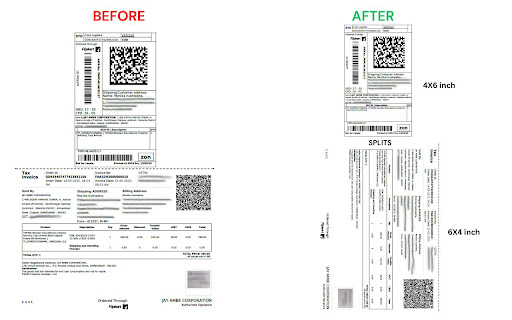
Crop Flipkart Label and Invoice from a combined PDF Flipkart Label & Invoice Cropper ✂️ – Easy Download & Print for Sellers Crop, download, and print Flipkart labels & invoices. Upload Flipkart label/invoice PDF, auto-crop accurately, and download clean PDFs separately. Fast & easy tool for sellers. This Chrome Extension is designed for Flipkart sellers to process their order documents quickly. Just upload the original Flipkart PDF and the tool will automatically crop each one perfectly. Download them as clean, separate PDFs for printing. Upload Flipkart Label or Invoice PDFs Auto-crop with precision (no manual adjustments needed) Download clean, separate PDFs for each label/invoice Simple and fast interface – zero technical knowledge required No watermark, no ads – 100% clean output 💼 Perfect for: Flipkart sellers Small and medium e-commerce businesses Warehouse or packaging teams 🚀 Save time, reduce mistakes, and streamline your packaging process. Install now and make your Flipkart selling workflow smoother!

Flipkart Image Downloader
📸 Flipkart Image Downloader - Your Ultimate Tool for HD Product Images Download high-quality product images from Flipkart with just one click! This powerful extension helps you save Flipkart product images in full HD resolution (1280x1280) quickly and easily. 🔍 KEY FEATURES: • Download Flipkart product images in HD quality • Batch download multiple product images at once • Simple and intuitive interface with sidebar gallery • One-click download buttons on product pages • Automatic high-resolution image conversion • No watermarks, pure product images 💡 PERFECT FOR: • Online sellers needing Flipkart product images • Digital marketers creating product catalogs • Shoppers saving product references • Designers needing high-quality Flipkart images • Anyone wanting to download Flipkart product photos ✨ HOW IT WORKS: 1. Visit any Flipkart product page 2. Click the extension icon or use the sidebar 3. View all available product images in HD 4. Download individual images or all at once 5. Images are automatically saved in highest quality 🔒 PRIVACY & SECURITY: • No ads or popups • Minimal permissions required • No user data collection • Works only on Flipkart pages • Safe and secure downloads 💪 WHY CHOOSE US: • Best image downloader • Highest quality product images • Fast and efficient downloads • Regular updates and support • User-friendly interface Note: This extension uses affiliate links when opening product pages to support ongoing development and maintenance. This doesn't affect your shopping experience. Note: This extension is not affiliated with Flipkart and is designed for personal use only.

Flipkart Seller Keyword-Listing Tool Datavio
Optimise listings on Flipkart, Amazon, quick commerce marketplaces, benchmark competitors, gain category insights and product trends Overview: The Freemium Listing Analyzer is a powerful Chrome extension designed to provide e-commerce brands and category managers with valuable insights through competitor research, market research, price and stock movement tracking, and product research. We currently serve on myntra, flipkart and amazon and building quickly for quick commerce platforms through our webapp. Please connect in case of any customised requirements. ✓ Monitor Competitors and access their share of revenue and sales history ✓ Get keyword ideas and search volume to optimize listings and PPC campaigns ✓ Chatgpt powered review analysis to extract most frequent user complaints ✓ Calculate potential profit margins with Profitability Calculator ✓ Powerful Category insights ✓ Price Intelligence and History Keyword Suggestions and Volume Data: Get relevant keywords suggestions and volume for your product listings. Get the keywords in your competitors listings and their ranking difficulty and competition. Monitor Competitors Strategies: Monitor competitors product listings and get notified on price changes, keyword changes, content changes and take appropriate actions in real-time. Listing Health Score: Gain a clear understanding of the overall health of your e-commerce listings with the Listing Health Score feature. This feature uses advanced algorithms to evaluate various parameters such as title optimization, product description quality, image quality, pricing competitiveness, and more. By analyzing these factors, it generates a comprehensive health score for each listing, allowing you to identify areas for improvement and optimize your product sales. Review Analysis: The Review Analysis feature enables you to dig deeper into customer feedback and understand the sentiment behind reviews for your products. It uses natural language processing techniques to analyze reviews, create word cloud, and easily filter through relevant reviews. By gaining valuable insights from customer feedback, you can take proactive steps to address concerns, improve product quality, and enhance the overall customer experience. You can also generate keyword ideas about what people are talking about the most in reviews. Profitability Calculator: The Profitability Calculator is a valuable tool for e-commerce sellers seeking to maximize their profits. With this feature, you can input relevant cost factors such as product price, shipping fees, packaging costs, and other expenses. The calculator then analyzes these inputs along with marketplace fees, commission rates, and taxes to provide you with an accurate profitability analysis. This helps you make informed decisions about pricing, cost optimization, and maximizing your margins. User-Friendly Interface: The Listing Analyzer extension offers a user-friendly and intuitive interface, ensuring a seamless user experience. The extension seamlessly integrates into your Flipkart seller dashboard, providing quick access to its features without any hassle. With its clean and visually appealing design, you can effortlessly navigate through the various tools and extract valuable data to inform your e-commerce strategies. Start using the Flipkart Listing Analyzer Chrome extension today and gain a competitive edge in the e-commerce marketplace. With its comprehensive suite of features, you can identify and improve listing health, analyze customer reviews effectively, and make data-driven decisions to enhance profitability. Empower your Flipkart selling journey with this invaluable tool and unlock new opportunities for success.

Amazon Index Checker
Free keyword ranking & index check tool by SellerApp - The most accurate seller tool for all amazon market places. Don’t have the time to track the right keywords for your listings? We don’t blame you. We understand that your time is valuable to you. Heck, that’s why we've got you the Keyword Rank Tracker. Amazon SEO takes time. Tracking keywords manually takes time. Marketing takes time. It’s not much freedom if you’re spending all of your time in front of a computer instead you could be spending doing what you love — spending your time your way. The combined Index Checker and Keyword Rank Tracker is built with focus on ease of use and effectivity. Save your time, benefit from the indexing information, page ranking, and the keyword position all on one screen. Helps you accurately identify the keyword ranks for you to know the position of your product listing for the most important keywords - Check your current Amazon keyword ranking, indexing information, Page Rank and positions - Helps you check ranking on all marketplaces - US, EU, UK, CN, JP, FR, DE, IT, NL, CA, MX, BR, AU - Helps monitor the effectiveness of your marketing efforts with changes in your PPC campaigns, keywords in your listings - Manually refresh your real time keyword ranking results - Export your daily keyword indexing, ranking and other ranking information to a Google spreadsheet for custom analysis and backup Keyword research, on-page and off-page optimization are just small parts of the SEO puzzle. It is more critical to control how your listing is performing in search. It's really important to understand what is going on your listing, and to track your most important product keywords to be alerted whenever something is going wrong -to know if you're losing rankings for a certain keyword or a pool of keywords. If you're not ranking for your most important keywords anymore, you could lose a lot of money in sales. The listing keyword search ranks keep constantly changing and you should stay vigilant against your keyword performance. Rank tracking also helps you find out how your competitors are ranking in search and find the best ways to outrank them. Make sure you keep an eye on the competition with the ranking tracker. Q1. How to check keyword ranking on amazon? Enter all the your most important keywords in the keyword tracker and click on ‘Analyze’. The Extension crawls through the Amazon listing pages to analyze your listing position in the search results. Q2. How to index keywords on Amazon? Keywords on Amazon are indexed based on the sales made by the listing for the keyword. Amazon considers the product making the most sales as the most relevant one and places it on the top of the search results for the keyword. Q3. How to enter keywords in listing? The keywords can be entered in different parts of the listing including the title, bullet points, the product description and the backend keywords. Amazon’s search engine picks up the keywords from your listing under all these portions to index it for your product listing.

Meesho Label and Invoice Cutting Tool
Advanced tool to auto detect label and invoice and sepaseparate it Meesho Label & Invoice Cropper ✂️– Easy Download & Print for Sellers (Updated version with auto detect label and invoice cutting features) Crop, download, and print Meesho labels & invoices. Upload Meesho label/invoice PDF, auto-crop accurately, and download clean PDFs separately. Fast & easy tool for sellers. This Chrome Extension is designed for Meesho sellers to process their order documents quickly. Just upload the original Meesho PDF and the tool will automatically crop each one perfectly. Download them as clean, separate PDFs for printing. Upload Meesho Label or Invoice PDFs Auto-crop with precision (no manual adjustments needed) Download clean, separate PDFs for each label/invoice Simple and fast interface – zero technical knowledge required No watermark, no ads – 100% clean output 💼 Perfect for: Meesho sellers Small and medium e-commerce businesses Warehouse or packaging teams 🚀 Save time, reduce mistakes, and streamline your packaging process. Install now and make your Meesho selling workflow smoother!
