
fpcdkjdaepkpmbjdigeimabjokgijcfb
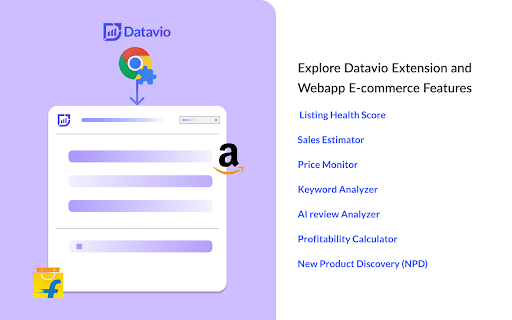
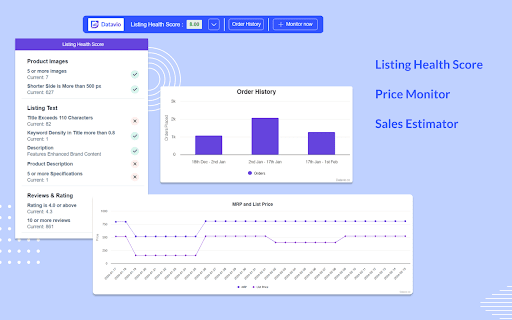
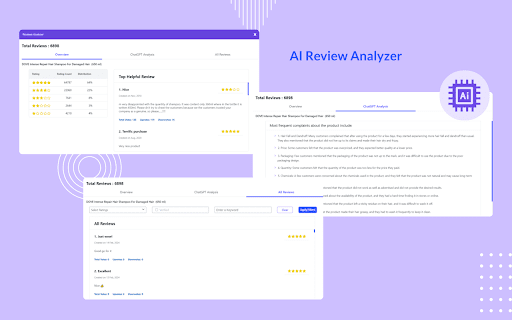
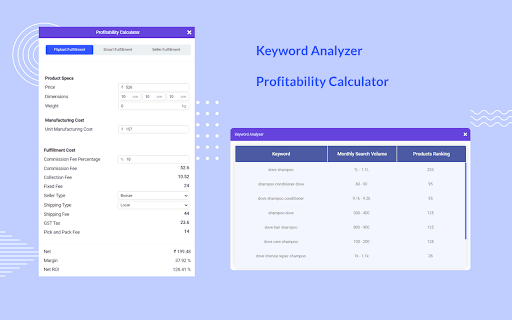

Optimise listings on Flipkart, Amazon, quick commerce marketplaces, benchmark competitors, gain category insights and product trends Overview: The Freemium Listing Analyzer is a powerful Chrome extension designed to provide e-commerce brands and category managers with valuable insights through competitor research, market research, price and stock movement tracking, and product research. We currently serve on myntra, flipkart and amazon and building quickly for quick commerce platforms through our webapp. Please connect in case of any customised requirements. ✓ Monitor Competitors and access their share of revenue and sales history ✓ Get keyword ideas and search volume to optimize listings and PPC campaigns ✓ Chatgpt powered review analysis to extract most frequent user complaints ✓ Calculate potential profit margins with Profitability Calculator ✓ Powerful Category insights ✓ Price Intelligence and History Keyword Suggestions and Volume Data: Get relevant keywords suggestions and volume for your product listings. Get the keywords in your competitors listings and their ranking difficulty and competition. Monitor Competitors Strategies: Monitor competitors product listings and get notified on price changes, keyword changes, content changes and take appropriate actions in real-time. Listing Health Score: Gain a clear understanding of the overall health of your e-commerce listings with the Listing Health Score feature. This feature uses advanced algorithms to evaluate various parameters such as title optimization, product description quality, image quality, pricing competitiveness, and more. By analyzing these factors, it generates a comprehensive health score for each listing, allowing you to identify areas for improvement and optimize your product sales. Review Analysis: The Review Analysis feature enables you to dig deeper into customer feedback and understand the sentiment behind reviews for your products. It uses natural language processing techniques to analyze reviews, create word cloud, and easily filter through relevant reviews. By gaining valuable insights from customer feedback, you can take proactive steps to address concerns, improve product quality, and enhance the overall customer experience. You can also generate keyword ideas about what people are talking about the most in reviews. Profitability Calculator: The Profitability Calculator is a valuable tool for e-commerce sellers seeking to maximize their profits. With this feature, you can input relevant cost factors such as product price, shipping fees, packaging costs, and other expenses. The calculator then analyzes these inputs along with marketplace fees, commission rates, and taxes to provide you with an accurate profitability analysis. This helps you make informed decisions about pricing, cost optimization, and maximizing your margins. User-Friendly Interface: The Listing Analyzer extension offers a user-friendly and intuitive interface, ensuring a seamless user experience. The extension seamlessly integrates into your Flipkart seller dashboard, providing quick access to its features without any hassle. With its clean and visually appealing design, you can effortlessly navigate through the various tools and extract valuable data to inform your e-commerce strategies. Start using the Flipkart Listing Analyzer Chrome extension today and gain a competitive edge in the e-commerce marketplace. With its comprehensive suite of features, you can identify and improve listing health, analyze customer reviews effectively, and make data-driven decisions to enhance profitability. Empower your Flipkart selling journey with this invaluable tool and unlock new opportunities for success.

Titans Quick View - Amazon Niche Finder
Niche & Keyword Research Tool, Amazon Quick View BSR Data for Amazon KDP & MBA This Titans Amazon Quick View works on all Amazon marketplaces. This extension will help you with niche & keyword research for Amazon FBA, KDP and Merch by Amazon. TOP EXTENSION BAR DATA FEATURES: * Average Amazon BSR (Best Seller Rank) * Average BSR calculation * Average price calculation * Average reviews calculation * Keyword / Niche Score calculation * Download data option SINGLE PRODUCT BOX DATA FEATURES: * Main BSR & Sub BSR * Type of Book * Page count * Book size * Publish date You can simply click the download button, and it will create an excel file with all ASINs, Author/Seller names and all Titles for every product on the home page. You can use this for research and best of all for ads creations to target all the best sellers directly as a product campaign, a keyword campaign targeting their author name as well as the book title. This keyword niche score is an algorithm that I have been perfecting over the last year and use daily for research. It is recommend finding niches with a score of 62% and higher. This algorithm takes into account all listings on the first page and goes through how many exact product results there are, how many results on the first page, what all the prices are and the average, what the reviews are and the average, what all individual BSR are and the average and then uses all the data combined into a very thorough algorithm to determine how easy it will be to compete and rank on page 1 and what keywords to use for ads to get the best traction in rankings. You can't simply rely on just how many results and some BSR data. What is the results and BSR is good, but every book on page 1 has a TON of reviews, or MOST books have some low price that you can't really compete with, especially with no reviews and no ads... The algorithm takes everything into consideration. Imagine how much easier publishing book with Kindle Direct Publishing can become. No more guess work on Amazon search pages, no more time consuming copy & pasting, no more endless calculations. I hope this brings you lots of ease and success with your KDP Amazon journey.

Launch Fast - Amazon Product Research & FBA Seller Analytics
Amazon product research & FBA seller analytics: market intelligence, keywords, Google SEO, supplier sourcing, and profit tools. Launch Fast is the all-in-one Amazon product research and seller intelligence Chrome extension. Instantly analyze products with AI-powered scoring, revenue estimates, keyword data, Google SEO metrics, and supplier sourcing — directly on Amazon search and product pages. Unlike other Amazon research tools, Launch Fast grades every product on a proprietary A10-to-F1 scale across 40 levels — factoring in monthly profit, margins, competition, CPC costs, and risk signals. See at a glance which products are worth pursuing and which to skip. ━━━━━━━━━━━━━━━━━━━━━━━━━━━━━━━━━━━━━━━━━━━━ KEY FEATURES ━━━━━━━━━━━━━━━━━━━━━━━━━━━━━━━━━━━━━━━━━━━━ PRODUCT RESEARCH & INTELLIGENCE • Analyze Amazon products with monthly revenue, sales estimates, BSR rankings, profit margins, and competition data • Proprietary A10-F1 product scoring system — 40-grade scale based on profitability, risk, and opportunity • AI-powered market reports with demand analysis, competitive landscape, and customer insights • Filter and sort by revenue, ratings, BSR, price, review count, and more • Research Collections — save and organize products, keywords, and suppliers across sessions KEYWORD RESEARCH & OPTIMIZATION • Amazon keyword data with search volume, competition scores, and ranking difficulty • CPC and advertising cost insights for PPC campaign planning • Reverse ASIN lookup to uncover competitor keyword strategies • Google SEO integration with search volume, CPC trends, and SERP data SUPPLIER SOURCING • Find verified Alibaba suppliers matched to any Amazon product • Compare supplier pricing, MOQs, and ratings • One-click sourcing from product research to supplier discovery MARKET ANALYSIS • AI-generated market summaries with competitive analysis • Track market trends, new entrants, and category dynamics • Bulk export ASINs, keywords, and product data for offline analysis ━━━━━━━━━━━━━━━━━━━━━━━━━━━━━━━━━━━━━━━━━━━━ BUILT FOR AMAZON SELLERS ━━━━━━━━━━━━━━━━━━━━━━━━━━━━━━━━━━━━━━━━━━━━ • Amazon FBA Sellers — Find profitable products and validate opportunities • Amazon FBM Sellers — Research markets and analyze competition • Private Label Sellers — Score product ideas and assess market fit • Wholesale & Arbitrage Sellers — Quickly evaluate profitability • E-commerce Entrepreneurs — Discover niches and validate product ideas • Only tool with A10-F1 product scoring — know instantly if a product is worth pursuing • AI market reports — get competitive intelligence without manual research • 5 tools in one — Products, Keywords, Google SEO, Suppliers, and Market Reports • Works on Amazon search pages AND product pages • Supports all major Amazon marketplaces: US, UK, DE, FR, IT, ES, CA, AU, JP, and more • Fast and lightweight — smart caching keeps Amazon pages responsive • Research Collections — bookmark and organize your research across sessions • Clean interface with dark/light theme support • Minimal permissions — only activeTab and storage • Secure authentication via encrypted tokens • No personal data collection — only product research data • Works only on Amazon pages — no tracking elsewhere • Local caching for performance and privacy Transform your Amazon product research with Launch Fast — the only extension that scores, analyzes, and sources products in a single view.

Lazada Chat Tuesday API Extension
Lazada Chat Tuesday API - Product, Sales: Lazada Chat Tuesday API - Lazada Chat Tuesday Chrome Extension, integrated with the Chat Tuesday API, is an intuitive and powerful tool for extracting detailed product, price, sales rank, and review data from Lazada. With its seamless integration into Chat Tuesday’s generative AI platform, users can effortlessly organize and modify Lazada data to meet their unique requirements. The extension allows users to insert extracted data directly into Chat Tuesday, where the AI assists in arranging, analyzing, and customizing the data based on individual preferences. Whether you need tailored reports, dynamic reorganization of data, or insights for decision-making, this combined solution offers a streamlined approach to handling Lazada data with precision and ease. This extension is completely FREE, making web scraping and data downloading effortless and accessible. With our tool, you can extract valuable information with ease while ensuring your data security and privacy. All scraped data stays within your browser, guaranteeing complete control and protection of your information. *Using the Chrome browser, use our unique point-and-click feature to retrieve data from trusted sources. For the first time, you can scrape and organize data from many sources without download any learning programs. Download and use our web scraper for free. The difference between our extension and other Lazada scrapers is not only extracted the ASIN and Price. Comprehensive Data Retrieval and Integration with Chat Tuesday Generative AI - The extension retrieves almost all page data from Lazada, including pricing, product specifications, sales rank, ASIN, product features, client reviews, and even services offered by consumers who purchased the item. - By selecting the Synchronized button, you can sync scraped product data—such as Product Title, Price, and Brand—with the Chat Tuesday Generative AI platform. Once the data is inserted, a new chat is generated containing the imported data. You can then interact with the AI to reorganize the data, ask questions, or gain insights, with the AI providing accurate and helpful guidance. - The Bulk URL functionality allows you to add up to 100 product URLs, including single product URLs, category URLs, or a mix of both, separated by commas. The data can be saved directly to an Excel spreadsheet for easy access and management. - In case the Data Scraper closes unexpectedly during a task, you can click the Restart button to quickly resume operations. Mandatory Step : Go to ChatTuesday.com to set up the free account and start the below steps in the same browser session. 2. Search for Products - Enter any keywords in the search bar, such as a brand name or product-specific keywords. - Use Lazada's filtering options to refine the search results as needed, then press Enter. 3. Activate the Chrome Extension - Once the search results are displayed, open the Chat Tuesday Chrome Extension. - A new tab will open, prompting you to either create a Chat Tuesday account or log in if you already have one. - After verifying your login details, the system will confirm your plan status as Active. Click Start, and the data will begin extracting in Excel format. 4. Sync Data with Chat Tuesday AI - After the desired data has been extracted, click the Sync button. The extracted data will be inserted into the Chat Tuesday Generative AI platform, creating a new chat. - You can now interact with the AI to ask questions, organize the data, or gain insights based on the data you’ve imported. 5. Add More Data with a Bot ID - If you want to insert additional extracted data into the same session, retrieve the UID from your Chat Tuesday profile (visible upon login) and use it to sync the new data. This product has the following advantages: 1. Competitor Analysis - Extract the entire product list, sales rank, and pricing information in Excel format. - Conduct in-depth competitor comparisons to refine your business strategies and stay ahead of the competition. 2. Get to Know Your Clients - Access customer feedback and reviews on specific products. - Gain valuable insights into client preferences to improve offerings and boost customer satisfaction. 3. Market Research - Identify the number of resellers and competitors offering the same products in your target market. - Understand market trends and saturation for more informed decision-making. 4. Unauthorized Sales Channel Monitoring - Detect merchants listing products below the reseller pricing by analyzing extracted data. - Identify potential parallel importers or imitation resellers to maintain control over your distribution channels. 5. Seamless Integration with Chat Tuesday Generative AI - Insert extracted Amazon data directly into Chat Tuesday AI to organize and analyze it effortlessly. - Generate tailored chats where you can ask the AI to arrange, customize, or provide insights based on the data. 6. Data Customization and Reporting - Utilize Chat Tuesday’s AI to create dynamic reports and reorganize data to meet your specific requirements. - Simplify workflows by automating tasks like data categorization, visualization, and detailed analysis. What data you can extract : - Product specification - Price - Seller price and details - ASIN - Sales Rank - Product image - Customer review - Description Technical support : We welcome any comments or ideas to enhance the products. Please contact:

SellerSprite - Amazon Research Tool
Join over a million sellers using SellerSprite to research, analyze, and optimize smarter — directly from your browser. Built on powerful data and AI, SellerSprite's Chrome Extension mirrors 80% of the full web app’s functionality. From product research to keyword analysis and competitor tracking, streamline your Amazon FBA business with real-time insights —all without leaving the Amazon page. In a single view, you can instantly spot high-potential products, analyze top competitors, uncover hidden keywords, and filter by sales, ratings, BSR, and more — without ever switching tabs. Key Features 📊 Deep Market Insights - Analyze subcategories with 16+ data points: demand, competition, supply/demand ratio to instantly spot high-potential niches and blue-ocean markets - Access granular BSR analytics with Top 400 rankings—track performance by parent and child ASINs, analyze variant-level sales distribution, and identify underexploited long-tail demand with precision - Customize your own product lists to batch-research trends, volume, and seasonality 🔑 Smart Keyword Tools - Discover high-converting long-tail keywords and build optimized listings - Track organic & sponsored keyword rankings in realtime - Reverse-search competitor ASINs to uncover hidden keyword strategies 🎯 Competitor Intelligence - Track BSR and sales across global sites - Detect brand infringement risks and benchmark strategies - Analyze reviews with AI and generate optimization suggestions ⚙️ Bulk Efficiency Tools - Download images, reviews, and selling points in one click - Collect ASINs and invite reviews in batches - Save hours with automation and smart scraping 💡 Why Sellers Choose SellerSprite - Feature-rich extension with 80% of full functionality — built into your browser - Real-time insights directly on Amazon pages - Trusted by over 1,400,000 Amazon sellers worldwide - Works with all major Amazon marketplaces ✅ Free to install — start exploring today! 1. Install the Extension • Download the SellerSprite Chrome Extension from the Chrome Web Store. 2. Create a Free Account • Sign up or log in. • New users get a 3 day-free trial of premium services. 3. Start Researching • Visit any Amazon product page to activate the extension. • Uncover competitor strategies, analyze product performance, and explore market trends. • Access in-depth historical data on pricing, sales, and keyword rankings to make informed decisions.
