
dngbhajancmfmdnmhhdknhooljkddgnk
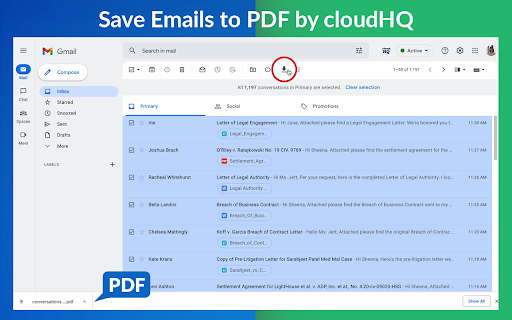


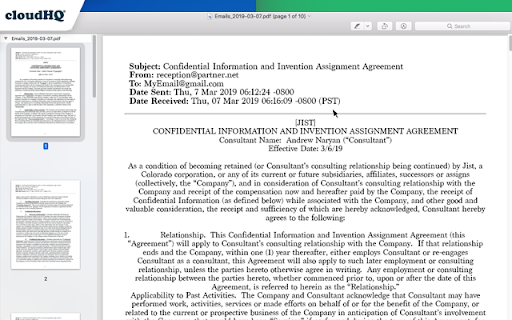
Export, convert and save Gmail™ emails as a PDF document This extension lets you easily save Gmail emails and labels as a PDF document. Our service works in just 3 clicks, and you're done! With this extension you can: ✔️ Create a hard copy backup of messages for your own records ✔️ Merge multiple emails into one PDF ✔️ Backup multiple messages into separate PDFs ✔️ Save only the attachments of your Gmail messages into PDF ✔️ Great to upload your correspondence and: - Upload them into your CRM, like Salesforce, Zoho, etc. - Send it to your lawyer for legal proceedings - Send your bills, receipts, or invoices to your accountant - Send it to your human resources department for any internal issues This this extension is great for: 1. Real estate agents: 🏡Package all your Gmail messages regarding your sales transactions and upload them into SkySlope or another CRM that you're using. 2. Lawyers and legal professionals: ⚖️ Save, organize and sort all Gmail messages into one document and submit it to court. ⚖️ Convert all online conversations (sent documents, received documents, etc.) into a single file that you can then easily Clio or another CRM that you're using. 3. Project Managers and Team leads: 🚧 Archive all project communication as one document and keep it organized. 🚧 Setup an automatic saving of Gmail labels with project-related conversations to your Google Shared Drive for collaboration with your team. 4. Business owners: 💼 Get all your Gmail messages with receipts and organize them by date, customer, etc. 6. Contractors: 👩💻 Archive all communication with your clients. 7. Anybody who needs to convert, save and archive important online conversations, this is FOR YOU! 🕵️👮🏾♀️👨🎨🧑🎤👨💻🤵🏻♀️👩🔬🧕🏽🧑💼🧑🔧👩🏿🏫🧏👷 Here's everything you can do with this Convert Gmail to PDF Chrome extension: 1. You can save: - A single message or conversation - Multiple messages or conversations - An entire Gmail label - Messages and conversations matching filters - Your entire account 2. To any of these platforms: - A downloadable PDF to your local hard drive - Google Drive - Dropbox - Box - Egnyte - OneDrive 3. Feature Options you can choose to: * Include or exclude attachments * Append emails to an existing PDF document * Save your attachments only (not the body itself, but just the attachment) * Add page numbers * Condensed format (all signatures, quotations and other unnecessary data is removed) * Select an appropriate page size for printing purposes * Encrypt your file with password protection (highly encouraged for legal documents) * Forward your Gmail mails as a pdf attachment to someone else * Save your online conversation as one document with your selection * Convert and save your online conversation as a zip file with each Gmail message or conversation in separate PDF files * Convert and save your online communication one text (TXT) file * Convert and save your online communication as one HTML document * Share packages with your online conversations using secure share links We know that not one size fits all—especially when it comes to your Google e-mail, but with these flexible features, you should be covered with this extension. cloudHQ. Helping your productivity, 1 click at a time. cloudHQ website: https://www.cloudhq.net Website: https://www.save-emails-as-pdf.com Pricing: https://www.save-emails-as-pdf.com/pricing Support page: https://support.cloudhq.net/category/browser-extensions/save-emails-to-pdf/ Blog: https://blog.cloudhq.net Gmail, Google Calendar, and Google Workspace are trademarks of Google LLC. Use of these trademarks is subject to Google Permissions. cloudHQ is trademark of cloudHQ LLC. https://tsdr.uspto.gov/documentviewer?caseId=sn97775615&docId=ORC20250405001500&linkId=2#docIndex=1&page=1

Copilot for Gmail™ by cloudHQ
Mini CRM for your Gmail Copilot for Gmail™ is a mini CRM that lets you see a snapshot view of your email contact's profile information, and any past emails conversations you've had. This is crucial to have so that you can respond intelligently, and help you dramatically cut down your search time when you're looking for a past email conversation you had with your email contact. Right within Gmail, you can: ✔️View profile information of the person you're emailing, or who emailed you ✔️Create private notes about this contact (For example: This client has needed support for over 4 hours last week) ✔️Set up a reminder alarm for this contact (For example: Follow up with client on a specific date/time) ✔️A list of all the email conversation history you have with that email contact ✔️A list of all documents and attachments related to that email contact This is great for anyone who wants to appear more professional, and have everything neatly organized in their email. Key features: ⭐️ person and company profile info ⭐️ easy access to all email messages ⭐️ easy access to all attachments ⭐️ notes (private or shared with the team) ⭐️ reminders cloudHQ. Helping your productivity, 1 click at a time. cloudHQ website: https://www.cloudhq.net/ App website: https://www.gmail-copilot.com/ Pricing: https://www.gmail-copilot.com/pricing Support page: https://support.cloudhq.net/category/browser/gmail-copilot Blog: https://blog.cloudhq.net Demo: https://www.cloudhq.net/demo Google Workspace, Google Sheets, Google Drive, Google Alerts and Gmail are trademarks of Google LLC. Use of this trademark is subject to Google Permissions.

Share and attach files in Gmail™ by cloudHQ
Attach and share files effortlessly from OneDrive, Dropbox, Box, Google Drive, Evernote and many more. When you're in Gmail, wouldn't you love a button that you could just click to attach any of your cloud files to your email? Well, with Share and Attach Files in Gmail, you can! You can attach any of your cloud files too, like: Google Drive, Salesforce, Microsoft Excel, Dropbox files. You name it- we give you access with 1 little button right from your Gmail. This handy tool: ✅ Saves you time from searching through numerous cloud platforms ✅ Keeps everything in the cloud (great for Chromebook users) ✅ Keeps your files off your hard drive so that you can have a faster computer. 💻 Website: https://cloudhq.net/chrome_extensions Pricing: FREE Support page: https://support.cloudhq.net/ Blog: https://blog.cloudhq.net cloudHQ. Helping your productivity, 1 click at a time. Gmail, Google Shared Drive, Google Drive, and Google Workspace are trademarks of Google LLC. Use of these trademarks is subject to Google Permissions.

Screenshot Tool by cloudHQ
Take a screenshot, markup and annotate it. Easy share, anywhere This is a lightweight Chrome extension that will let you screenshot anything you see on your screen, so you can do any of the following on your screen capture: ☑︎ Write text ☑︎ Crop ☑︎ Use arrows ☑︎ Pixelate sensitive information ☑︎ Include rectangular boxes or lines ☑︎ Get a link of your marked up image to send to anyone! ☑︎ Share and collaborate on screenshots ☑︎ Full Gmail email message and email conversation screenshots ☑︎ Forward email messages or email conversations as screenshots ☑︎ Save screenshots to Google Drive, Dropbox, Box ☑︎ Save screenshots as PDF This is an excellent communication tool for any graphic designers, remote teams, project leaders, and more! cloudHQ. Helping your productivity, 1 click at a time. Website: https://www.screenshot-tool.com/ cloudHQ website: https://www.cloudhq.net Pricing: FREE Support page: https://support.cloudhq.net/category/browser-extensions/gmail-screenshot/ Blog: https://blog.cloudhq.net Gmail, Google Calendar, and Google Workspace are trademarks of Google LLC. Use of these trademarks is subject to Google Permissions.

Email List Builder by cloudHQ
Build a spreadsheet with all your Gmail contacts and emails Are you looking for an email list builder that will create an email list for you in a matter of seconds? Email List Builder by cloudHQ gets you a list all of the people that you've ever had contact with in your Gmail™, into a neat and organized Google Sheet™ for you. This is an excellent solution to use so that you can: ✅ Create an email list to send an email campaign (*tip: use mailking.io, another one of our services for free email campaigns) ✅ Monitor interactions with your customers or your suppliers ✅ Keep an updated list of your email contacts in Google Sheets™ You'll get every email merge tag identifier needed in order to build an impressive email list of all your contacts and their information. You can even set this service up so that it can continuously update the contact information from your Gmail™ emails, to be captured and updated for you in your Google Sheet™ spreadsheet. Here is a list of all the email merge tag identifiers that you'll get in separate columns in your Google Sheet™: 1) Email Address 2) First name 3) Last Name 4) Full Name 5) Bio 6) Location 7) Personal Website 8) Last Sent Email Date (Last email sent to the contact) 9) Last Sent Email (A link to the actual email you sent) 10) Total Number of Emails Sent 11) Awaiting for Reply? (Awaiting reply from the contact) 12) Last Received Email Date (Last email received from the contact) 13) Last Received Email (A link to the actual email you received) 14) Total Number of Emails Received 15) Not Replied? (Not replied to the contact) 16) Company Name 17) Role at Company 18) Company Website 19) Company Logo 20) LinkedIn (Link to profile) 21) Facebook (Link to profile) 22) Twitter (Link to profile) We hope you enjoy this simple solution to help you build your email list! Happy email campaigning from your friends at cloudHQ. This is an excellent solution for small businesses to improve communications with their customer or supplier relationships. Your spreadsheet will automatically be updated in real-time as new emails or new contacts come into your inbox, so you will always have full visibility of each business-related relationship in an organized report whenever you need it, in a shareable way via Google Sheets. cloudHQ. Helping your productivity, 1 click at a time. cloudHQ website: https://www.cloudhq.net/ App website: https://www.email-list-builder.com/ Pricing: https://www.email-list-builder.com/pricing Support page: https://support.cloudhq.net/category/browser-extensions/email-list-builder/ Blog: https://blog.cloudhq.net Google Gmail and Google Sheets are trademarks of Google LLC. Use of these trademark are subject to Google Permissions.
