
dnamcidmhfepdejfdiamgllapdmbjpcc

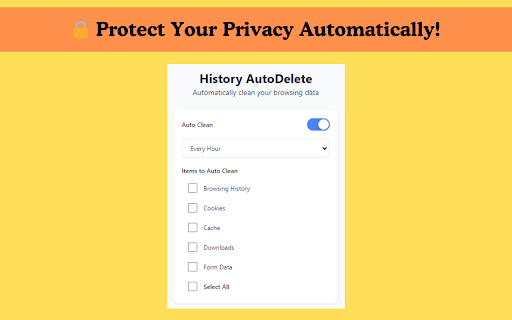


Easily automate the deletion of your browser history and cookies. Protect your privacy and enhance your browsing experience. History AutoDelete - Tabbee plugin was born as a solution for everyone who feels the need to protect your privacy. Completely eliminating the hassle of manually clearing browser history, cookies 🍪 and cache 🗑️, this plugin was developed to protect users' privacy and improve browser performance. Many users used to complain about the difficulty of clearing browser history on a regular basis. Therefore, History AutoDelete - Tabbee aimed to automate tools such as privacy protection and browser history cleaner, allowing everyone to use a safer and faster browser. 🚀 Now, let's explain in detail how to install this plugin and how to use it! ✔️ Protect Your Privacy 🔸History AutoDelete - Tabbee helps you protect your privacy by automatically clearing your browser history, cookies and cache. 🔒 🔸You can improve your browser's performance by eliminating unnecessary data. This extension acts as Chrome data cleaner and internet history remover. ⚡ 🔸The plugin is very easy to use thanks to its simple and user-friendly interface. It offers all the cleaning tools you need in one place, without unnecessary complexity. 🛠️ History AutoDelete - Tabbee is a history wipe extension solution to keep your browser clean and secure. With its advanced privacy protection tools and easy-to-use interface, you can keep your browser data under control and have a safer internet experience. 🔗 Download Now and Protect Your Privacy! 😊 ✔️Open the Chrome Web Store 🔸Go to the Chrome Web Store page in your browser. Type “History AutoDelete - Tabbee” in the search box to find the extension. 🔍 🔸After opening the History AutoDelete - Tabbee plugin page, click the “Add to Chrome” button in the upper right corner. After that, the extension will be added to your browser. This extension automates features like auto history wipe and cookie cleaner. 🔸After the installation is complete, you will see the History AutoDelete - Tabbee icon in the upper right corner of your browser. You can adjust the settings of the plugin via this icon. ⚙️ ⚙️ How to Use the Plugin? 🖱️ 🔸You can open History AutoDelete - Tabbee by clicking on the plugin icon in the upper right corner of your browser. The plugin interface is very simple and user-friendly. 👨💻 ✔️Determine the Time Interval ⏱️ 🔸The Time Range Selection section allows you to choose when you want to clear your browser history. For example, you can set a cleaning time in the last hour, last 24 hours, last week or custom time range. This feature allows you to automatically manage browser data with auto history wipe. 🔸In the Items to Clean section you can select the data you want to clean. In this section, there are different options such as browser history, cookies, cache, downloads and form data. Everything you select will be automatically cleaned by the plugin. You can make your browser faster with cache cleaner and cookie cleaner features. 💨 ✔️Start the Cleanup Process 🔸By clicking the “Clean Now” button on the plugin, you can immediately start cleaning the selected items. 🔄 Manifest Update: The manifest file has been updated to comply with the latest changes in Chrome. Content Script Removed: The content script has been removed to enhance user experience. This will improve the performance of the extension and eliminate unnecessary overhead.

Auto Tab Discard (suspend)
Increase browser speed and reduce memory load when you have numerous open tabs. "Auto Tab Discard" is a lightweight browser extension that automatically reduces the amount of memory used by open but inactive tabs, helping to conserve battery life on portable devices by disabling JavaScript code and DOM events on discarded tabs. There are two options on the extension's interface to either discard tabs or release discarding (the "x" buttons) The features of "Auto Tab Discard" are: * Improves browser performance and reduces memory usage by automatically or manually discarding inactive, idle, or forgotten tabs. * Includes a list of hostnames or regular expressions that can be excluded from auto-discarding. * Preserves the discarded state of tabs when the browser is closed and reopened. * Indicates the discarded state of a tab through the favicon or title. * Restores the state of a tab, including scroll position and text box content, after it is released from being discarded. * Allows for the forced discarding of specified hostnames. The options for configuring whether tabs should be discarded or not include: * Pinned tabs * Tabs that are playing media * The presence of a power source * Unsaved content or user input in a tab The available plugins for "Auto Tab Discard" are: * Release the discarded state of the next or previous tab. * Release the discarded state of all tabs in the active window. * Automatically discard all newly opened inactive tabs. * Store YouTube's timestamp before a tab is discarded. * Permanently delete (remove) old discarded tabs that are inactive. * Unlike the "The Great Suspender" extension, this extension uses the native method for discarding tabs, which means that even if the extension is removed or the browser crashes, your browser will automatically restore everything for you. https://webextension.org/privacy-policy/extension/tab-discard.html

Cleaner - history & cache clean
Best way to clean cache and chrome browsing data! Easily clean history, downloads, cookie or set auto history cleaning! Fasten Browser with Smart Cleaner extension *New Option: Hot key "Clear" - Alt+C (works for all OS). Smart Cleaner is a simple utility to clean browser data, cache, cookies, downloads and increase an overall browser speed. Click "add to chrome" button to run Smart Cleaner and flush the browser history without any efforts. My Google Chrome is getting too slow. What can I do? The problem with all the browsers, whether it’s internet explorer or Google Chrome, is that they become slow and clunky after a period of time. They take time to start up to, to load websites and to open and close tabs. This is when one should consider cleaning up the browser and getting rid of the cache, history etc. Clean is a useful browser extension that helps you quickly clean up the browser. and It help to delete all traces of your online activity to protect your privacy. Clean is very easy to use and fast. Clean up browsing data from a user's local profile. Make your Chrome browser more faster and Protect your personal data!! + Instant removal with one-click + Cleaner Chrome history + Empty the cache + Automatic data remove + Delete cookies and other site and plug-in data + Delete History + Remove Passwords + Cleaner for saved form data + Ability to choose time period + Dark mode + Quick clear button + Making fetch call based on the response creating tab with response url This lightweight extension enables you to do all that mentioned above instantly, with one click on the Eraser icon in the Chrome toolbar.

Cache Clear
Quickly delete browser cache, clear cookies, and history. Optimize browsing performance with Cache clear. 🚀 Introducing: Your Ultimate Browser Cleanup Companion. 😩 Are you tired of your browser slowing down due to accumulated clutter? 📝 Do you worry about your online activities being tracked or your personal data being stored without your consent? 🛡️ Say goodbye to these concerns with Cache clear chrome – the definitive Google Chrome extension designed to streamline your browsing experience and safeguard your privacy. ⚡ What is cache clear? It is a comprehensive browser tool meticulously crafted to declutter your digital footprint effortlessly. 💥 With just a few clicks, you can: 1️⃣ Delete cache 2️⃣ Delete search history 3️⃣ Clean cookies 4️⃣ Delete downloads 5️⃣ Clear storage 6️⃣ Clear passwords chrome And much more, all within the familiar confines of your Chrome browser. 🔑 Key Features: ☑ Cache clear: Instantly eliminate cache buildup that can bog down your browser's performance. ☑ Clear search history: Safeguard your privacy by delete web history in a flash. ☑ Manage cookies: Take control of your online identity by easily clearing cookies that track your browsing habits. ☑ Delete browsing history: Bid farewell to your clear browsing history chrome with a single click, ensuring your online activities remain confidential. ☑ Secure password management: Effortlessly delete stored passwords to enhance security and protect sensitive information. ☑ Customizable Settings: Tailor cache cleaner to suit your preferences with customizable settings for clear website cache, cookie cleaner, clean chrome browser history, and more. 🎉 How to Use: 1. Install the Extension: Visit the Chrome Web Store and add our app to your browser. 2. Click on the Cache Clear icon in your Chrome toolbar to access the extension's settings. 3. Select the data you want to clean, such as cache, cookies, and browsing history, clear browsing data. 4. Hit the "Clear" button, sit back, and watch as cache cleaner swiftly tidies up your browser. Why Choose? ⏱️ Efficiency: our extension streamlines the process of clearing cache, delete all history, and cookies, saving you time and hassle. 🛡️ Privacy Protection: Rest easy knowing that your online activities are kept confidential with clear cache and cookies thorough data deletion capabilities. 🚀 Enhanced Performance: By regularly clearing cache and other clutter, clear cache helps optimize your browser's performance for a smoother experience. 🌀 User-Friendly Interface: With its intuitive design, clean cache is accessible to users of all experience levels, making browser maintenance a breeze. 💪 Comprehensive Cookie Control: ■ Cookies are essential for many online tasks, but they can also clutter your browser and compromise your privacy. ■ Our tool empowers you to manage your cookies effectively, giving you the control to delete unwanted cookies and maintain your online privacy. ⚡ Streamlined History Cleanup: 🔸 Your browsing history can reveal a lot about your online activities. 🔸 With this tool, you can clear history with ease, ensuring that your online footprint remains private and secure. 📌 FAQs: ❓ How to clear cache in Chrome? 💡 Simply install our extension from the Chrome Web Store, access the extension's settings, and choose the cache clearing option. Click "Clear," and delete browser cache. ❓ How to clear cookies? 💡 Access the extension, and choose the clearing cookies option. Click delete cookies. ❓ How to delete search history? 💡 Access the extension, and choose the delete history option. ❓ Is this extension compatible with other browsers? 💡 Currently, our app is designed specifically for Google Chrome. ❓ Will using this app on chrome affect my saved passwords? 💡 No, our app gives you the option to delete stored passwords for added security, but it won't interfere with your ability to save new ones. ❓ How often should I use browser cleaner? 💡 It's recommended to use this app regularly to keep your browser running smoothly and your online activities private. Download Today: 💫 With our tool, you'll never have to worry about slow browsing speeds or cluttered browser histories again. 💻 Don't let unnecessary cache files and cookies slow you down. 🛠️ Take control of your browsing experience and safeguard your privacy with clear browser cache. 🌟 Say goodbye to cluttered caches, unwanted cookies, and prying eyes – download Cache clear from the Chrome Web Store today and experience a browser cleaner, more secure browsing experience.

Clear Browsing History
Clear Browsing History Extension lets you clear browsing history on closing browser and disable browsing history saving easily! Keeping your browsing activity private is essential in today’s digital world. Our Chrome extension is the ultimate solution to clear browsing history quickly, efficiently, and securely. Whether you want to clear browser history for privacy reasons or to free up space, this tool makes it incredibly simple. Why Use This Chrome Extension?🗂️ 1. Instant History Cleaning – With just one click, you can clear history without any hassle. 2. Customizable Options – Choose whether you want to clear web browser history for the past hour, day, week, or all time. 3. Secure & Private – No data is stored or shared. Your information remains yours alone. 4. User-Friendly Interface – A clean and easy-to-use design ensures smooth navigation. 5. Works with Google Chrome – Specifically designed to clear browsing history Chrome without affecting other browser settings. If you’re wondering how to clear browser history effortlessly, this extension is the answer. With a simple installation, you can: * Delete all browsing logs in one click * Clear browsing history without needing to navigate deep into settings * Clean Chrome browser history without disrupting your workflow * Clear web logs while keeping other browsing preferences intact Benefits of Using This Extension 🤯 1️⃣ Speed Up Your Browser Over time, stored history and cached files can slow down your browser. By regularly cleaning browser history, you improve speed and performance. 2️⃣ Enhanced Privacy Protection Protect yourself from prying eyes by making sure you clear browsing stories after every session. Whether you’re using a shared computer or just want extra privacy, this tool ensures your data isn’t left behind. 3️⃣ Free Up Storage Space A cluttered history can take up unnecessary storage. When you delete all browsing history, you also remove redundant cached files, making your browser lighter and more efficient. 4️⃣ Hassle-Free User Experience Forget about navigating through complex settings. This tool makes it effortless to clear the browsing history with just a single button press. ➤ Instant Clean-Up – Clear browsing data in seconds ➤ Flexible Time Range Selection – Remove history from the past hour, day, or all time ➤ Privacy-Oriented – No data tracking or sharing ➤ Compatible with Latest Chrome Updates – Always up-to-date ➤ Lightweight & Fast – No impact on browser performance Who Needs This Extension? If you frequently search for ways to clear web browser history, then this tool is perfect for you. It’s especially useful for: - Professionals who use shared computers - Students who want to maintain their online privacy - Anyone who needs to clean my browser history quickly and efficiently Step-by-Step Guide to Use 1️⃣ Install the Extension – Download and add it to your Chrome browser. 2️⃣ Open the Extension – Click the icon to access the settings. 3️⃣ Select Time Range – Choose how far back you want to clear browser history. Why This is the Best Tool to Clear Web History ? 🌟 Not all extensions offer the flexibility and ease of use that this one does. With a browser delete history function that works instantly and efficiently, you won’t need to waste time digging through settings. Q: Will this extension affect my saved passwords? A: No, the extension only clears the browsing history and does not interfere with saved passwords or autofill data. Q: Can I choose a specific time range? A: Yes! You can clear web browser history for the last hour, day, week, or all time, depending on your needs. Q: Does this extension work on all versions of Chrome? A: Yes! It’s regularly updated to remain compatible with all the latest Chrome versions. 👆🏻 Ready to clean Chrome browser history in seconds? Install the extension today and take control of your privacy. With just one click, you can clear browsing history and browse with peace of mind. Don’t wait – protect your online activity now!
