
dmfgbagojglecgaheiaggkhjemlfoclf

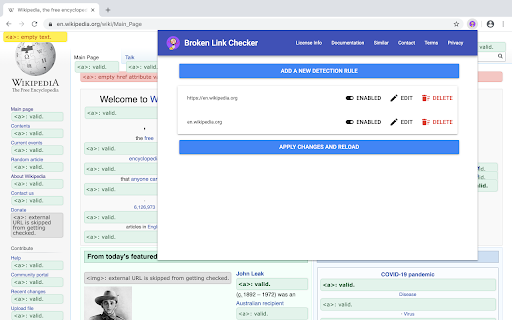
Helps you to automatically detect broken links on websites you visit. "Broken Link Checker" can detect broken audio, video, iframe, image and anchor tag links on any website you visit. Users can add their own rules with customized settings for detecting broken links. When a user navigates to a specific hostname, the rules defined in "Broken Link Checker" are executed in background allowing automatic detection of broken links as they navigate around a specific hostname. This tool is helpful if you are doing a SEO audit of a website and want to know if there are any broken links on the page. This tools helps you to detect and eliminate broken links. Nested shadow elements and nested iframe elements are not fully supported by this tool. This tool also does not support shadow root opened with the closed mode. Checking broken tags inside iframe elements is supported but rule of parent document is applied while checking errors to child frame instead of applying rule for the hostname of the child frame. At the moment, following html tags are supported: - - - - - - Allows a user to whitelist specific URL schemes from getting checked to avoid false positives. - Exclude specific URLs from getting checked. - Provides a user with various rate limiting options to avoid sending too many requests at a time. - A user can exclude specific URLs from getting checked. - This tool provides an option to rate limit number of requests sent by the web browser by allowing user to specify a custom delay time between consecutive requests. - This tool will run in background whenever the page is updated, allowing a user to automatically check various elements displayed on the page. - This tool provides information about broken or missing attribute values such as alternate text. - This tool can validate mime type of URL specified in the image tag is a valid image or not, this can help to make sure that URL specified in the image is a valid image. - Limitations of this tool - Sending too many get requests for validating linked resource can get a user’s IP address to get blacklisted or rate limited by the server. - Most external URLs can’t be verified to be correct or not because some servers are configured to disallow cross origin requests and also because of CORB protection Hostname: This input parameter is used for identifying the hostname for which a rule will be applied. Whitelisted schemes: This input parameter allows a user to select schemes that must be whitelisted. Whitelisted schemes will not result in an error while checking for broken tags. Excluded URLs: This input parameter allows a user to specify what URLs must be excluded from getting checked. Excluded URLs will be skipped from getting checked by the tool regardless of whether they are valid or not. Rate limiting: This option allows a user to specify a time interval between two consecutive HTTP requests while an element is checked. Using this option a user can control the number of HTTP requests sent per minute. - Click on “Broken Link Checker” extension icon, after that a popup page will be opened. - Click on “Enabled / Disabled” button of detection rule. - Click on “Apply changes and reload” button to apply changes. - Click on “Broken Link Checker” extension icon, after that a popup page will be opened. - Click on “Delete” button of detection rule. - Click on “Apply changes and reload” button to apply changes. - Click on “Broken Link Checker” extension icon, - Click on “Edit” button of detection rule. - Now you can edit any configuration related to selected rule. - Click on “Update” button. - Click on “Apply changes and reload” button to apply changes. - Click on “Broken Link Checker” extension icon, after that a popup page will be opened. - Click on “Add a new detection rule” button. - This will open a new dialog box. - Enter a custom hostname. - Select custom URL schemes to be white-listed. - Enter URLs to be exclude from getting checked. - Select highlighting options. - Select rate limiting options to avoid sending too many requests at a time. - After required settings are selected, click on “Add” button. - Click on “Apply changes and reload” button to apply changes. ## Please contact us if you found a bug or want a custom feature to be added in the software. This software is free for non-commercial use however a license must be purchased for commercial use. This software will ask you to purchase a license if commercial use is detected. Privacy notice: This software neither collects nor transmits any personally identifiable information. This software does not track your browsing behaviour. Information necessary for functioning of this software is stored on the devices of the end user, our servers do not have access to this information. For more information please read our privacy policy and terms of service.

Auto Link Checker
Auto link checker is a link checker that crawls through your webpage and looks for broken links. Boost Website Quality with 404 Link Checker Discover the ultimate solution for web developers, designers, and content managers with the 404 Link Checker Chrome extension. Streamline your workflow and elevate your website's performance by effortlessly identifying broken links. Ensure a seamless browsing experience for your users and maintain your website's credibility. Introducing the 404 Link Checker extension, a game-changer in the world of web development. Say goodbye to frustrating "404 - Page Not Found" errors and hello to an error-free online presence. With its easy installation and user-friendly interface, this powerful extension seamlessly integrates into your Chrome browser, providing a hassle-free experience from the start. It's designed for both seasoned professionals and beginners alike, ensuring everyone can harness its capabilities effortlessly. Experience the power of accurate link detection as the 404 Link Checker extension crawls through your web pages, meticulously examining each hyperlink. It swiftly identifies broken or dead links, including those that may have been mistyped or changed over time. Don't let a single faulty link tarnish your website's reputation—take control with the 404 Link Checker. Real-time scanning and instant feedback are at your fingertips. As you browse your website or any other page, this dynamic extension tirelessly analyzes links, promptly highlighting any broken ones. You'll be able to spot issues with a single glance, empowering you to take immediate action and safeguard your website's functionality. Customization is key, and the 404 Link Checker extension offers customizable link validation options. Tailor its behavior to meet your specific needs by excluding certain link types from the scanning process or fine-tuning the depth of the scan. Enjoy a personalized experience that fits your unique requirements. Reporting and exporting capabilities take your efficiency to new heights. The extension generates comprehensive reports, detailing all the broken links discovered during the scanning process. Export these reports in various formats, such as CSV, for further analysis or collaboration with your team. Stay informed and make informed decisions effortlessly. For those managing larger websites or analyzing multiple pages simultaneously, the bulk link checking feature is a game-changer. Save precious time and effort as the extension effortlessly scans entire websites, ensuring thorough site-wide checks in a fraction of the time. Embrace efficiency and tackle your projects head-on. Experience unparalleled productivity with the 404 Link Checker Chrome extension. By automating the link checking process, this remarkable tool frees you from the tedium of manual checks, enabling you to focus on what truly matters—delivering outstanding web experiences. Spend less time troubleshooting and more time crafting remarkable websites. Don't compromise on quality—elevate your website's performance with the 404 Link Checker extension. Download it today and witness the transformative power of error-free browsing. Ensure user satisfaction, maintain your website's integrity, and make broken links a thing of the past. Supercharge your web development projects and embark on a journey toward perfection.

Broken Link Checker
Broken Link Checker finds dead links, 404 errors & redirects on any page. One-click scan with color coding. Export results to CSV. Broken Link Checker scans every URL on the current page and shows the result with color codes: green for valid links, red for broken ones (404 and other errors), blue for redirects. Click the icon, wait a few seconds, and see the full picture — no setup, no account, no external service. All checks run locally in your browser. No data is sent anywhere. 1. Open any webpage in Chrome 2. Click the Broken Link Checker icon in the toolbar 3. Watch as each link gets highlighted with a color-coded status 4. Use filters to narrow down by status: Valid, Redirect, or Broken 5. Click "Export" to download a CSV file with all results What you get in the CSV report Each row includes the link text, URL, HTTP status code, and status description. Use it for SEO audits, client reports, QA checklists, or internal documentation. SEO specialists — check for broken links on any page before or after publishing. Spot dead URLs that hurt rankings and user experience. Developers — validate navigation elements, internal links, and API endpoints during development and staging reviews. QA testers — run a quick link check as part of pre-release testing. No need to set up a separate crawling tool for page-level validation. Content editors — find outdated references and dead links in articles, landing pages, and documentation. Marketing teams — make sure every CTA, banner, and campaign link actually works. Q: Does it scan every link on the page? A: Yes — anchor tags, navigation menus, area maps, meta links, data attributes, and onclick handlers are all checked. Q: Can it detect redirects? A: Yes. Redirected URLs (301, 307, 308) are highlighted separately so you can decide whether to update them. Q: Is there a limit on the number of links? A: No hard limit. It handles pages with hundreds of links. For full-site crawls, use a dedicated crawler — this tool is built for fast page-level checks. Q: Is my data safe? A: The extension runs entirely in your browser. No data is collected, stored, or sent to any server.

SEO LinkChecker — Follows, External & Internal
Find nofollow, dofollow, broken, internal & external links on any page. Export CSV/JSON with color-coded highlights. Link Checker chrome extension helps you to find all do follow, no follow and broken links on a webpage. It also tells you internal and external links along with anchor text. Just add to your chrome and done! Click the extension and you will get the number of all links on the webpage. If you click analyze it will analyze all the links and show you a table. You can download the full report in excel and fix all seo bugs. ** Update ** We have also included to highlight links on the page so you can see all the links even hidden links on the page only.

Schema Builder for Structured Data
Easily build validated json-ld structured data markup for any webpage. Based on schema.org specification Generating structured data markup for your webpages doesn't have to be hard! No more having to learn each Schema type, which elements are required vs. recommended or worrying about errors and issues. Schema.dev's Schema Builder makes it as simple as point and click to generate the perfect JSON-LD structured data for dozens of Google supported Schema types! and all for FREE! ============================================= Be sure to view the initial training video for fastest time to value. https://videos.seoclarity.net/video/kazj73n005plxgv61 ============================================= Simply enable the plugin, choose the schema markup you'd like to add and then populate the form using the point and click capabilities or manual input. Already have schema markup on your webpages? The built-in Schema testing tool helps validate your schema markup and shows errors and warnings. Key Features - Updated March 2nd, 2025 ================================== + NEW! Support for Vehicle Listing Markup + Support for 20+ Schema types - including ALL Google supported markups + Automatic detection of existing structured data + Point-and-click ease to populate schema fields + Intuitive UI that guides you through required, recommended and optional elements for each schema + Structured Data Testing capabilities built in for any schema markup generated + Intuitive UI to guide through required, recommended and optional elements NOTE: The plugin is in actively development - Join the forums at https://support.schema.dev for feedback, bugs and tips.
