
egeiolgdbnfebfedgahmeokhlfkpbind


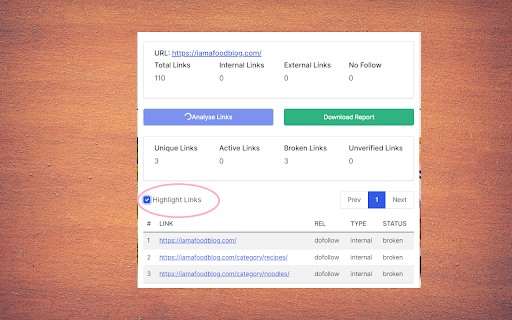
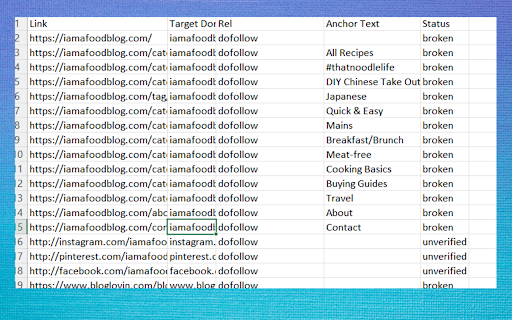
Find nofollow, dofollow, broken, internal & external links on any page. Export CSV/JSON with color-coded highlights. Link Checker chrome extension helps you to find all do follow, no follow and broken links on a webpage. It also tells you internal and external links along with anchor text. Just add to your chrome and done! Click the extension and you will get the number of all links on the webpage. If you click analyze it will analyze all the links and show you a table. You can download the full report in excel and fix all seo bugs. ** Update ** We have also included to highlight links on the page so you can see all the links even hidden links on the page only.

Detailed SEO Extension
Get SEO insights at the click of a button to any website you're currently on. Built by full-time SEO's for daily analysis. Get SEO-related insights at the click of a button to any website you're currently on. Pull back their title tag, meta description, meta robots tag and much more. Save hours of time looking through the source code of this page with our SEO analysis extension.

SEO META in 1 CLICK
Displays all meta data and main SEO information for the best SEO SEO META in 1 CLICK is a tool that displays all meta tags/data and main seo information clearly. By using this tool, we hope you can better manage and improve your SEO and visibility on Internet We focus on displaying: ✔ title and its length, ✔ description and its length, ✔ URL (and meta-canonical url too), ✔ meta-robots, ✔ displaying headers in order of their appearance in HTML (H1, H2, H3, H4, H5 and H6), ✔ number of images with and without ALT, ✔ the number of links (internal, unique, ...) ✔ Open Graph and twitter social data ✔ Robots.txt and sitemap.xml ✔ and much more... (See printscreens) You can also via ETERNAL TOOLS analyse your site and know how improve it (html, css, Google Rich Snippet, PageSpeed...)

Broken Link Checker
A SEO tool to find broken (404) and redirected (301, 307, 308) links in all frames A simple tool to find broken (404 code) and redirected (301, 307, 308 codes) links in the current page. This tool examines all links in the current page (top frame and all sub-frames) and returns the status code and its meaning for each link. You can optionally ask the extension to check links inside about:blank frame elements are well. All broken links are placed in a separated category for easier detection. Beside each link, there is an inspect button which focuses the link to the center of the page to help to find the links faster. Note that to increase link validation speed, the extension evaluates 5 links simultaneously. Note that you can open the validation UI in a new popup window or as an embedded frame inside the page. Note that this extension also notifies you about the links that are skipped like none HTTP links or mailto links Features: 1. Deep search: search deep inside a website. If this mode is enabled, the extension parses all links of the same domain and extract links from them. 2. Filter: Ignore URLs that match with the user-specified keywords. This way you can increase the searching speed by ignoring particular URLs. 3. Filters to show and hide links with 2XX, 3XX, 4XX, and 5XX status codes

Free Link Checker by LRT
Free link checker to verify all links on a page. Finds broken, unverified, no-follow, follow, internal, external links. Analyze all links on a page in seconds - advanced and fast export of link data. This unique and free Link Checker allows you to check all links on a page and see broken links and unverified links in categories no-follow links vs. follow links, internal links vs. external links. An on-page link code browser lets you see the exact source code of any link on mouse over for quick spotting of issues. Highlighting no-follows and links from own projects are supported as well as other power-user features. Features * Live Links, Broken Links and Unverified Links * No-Follow Links vs. Follow Links * Own Network Links vs. External Links * Source Code Browser on Mouse Over * LRT Power*Trust for every link * Live Filter Link Detail Table Benefits * Built for professional SEO power-users * Replaces all other link checker extensions * "My domains" highlighting * Blazzing fast link data export feature * Ongoing development by LRT Screenshot #1 1. Count the total links the page 2. Count the number of live links 3. Count the number of unverified links 4. Count the number of live links broken links 5. Different link scope for internal, links, within same root domain and external links 6. Count the number of Follow vs No-Follow links for every link scope. Click on those numbers to traverse through code details 7. Go to fancy review and export function (see below) Screenshot #2 8. Full dynamic link detail table and export to Excel and CSV action 9. Show links by network status 10. Show links by link scope 11. Show links by Follow vs. No-Follow 12. Filter links by keyword Screenshot #3 13. Mouse over any link to see details 14. LRT Power*Trust to measure strength and trust of the target page where the link points to - if this is very low, this could be a problematic or new page 15. Full HTML Source Code to review and possibly spot spammy things 16. Blue Marker for own domains (configured in extension settings) 20180917 V0.1.2 - Initial release 20180918 V0.1.3 - Improved Export function and text labels 20190912 V0.1.5 - Added support for UGC and SPONSORED link rel attribute 20190917 V0.1.6 - Resolved issues with source code preview caused by "data-html" attribute.
