
dlkffcaaoccbofklocbjcmppahjjboce
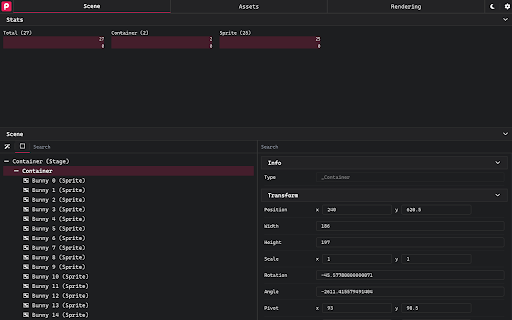
DevTools for PixiJS The official Chrome devtools extension for debugging PixiJS Applications

Coconutool
Chrome and DevTools extension for debugging Cocos Creator V3 games. Chrome devtool for debugging games that made by Cocos Creator V3. You can do several things below: 1. Inspect game internal node and modify properties of it. 2. Modify internal components just like that in IDE. 3. Modify CUSTOM COMPONENTS just like that in IDE. This may help you adjusting configs without switching between Chrome & IDE, and no need to rerun the game time after time. 4. Change node's display index with drag&drop.

MobX Developer Tools
Dev-tools for MobX and React Inspect mobx-react observers. Edit values in observable objects (Doesn't support editing react props/state, use react-devtools for that) Track changes in MobX observables MST support

Vue.js devtools (beta)
DevTools browser extension for Vue.js Chrome DevTools extension for debugging Vue.js applications. Thank you for trying the Vue.js devtools Beta! If you have any issue, please report them on the GitHub repository. This is the beta channel with a brand-new re-implementation, built with Vue 3. Note the beta channel may cause conflict with the stable version of Vue devtools. If the Vue icon is lit but the Vue tab doesn't show up in devtools, please temporarily disable the stable version and re-open the page.

BrowserStack
Instantly test your webpage on any desktop or mobile browser. Launch a new test session in any browser using the BrowserStack Quick Launch Extension. Select any combination from "All Devices" dropdown OR set up to 12 browsers for quick access under favourites and minimise the time spent in switching browsers. Review changes immediately and make cross-browser testing an integral part of development. To use the integration: 1. Install the extension. 2. Open the webpage you want to test and click on the BrowserStack logo on your extension toolbar. 3. Select the browser & device combination you want to test on. Your webpage will be launched in the combination selected. Test this webpage using BrowserStack’s Dev Tools, check page behavior in real user conditions and file bugs directly. NOTE: You need to have a BrowserStack account to use this Chrome extension. You can sign up from the extension or use this link: www.browserstack.com/users/sign_up
