
dljhdicfhhaonnblplgbonjbagabjjkf
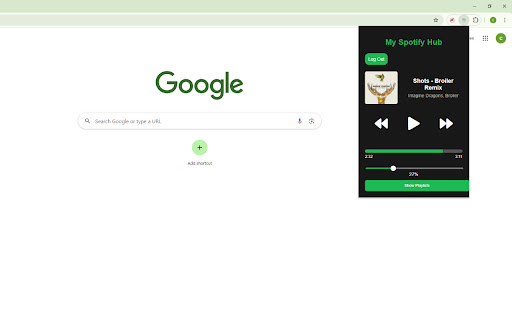


Control your Spotify music with this extension. Access you playlists and more. Spotify Hub Extension Take control of your Spotify experience directly from your browser! The Spotify Hub Extension allows you to effortlessly manage your music without ever needing to switch tabs. With this extension, you can play, pause, skip tracks, and browse your playlists seamlessly, all from a convenient popup. Real-time Playback Control: Instantly play, pause, skip, or go back to your favorite tracks. Track Information at a Glance: View the current song's album art, title, and artist without leaving your current tab. Progress Bar: See how far along you are in the song with a live progress bar. Playlist Access: Quickly browse your Spotify playlists and jump to your favorite tracks. Why You'll Love It: Stay focused: No more switching between tabs or applications to control your music. Keep your flow intact while enjoying your favorite tunes. Effortless control: Control your Spotify player directly from the browser, making your listening experience faster and smoother. Seamless integration: Authenticate through Spotify's secure login and enjoy full access to your playlists and playback controls. Whether you're working, studying, or simply browsing the web, the Spotify Hub Extension ensures that your music is always just a click away.

Spotify Playback Speed
Adds a button and menu to manipulate playback speed on Spotify Web. February 2025: * Fixed a bug where menu is hidden by 'Now Playing View' and 'Queue' sidebar 2023: * Fixed preserve pitch setting not being remembered * Fixed playback rate not being set right away when changing value * Added more checks to ensure a bug causing playback speed of 0 doesn't get set. * Fixed a bug from a recent Spotify Web update that caused the extension to not show up. * Fixed a bug that was causing potential audio artifacts due to unintended playback speed changes coming from a recent Spotify Web update. - Big thanks to Kamil K. for the help!

Translatify - Translate Spotify Lyrics
Instantly translate Spotify lyrics into your language in real-time. Translate lyrics displayed in Spotify’s web player into your chosen language. With seamless multilingual support and an intuitive interface, enjoy real-time lyric translations while listening to your favorite songs. Install with ease and select your preferred target language directly from the extension’s popup. A new translation button will appear on the player interface allowing you to toggle the translation ! ## Version 0.0.0.15 - fixed CORS problems by fetching translation using the browser in background.js instead of using content scripts ## Version 0.0.0.8 - style fix for translateButton - added link to GitHub in the popup menu ## Version 0.0.0.6 - Better language select in popup page (now searchable) ## Version 0.0.0.4 - Smaller popup/settings page - Small bug fixes

Music Player
A music player for Chrome with a floating window. Control Spotify, YouTube, SoundCloud, and other music right on your screen! ✅ This Chrome extension turns your browser into a convenient floating music player. Control your music and videos without switching between tabs—everything is right on your screen 🎵 🪟 The player appears as a floating window that you can freely move around the screen. Place it wherever you like and continue working, studying, or relaxing without losing control of playback. 🎧 The extension supports popular platforms, including Spotify, YouTube, SoundCloud, and more. All your music and videos are automatically available for management in one place. 🌟 The player is designed for maximum convenience and speed. You can control playback without distracting from your current tasks—everything works smoothly and intuitively. Key features include: 1️⃣ Floating player window with movable controls 2️⃣ Playback controls (pause, play, switch) 3️⃣ Support for music and video from different platforms 4️⃣ Quick access to the current track or video 🎶 With the extension you can: • pause music in one click • switch tracks without searching for a tab • control videos right while you work • keep the player always in sight 💻 You no longer need to look for the music tab among dozens of open pages. The player is always available on top of other windows and does not interfere with your work. 🚀 Ideal for: 💠 work and study 💠 background music listening 💠 watching videos without switching tabs 💠 multitasking in the browser 🔄 The extension replaces the usual inconvenient scenarios: ➤ switching Between tabs for the sake of pausing ➤ Searching for the right video among open pages ➤ Losing playback control ➤ Cluttered browser interface 💎 All controls are concentrated in a compact and convenient interface. Just open the player and manage content instantly. 🔒 The extension works directly in the browser and does not require complex configuration. Fast, simple, and convenient - just the way it should be 👍 ✨ Whether you're listening to music or watching videos, this player makes the process comfortable and uninterrupted. Try it now and manage your music easier than ever 🚀 ❓ How does the floating player work? 🪟 💡 It appears on top of the browser and allows you to control playback without switching tabs. ❓ Can I move the player window? 🖱️ 💡 Yes, you can move it freely around the screen and place it anywhere you like. ❓ Does it support multiple platforms? 🎧 💡 Yes, the extension works with popular services like Spotify, YouTube, and SoundCloud. ❓ Can I control the video? 🎬 💡 Of course. You can pause, play, and skip videos directly from the player. ❓ Do I need to install additional software? 💻 💡 No, everything works right in the browser—quickly and without any extra steps.

Widget for Spotify
This is a now playing media widget for Spotify. Inspired by Spotify's Android widget. Features - control your music/podcasts whilst minimizing interruptions to your workflow - play, pause, previous, next - background colour dependent on cover art - click anywhere in the extension to go to the Spotify tab playing media - presents a link to Spotify when Spotify is not open OR when nothing is playing Use - to use, go to Spotify Web (https://open.spotify.com/) and login - optional: PIN extension - click extension to open and control playback
