
bgehnoihoklmofgehcefiaicdcdgppck
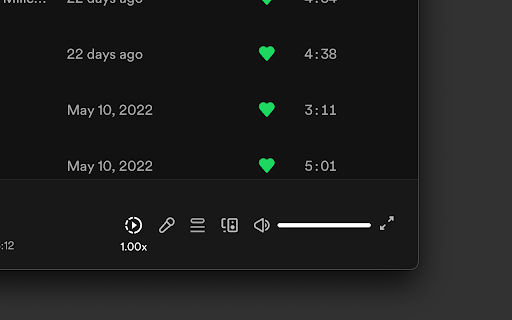
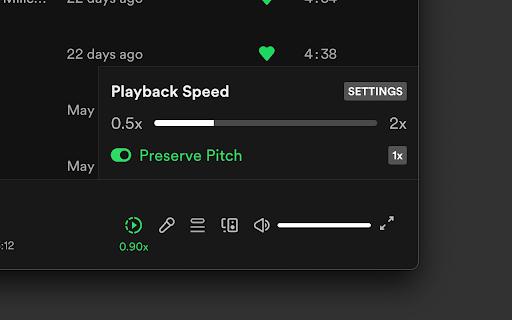
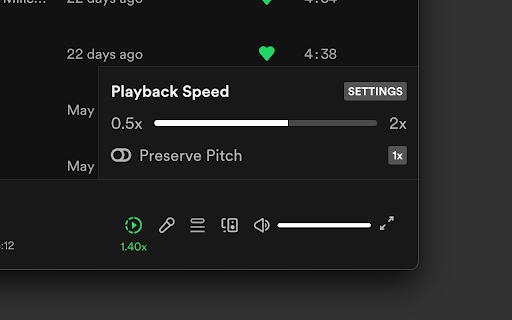
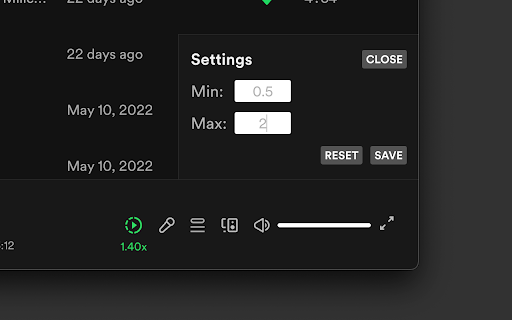
Adds a button and menu to manipulate playback speed on Spotify Web. February 2025: * Fixed a bug where menu is hidden by 'Now Playing View' and 'Queue' sidebar 2023: * Fixed preserve pitch setting not being remembered * Fixed playback rate not being set right away when changing value * Added more checks to ensure a bug causing playback speed of 0 doesn't get set. * Fixed a bug from a recent Spotify Web update that caused the extension to not show up. * Fixed a bug that was causing potential audio artifacts due to unintended playback speed changes coming from a recent Spotify Web update. - Big thanks to Kamil K. for the help!

Spotify Ad Blocker - Blockify
It is an effective Spotify Ad Blocker, specifically designed for removing audio ads using proven Spotify adblock technology. Do you wish you could enjoy your songs & playlists without constant ads and interruptions? Blockify is here to save the day! It greatly enhances your Spotify web player experience by blocking and removing all those cringy, frustrating, & embarrassing audio ads. Say goodbye to disturbing interruptions and enjoy uninterrupted music streaming today using Blockify- the best ad blocker for Spotify! Our algorithm has been specifically designed to work seamlessly with the Spotify web player, ensuring that you can listen to your favorite music without any disruptions. Update v1.8.7: Good news! Blockify now also supports ad-blocking on Twitch and Hulu! 1. Ad-free listening: Blockify blocks and removes audio ads from the Spotify web player, allowing you to enjoy your music without any annoying interruptions. 2. Easy to use: Simply install the Blockify Chrome extension, and the ad-blocking will automatically get applied as soon as you visit open.spotify.com, no complicated settings or configurations are required. 3. Lightweight and efficient: With less than 400 kb package size, Blockify is designed to be lightweight & efficient, ensuring that it doesn't slow down your browser or consume excessive resources. 4. Regular updates: Our team is constantly working to improve Blockify and ensure that it stays up-to-date with the latest changes in the Spotify's algorithm. This means that you can always enjoy an ad-free listening experience. 5. Privacy-focused: Blockify is committed to protecting your privacy. We do not collect any personal information or track your browsing habits. Your data stays safe and secure. 6. Browser-based: Enjoy music streaming using your browser, no desktop-based 3rd party software installation required. 7. Your choices, your control, complete transparency: From blocking ads across the web, to excluding (& enabling) ad-blocking on sites you love and support - users have complete control. Check your ad-blocking stats from the menu and tweak accordingly. To get started, simply install the Blockify adblocker Chrome extension and enjoy an ad-free audio listening experience. Whether you're working, studying, or just relaxing, our Spotify ad remover ensures that your music streaming is always smooth and uninterrupted. Blockify offers a dual layer of ad-blocking mechanism that improves its effectiveness and efficacy. It also offers automatic ad-muting as a fallback to handle rare instances when the ad-blocking algorithm fails to block or remove audio ads- helping the users with a more consistent and enjoyable experience. Please note: the algorithm packaged in this browser extension is an IP of ImpactEngine Digital LLP, and any direct or indirect theft of our IP will directly result in a strict legal action along with a DMCA strike. Upgrade your music and audio streaming experience today with Blockify. Download now and enjoy uninterrupted music streaming on open.spotify.com!

Spotify Friend Activity
View your friends' activity in Spotify's web player. This extension adds a panel to Spotify's web player that displays your friends' listening activity. Setup: 1. Add Spotify Friend Activity to your Chrome browser. 2. Open a new tab and navigate to https://open.spotify.com/ 3. Login with your Spotify account. 4. Make sure: - You are following the Spotify users that you want to see the activity of. - Your friends have the "Share my listening activity on Spotify" setting enabled in the Spotify desktop app. - Your friends have listened to music on the desktop app sometime in the last week. 5. If the issue persists, please report it here: https://bit.ly/sfa-report Request new features for the extension here: https://bit.ly/sfa-feature

Spotify Playback Speed Controller
Install Spotify Playback Speed Controller chrome extension and easily speed up or slow down video speed. Install Spotify Playback Speed Controller chrome extension and easily speed up or slow down video speed

SoundCloud Playback Speed
Easily control playback speed on SoundCloud with seamless interface integration. ✨ MAIN FEATURES: • Adjust playback speed from 0.5x to 2.0x • Preserve pitch option for natural audio quality • Integrated directly into SoundCloud interface • Auto-save settings 🎯 HOW TO USE: 1. Play any track on SoundCloud 2. Find the speed button (shows "1.00x") next to volume control 3. Click button to open speed control panel 4. Drag slider to adjust speed 5. Toggle "Preserve Pitch" if needed Perfect for language learning, music analysis, or listening at your preferred pace. Extension runs entirely locally and collects no personal data.
