
kbodklnajaiochpncacklndhdbjoijij
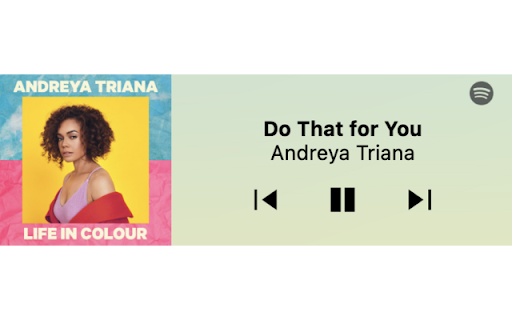


This is a now playing media widget for Spotify. Inspired by Spotify's Android widget. Features - control your music/podcasts whilst minimizing interruptions to your workflow - play, pause, previous, next - background colour dependent on cover art - click anywhere in the extension to go to the Spotify tab playing media - presents a link to Spotify when Spotify is not open OR when nothing is playing Use - to use, go to Spotify Web (https://open.spotify.com/) and login - optional: PIN extension - click extension to open and control playback

Spotify Web Player Hotkeys
Adds the following default keyboard shortcuts to open.spotify.com: There is no default shortcut, but you can also bind keys for: Navigating to the home page or the search page – opens a Spotify tab if necessary! Toggle shuffle Toggle repeat (single song, whole playlist, disabled) Toggle song like (since 2024, requires focusing the browser tab) Toggle showing the queue sidebar Toggle showing "now playing" sidebar Toggle showing lyrics Increase, decrease & mute volume Seek backward & forward in both songs (±5 seconds) and podcasts (±15 seconds) You can customize these shortcuts and make them global hotkeys (not just while Chrome is in focus) by opening chrome://extensions/shortcuts. Warning: Chrome/Chromium is known to not correctly register hotkeys after you've changed them in chrome://extensions/shortcuts. Please restart your browser by visiting chrome://restart after changes to shortcuts/hotkeys if you experience issues. This extension relies on the HTML/CSS structure of the website. Spotify might break it by changing their frontend. Please report issues by clicking on the Support link. * Version 1.4.3: Fix seek step being too coarse. * Version 1.4.2: Fix volume slider not working. * Version 1.4.1: Fix seeking. * Version 1.4.0: Fix un-liking songs. Add new shortcuts for opening home page, opening search page, showing lyrics, showing "now playing". * Version 1.3.1: Add new shortcut that either opens Spotify or cycles through home, search and queue pages. Add "interaction required" warning dialog. * Version 1.2.1: Fix volume slider not working. * Version 1.2.0: Make seek shortcuts work for songs as well as podcasts * Version 1.1.0: Add shortcuts for volume up / down / mute. * Version 1.0.0: Migrate to Manifest V3 so the extension remains functional after 2022. Add a workaround for the "Spotify Lyrics" third-party extension. * Version 0.6.2: Fix many broken buttons caused by a revamp of the toolbar design. * Version 0.6.1: Fix broken "like". * Version 0.6.0: Add short on-click animation; add Podcast seek shortcuts; fix broken "repeat" button. * Version 0.5.1: Add translations. * Version 0.5.0: Fix broken "repeat". * Version 0.4.0: Fix broken "next", "like", "repeat" and "shuffle". * Version 0.3.0: Fix broken "play/pause" and "next".

Chorus - Spotify Enhancer
Enhance Spotify with controls to save favourite snips, auto-skip tracks, and set global and custom speed. More to come! 👋 Welcome! I hope you enjoy using chorus as much as I do building it! ⭐ Please leave a review/rating and share if you find it useful. For community, support, feature requests, or bug reports: Discord: https://discord.gg/6nwYZsBw8G (most active & quick to respond) Google Forms: https://forms.gle/hxUed8wcfYUoYBeQ7 Github: https://github.com/chorus-studio/chorus-dev This is an open-source project—your support (feedback, feature ideas, bug reports, reviews, ratings) is greatly appreciated and motivates me to maintain and build new features! Become a supporter to support the developer! I release updates semi-frequently, so check for new features often! Join the discord for questions, issues, requests, and just music sharing! Let's build a community for music lovers! 🚀 ✅ Apply pitch shifting and semitone (key) changes to audio ✅ Save Favourite Track Section – Replay your favourite part of any song or podcast. ✅ Custom Equalizer Effects - Select from a wide range of equalizer presets based on Spotify's own and some custom common ones. ✅ Custom Reverb Effects – Apply unique audio effects like mufflers, filtered phone, or drum reverb. Additionally, common simulated reverbs like bathroom, large room, arena, etc, are available. ✅ Playback Audio Controls – Set custom rate, pitch, and semitone (key) for songs, podcasts, and audiobooks. ✅ Block Songs Forever – Skip unwanted tracks in albums, playlists, and queues. ✅ Artist Discography Playlists – Create playlists from an artist’s full discography. ✅ Share Your Snips – Generate and share links to your saved snips (future social sharing support). ✅ Advanced Looping - Toggle between Infinite & Counter Loop. Counter Loop allows for looping a track or snip a set amount of times before going to next track. ✅ Keyboard Shortcuts – Control playback, skip tracks, toggle features, and more. For setup, see: How to set extension shortcuts: https://www.makeuseof.com/open-browser-extensions-keyboard-shortcut/ ✅ Track notifications - Show quick track info as a notification. Notifications can be auto-triggered on track change or shortcut key. Notification buttons can also be used to block and toggle track liked state (not supported on FireFox). ✅ PiP V2 - Upgrade to Spotify PiP. Quick access all chorus features and UI in a floating window. ✅ Volume V2 - Increased volume up to 300%. Toggle between linear and logarithmic volume scaling. ✅ Progress Bar V2 - Click to exact song position based on time. Also available in popup. ✅ Popup Theming V2 - Select theme for popup based on vibrant colours from track cover image Blocks tracks natively from the Spotify Queue (requires the Queue Sidebar to stay open, for now). If the sidebar is closed, the extension mutes and skips blocked songs until an unblocked one plays. Future update: Option to reinsert a blocked track if it hasn't been skipped yet. Stay tuned for more updates! 🚀

Spotify on Chrome: A mini Spotify player
Mini Spotify player with global keyboard shortcuts. Stream, browse library, repeat or shuffle, manage queue — all from your browser. Spotify has a really cool feature called Spotify Connect. Basically it could turn anything into a Spotify player, and control it with your cellphone. I made this app trying to connect Spotify with Chrome.(Check it out: Firefox version is released!) By the restriction of Spotify, this add-on only works with Spotify premium account. Spotify on Chrome turns your browser into a full Spotify Connect player. No desktop app, no extra tabs — just a clean popup that does everything you need. Bigger, better player with seekbar (skip podcast ads with a click!) Smart playback button: shuffle, repeat one, repeat all—one button does it all Queue panel: see what's playing next Library panel: browse albums, playlists, and podcasts Full podcast support Why it's better than the Spotify website Plays in the background — no need to keep a tab open Global keyboard shortcuts work even when Chrome isn't focused Transfer playback from your phone to browser with one click Keyboard Shortcuts (set them up in chrome://extensions/shortcuts) Open source and privacy-friendly — we don't collect any data.

Casca: New Tab with ChatGPT and Widgets
Customise your new tab page and boost your productivity with Casca Extension Casca Extension is a tool with ChatGPT for productivity and collaboration. Customize your new tab, create and share multiple spaces, and maintain a work-life balance with ease. — Multiple workspaces: create separate spaces for work, personal projects, or hobbies. Keep each workspace organized and switch between them easily — Customizable dashboard: personalize your dashboard with widgets and customize the layout to suit your needs — Light / Dark themes with automatic switching — ChatGPT: get answers, explore new topics, and engage in interactive discussions — Change your wallpaper: search for the perfect wallpaper directly in your new tab, or use your own image — Website preview: preview multiple links without leaving your current tab. Simply long-press any link to activate a split-screen mode and compare content without switching tabs — Sticky notes: place important information anywhere on your dashboard — Collaboration: work on projects with colleagues or share spaces with friends. Collaborate in real-time and stay connected — Sync: Access your dashboard on multiple devices without having to register ✅ Todos: Create and manage to-do lists. 📝 Notes: Write a story, save articles or take notes 🗓️ Schedule: Efficiently plan tasks and activities 🍅 Pomodoro: Improve productivity with the Pomodoro Technique, breaking work into intervals with short breaks 🔒 Website blocker: Block distracting websites and stay focused 📑 Kanban: Visually organize tasks using interactive cards for effective workflow management ☀️ Weather: Current weather conditions and forecast for any city 🗂 Links Folder: Create a folder containing links to your favorite websites ☁️ Image hosting: Host and share images easily. Generate shareable links for smooth collaboration and image sharing 🖼️ Embedded Website: Embed any website you want to view in your dashboard ⏰ Clock: Display of current time 📅 Calendar: Track the day of the month 📧 Gmail: See all unread emails in your Gmail inbox 🔗 Link: Save frequently visited websites or important resources 🤖 Reddit Media: Browse random posts from your favorite subreddits 🛠️ GitHub PRs: Stay informed about the latest pull requests in repositories 💻 LeetCode: Sharpen coding skills with coding challenges and solutions 🚀 Product Hunt: Discover the latest products and trends in the tech industry 💡 Indie Hackers: Stay updated on innovative projects and startups 📰 Hacker News: Get the latest tech news and discussions from the community 📖 Word of the Day: Expand your vocabulary with a new word and definition every day And more 😉 Whether you're working on a project with colleagues or tracking your personal goals, Casca Extension has got you covered! Casca Extension prioritizes user privacy by not storing personal information. All data is securely stored in the browser storage by default. For more information, visit https://casca.space/privacy-policy/.
