
nifaiikfnpnppeicpgannigjabpjdcmh

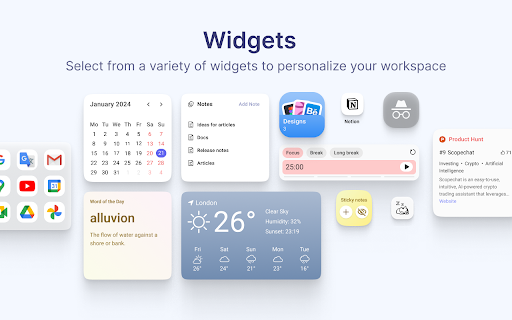
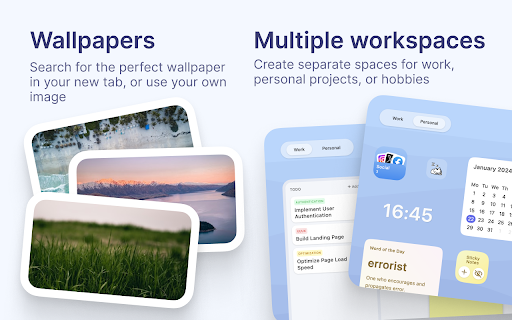

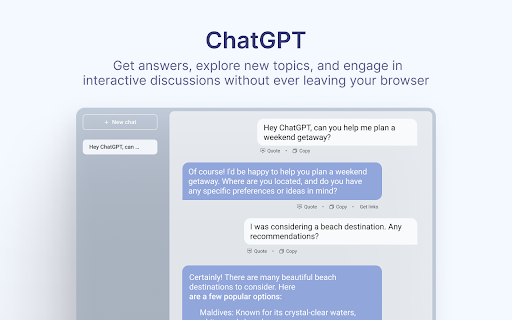
Customise your new tab page and boost your productivity with Casca Extension Casca Extension is a tool with ChatGPT for productivity and collaboration. Customize your new tab, create and share multiple spaces, and maintain a work-life balance with ease. — Multiple workspaces: create separate spaces for work, personal projects, or hobbies. Keep each workspace organized and switch between them easily — Customizable dashboard: personalize your dashboard with widgets and customize the layout to suit your needs — Light / Dark themes with automatic switching — ChatGPT: get answers, explore new topics, and engage in interactive discussions — Change your wallpaper: search for the perfect wallpaper directly in your new tab, or use your own image — Website preview: preview multiple links without leaving your current tab. Simply long-press any link to activate a split-screen mode and compare content without switching tabs — Sticky notes: place important information anywhere on your dashboard — Collaboration: work on projects with colleagues or share spaces with friends. Collaborate in real-time and stay connected — Sync: Access your dashboard on multiple devices without having to register ✅ Todos: Create and manage to-do lists. 📝 Notes: Write a story, save articles or take notes 🗓️ Schedule: Efficiently plan tasks and activities 🍅 Pomodoro: Improve productivity with the Pomodoro Technique, breaking work into intervals with short breaks 🔒 Website blocker: Block distracting websites and stay focused 📑 Kanban: Visually organize tasks using interactive cards for effective workflow management ☀️ Weather: Current weather conditions and forecast for any city 🗂 Links Folder: Create a folder containing links to your favorite websites ☁️ Image hosting: Host and share images easily. Generate shareable links for smooth collaboration and image sharing 🖼️ Embedded Website: Embed any website you want to view in your dashboard ⏰ Clock: Display of current time 📅 Calendar: Track the day of the month 📧 Gmail: See all unread emails in your Gmail inbox 🔗 Link: Save frequently visited websites or important resources 🤖 Reddit Media: Browse random posts from your favorite subreddits 🛠️ GitHub PRs: Stay informed about the latest pull requests in repositories 💻 LeetCode: Sharpen coding skills with coding challenges and solutions 🚀 Product Hunt: Discover the latest products and trends in the tech industry 💡 Indie Hackers: Stay updated on innovative projects and startups 📰 Hacker News: Get the latest tech news and discussions from the community 📖 Word of the Day: Expand your vocabulary with a new word and definition every day And more 😉 Whether you're working on a project with colleagues or tracking your personal goals, Casca Extension has got you covered! Casca Extension prioritizes user privacy by not storing personal information. All data is securely stored in the browser storage by default. For more information, visit https://casca.space/privacy-policy/.

New Tab Widgets - Personal Dashboard
Turn every new tab into your personal dashboard with widgets for weather, tasks, notes, and more. Your most-used tab. Now your most useful. Turn every new tab into a fully customizable workspace — notes, tasks, calendar, inbox, AI, live markets, Spotify, smart home controls, and more. Drag, drop, resize — done. Whether you keep it minimal or build a full command centre, everything loads instantly and works the way you want it to. • Google Drive widget (PRO) — search files, open recent uploads, and drag files in to upload • Bookmarks widget — search saved bookmarks and quickly open recent saved links • Multiple Gmail accounts (PRO) — connect more than one inbox • Background sync (PRO) — keep supported backgrounds in sync across devices • To-Do & Reminders widget — manage tasks with due dates and notifications • Daily Quote widget — start every tab with a fresh dose of inspiration • Currency Converter widget — convert between world currencies instantly • Unit Converter widget — quick conversions for length, weight, temperature, and more • Word of the Day widget — expand your vocabulary daily • TradingView live charts and stock ticker widgets • AI chat widgets for ChatGPT, Claude, Gemini, DeepSeek, and Perplexity • System Monitor for real-time CPU and memory stats • Sony Bravia TV Remote widget — control your TV directly from your dashboard • Picture-in-Picture mode — pop any widget into a floating overlay • Pre-configured news feed widgets • Cloud sync improvements and performance updates → Built for the tab you open all day — your workspace is always one click away → 69 widgets and growing — the largest library of any new tab extension → No sign-up, no account, no tracking required → Drag-and-drop layout with resizable widgets → Multiple pages for work, personal, trading, hobbies → Free plan with 10 widgets and 1 page — no time limits Everything you need, right where you already are. 📝 Sticky Notes – Quick notes, to-dos, and reminders ✅ To-Do & Reminders – Manage tasks with due dates and notifications 💬 Daily Quote – A fresh quote every time you open a tab 📖 Word of the Day – Learn something new daily 💱 Currency Converter – Convert currencies instantly 📏 Unit Converter – Quick conversions for everyday use 📅 Google Calendar (PRO) – See upcoming events at a glance 📧 Gmail (PRO) – Read and jump into email threads instantly, now with multiple accounts 📁 Google Drive (PRO) – Search Drive files, open recent uploads, and drag files in to upload 📰 RSS Feeds – Follow news, blogs, and podcasts in one place 🔎 Search – Use your default engine or add custom providers 📚 Bookmarks – Quick access to saved sites 🔗 Links & Link Groups – Shortcuts to your go-to sites (PRO: custom icons) ⏳ Countdown – Track deadlines and events ⏱️ Timer – Time-box tasks and meetings 🍅 Pomodoro Timer – Structured focus sessions with breaks 🧮 Calculator – Fast calculations with history 📋 Clipboard Buttons – One-click copy for frequent text 🕰️ World Clock – Multiple time zones, analog or digital Chat with ChatGPT, Claude, Gemini, DeepSeek, or Perplexity directly from your dashboard. Built for people who check markets throughout the day. 📊 TradingView Charts – Live, interactive price charts 💹 Stock Ticker – Track stocks, ETFs, and crypto in real time 📰 Market News – Financial news via RSS feeds 🎵 Spotify (PRO) – Mini-player with playback and search 🎮 Steam – Launch games directly 🖼️ Art – Rotating curated artworks 🖼️ Image Widget (PRO) – Display your own photos 📸 Instagram · 🎵 TikTok · 📌 Pinterest – Social feeds at a glance Control your environment without leaving your tab. 💡 Hue Scenes – Switch Philips Hue scenes instantly 💡 Hue Groups – Adjust brightness, color, and power 🎉 Hue Bookmark – Change lighting and open a URL in one click 📺 Sony Bravia Remote – Control your TV from your dashboard 🖼️ Iframe – Embed any website (Grafana, dashboards, anything) 🌐 Top Sites & Recently Visited – Quick access to browsing history 🧠 System Monitor – Real-time CPU and memory stats 🛒 OzBargain – Latest Australian deals ⛽ FuelWatch (WA) – Today’s and tomorrow’s fuel prices 🖼️ Backgrounds – Millions of HD wallpapers or your own images 📖 Multiple Pages – Separate dashboards for different workflows (PRO: unlimited) 🎨 Custom CSS (PRO) – Full control over design and layout ☁️ Cloud Sync (PRO) – Sync your setup, including supported backgrounds, across devices 🖼️ Welcome Screen – Clean time and date overlay The free plan is not a trial — it’s a fully functional dashboard with up to 10 widgets and 1 page. No time limit. No account required. Upgrade to PRO for: • Unlimited widgets and pages • Premium widgets (Gmail, Calendar, RSS, Spotify, Images, Stocks) • Freeform or grid layouts • Cloud sync across devices • Per-page wallpapers • Full design control with custom CSS • Priority support You open a new tab all day. Make it the most useful place in your browser.

Calendar New Tab
Meomni is the best calendar extension for Chrome, built for users who depend on Google Calendar and Microsoft Outlook to stay organized. It transforms your New Tab into a fast, minimalist productivity dashboard with the most reliable and seamless calendar integration available on the Chrome Web Store. Whether you manage a busy schedule, track appointments, or plan upcoming events, Meomni provides a unified, intuitive calendar experience that outperforms traditional calendar add-ons. Designed as the top Google Calendar extension, Meomni syncs instantly with your Google Calendar and Microsoft Outlook calendar. Events, reminders, and schedules load immediately on your New Tab, giving you a clear snapshot of your day every time you open the browser. It is also the most complete Outlook calendar extension for Chrome, offering dependable two-way syncing and smooth navigation between work and personal calendars. Meomni goes beyond standard calendar tools by combining advanced task management, a powerful ChatGPT sidebar, Gmail notifications, note-taking, and news updates—all in one place. Manage tasks across Google Tasks, Todoist, TickTick, and Microsoft To Do, while using AI to summarize information, rewrite text, translate content, or assist with work and research. Integrated weather forecasts, RSS news feeds, and a cloud-synced notepad enhance daily planning. Customization options include themes, wallpapers, colors, fonts, and layout controls, helping you create the calendar dashboard that fits your style. Live wallpapers and premium visual themes elevate the experience further. If you’re searching for the best Google Calendar extension or the most reliable Outlook calendar integration for Chrome, Meomni stands out by combining speed, clarity, and powerful productivity tools. It transforms your New Tab into the most complete calendar and productivity hub available. Upgrade your workflow with Meomni and experience why users consider it the best calendar extension for Chrome.

HiTab - New Tab Dashboard and Widgets
Customize your homepage with widgets, and dark mode support HiTab - New Tab Dashboard and Widgets. New Tab Dashboard and Widgets. Personal dashboard organizes bookmarks, favorite websites from start page. HiTab supports customizing your homepage with widgets, including dark mode. Hitab - New Tab Dashboard and Widgets,Hitab is a new tab extension for iOS that allows you to create your own visually appealing homepage with customizable widgets. It features card-style design, built-in features such as countdowns, anniversaries, weather, hot searches, and a calculator. Hitab makes all the information easily accessible, keeping your new tab page clean and beautiful. 1. Customize widgets and icons on your new tab page, freely arrange and mix and match them. 2. Personalize birthday countdown widgets, payday countdown widgets, holiday widgets, etc. 3. Quickly add frequently visited websites or widgets to your homepage. 4. Customize search engines and toggle between Google, Bing, Yahoo, and other search engines. You can also add your own custom search engines. 5. Customize wallpapers with a wide selection of high-definition wallpapers in categories such as nature, ocean, architecture, animals, etc. 6. Note-taking and to-do list widgets to keep your inspirations and tasks organized. 7. Customize dark or light mode, or automatically follow your system settings. 8. Customize the left sidebar with categorized icons for easy access to office and entertainment apps. You can hide or show the sidebar as needed. 9. Customize the bottom bar to store frequently used websites for convenient one-click access. You can hide or show the bottom bar. 10. Login/register a Hitab new tab account to backup and sync your data across different devices. 11. Receive message notifications from us. 12. Ability to adjust the icon size. 13. Hot search widgets. 14. Ability to adjust the icon width. 15. Ability to adjust the icon size to small, medium, or large. 16. Unit converter widget supporting calculators, length, weight, area, volume, temperature, speed, unit conversion, heat, pressure, power, force, etc. 17. Calendar widget. 18. Daily quotes widget. 19. News widget. 20. Habit tracker widget. 21. System status widget displaying real-time CPU, battery, and memory usage. 22. Currency exchange rate converter widget. 23. Mini game widget. 24. Dynamic wallpapers and gradient backgrounds. 25. Bookmark manager widget for easy bookmark management. 26. Full-screen clock widget and world time widget in the new tab. 27. Minimalist mode support for new tab.

Dashy New Tab Dashboard and Side Panel
New Tab Dashboard and Side Panel that integrates widgets and productivity tools. 🚨 The essential features of this custom dashboard are free. Advanced features for desktop power users are available with a monthly or annual subscription. 7-day free trial included, cancel any time. ⚡️ NEW UPDATE 2026! The Dashy referral program lets users earn a monthly or lifetime subscription by referring friends. Share your unique referral code with one or more friends and get your subscription for free. Learn more in the Referrals widget. 🤨 Why should anyone try Dashy? It's designed to transform your new tabs into a custom dashboard with all of your favorite widgets, productivity tools, and websites in one place. We made this product with the goal of having a customizable workspace that makes every new tab instantly more useful, personal, and productive than the default options provide. With Dashy you have the flexibility to create a minimalistic wallpaper tab, or you can fill your tab with calendars, music players, browser tools, and instantly switch between your saved dashboards. 🔗 Integrate features such as Google Calendar, Microsoft Outlook Calendar, Todoist, Spotify, Notes, Podcasts, News, and more. Keep up with your favorite social media feeds by adding phone-sized windows of Facebook, Reddit, Instagram, and YouTube directly into your new tabs. 🎨 Customize and organize your favorite websites, apps, and tools to your preference and optimize your online experience • Choose from thousands of background options, or import your own. ⚙️ Profiles and Settings • With up to three profiles, you can create a custom dashboard for work, school, or personal use. 🔍 Search Bar • Use the Google search engine, view your bookmarks, and access your browser history instantly. 🔄 Real-Time Syncing • All changes are saved and synced in real-time so you can access your dashboards and side panels anytime, anywhere. 🔒 Privacy and Security • Dashy does not sell to or share user data with third parties. ⬇️ The Dashy widgets and what they are for: Referrals 🎁 • Earn a free Dashy subscription by sharing your unique referral code. Academy 🎓 • A guided tour of the basic tools and features. Bookmarks 🔖 • Instantly import and manage your browser's bookmarks. Calculator 🧮 • Conveniently waiting to help with your mathematical needs. Clock ⏰ • Analog and digital options with the day and date included. Google Calendar 📅 • Create, sync, and manage your Google calendar events. History ⌛️ • Quickly access your frequently visited sites and history. My Dashy 👤 • Manage your account and subscription. Feedback 📩 • Contact our team with any questions or feedback. News 📰 • Access dozens of news media outlets, add your own, and pin your favorites. Notes 📝 • Jot down your ideas and never forget what’s important. Outlook Calendar 📅 • Create, sync, and manage your Outlook calendar events. Password Generator 🔐 • Make random and unique passwords to fit your specifications. Podcasts 🎙️ • Access dozens of podcasts, add your own, and pin your favorites. Screen Recorder 🎥 • Create unlimited screen recordings instantly and download MP4 files to share. Settings ⚙️ • Customize your dashboard, shortcuts, notifications, and profiles. Tab Manager 🗂️ • Quickly organize and manage your new tabs and tab groups. Time Tracker ⏱️ • Keep track of tasks, view history, and edit task names. Timer ⏲️ • Create timers and add a note, or repeat a previous timer. To-Do ✔️ • Create and manage your checklists from Google or Microsoft. Todoist ✅ • Create and manage all of your tasks from Todoist. Translator 🌐 • Translate text to and from multiple languages in a flash. Voice Recorder 🎤 • Record and save MP3 audio files directly to your device. Weather 🌤️ • All the weather info you need from every city on Earth. WhatsApp 💬 • Chat with your friends directly in your new tab home page. Thank you for trying this product. We genuinely hope you enjoy your new tabs.
