
dlibhfolcdihimbejlmiegbcbpenmgfk

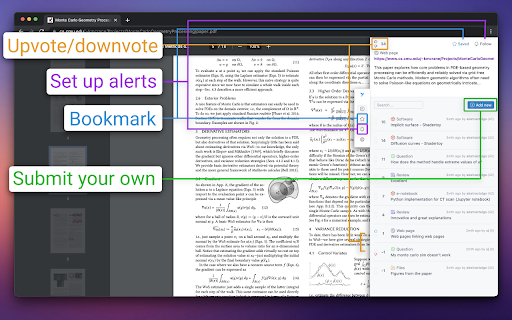


A tool for linking academic research together This is a tool for scholars and science enthusiast to easily discover and share relevant work and resources, in order to speed up scientific advancements. You can leave reviews and notes, link other papers, useful data, notes, slides and videos, projects,... Use it to promote your own work, improve discoverability of research in general or gather opinion of the entire community in a single place, right on the papers themselves where they can always be found. All contributions are curated with the help of a voting mechanic so the most relevant content is quickest to spot and knowledge around a topic grows over time for everyone to access and use. Have a single account across all of different websites and paper servers, and be able to contribute regardless of the features present on that specific page - leave reviews and report wrong research in time to help your peers.

nXr.iNote
Annotate and store text/quotes/images in a quote/image searchable library for writing accurately cited paper based on quotes/images. nXr.iNote supports you to collect text/quotes and images/graphs with tags/notes from articles while browsing, which are automatically stored along with the articles in a quote/image searchable library (nXr.iLibrary). Then, you can write well-substantiated reports/writing assignments/research papers by referring/making citations based on the quotes and images besides article titles. Moreover, you can share the cited quotes/images/articles with your peers or reviewers (by nXr.iCite) to confirm that your writing is comprehensive and free from quotation/citation errors. Other key features: - support for making annotated bibliography - create topics that group together information on issues or questions from various sources - article information autofill, save PDF, multi-label article grouping. - view notes automatically in articles when they are visited again. - share articles while browsing without writing emails. - anonymous integration and viewing of articles and their annotations made by a research group members (in nXr group account). - access Read it later, Latest read while browsing. - access millions of research papers made freely available by funders (powered-by Unpaywall) Visit nxref.com to learn more on how to do things for better research through nXr.iNote integration with nXr.iLibrary and nXr.iCite, which can never be done with traditional reference managers and citation tools. Please rate us and leave feedback for making nXr more productive for you.

Collect — Your Research Buddy
Collect references while you browse Always by your side when you are skimming through countless pages for your research. Like bookmarking designed for saving references! Simple and lightweight. Easiest way to use is select some text, right click on it and click Collect. It will appear in your collection.

Scientific Paper Advisor
Present information about connotations of the article in the scientific field. A tool for easier exploration of Google Scholar archives. It shows how a particular research article occurs in its domain by displaying a graph of its citation connotations and by mapping it on a linguistic similarity plane with other related publications. ➤ How it works? It sends to our server the research paper that you are about to read. Next, we are collecting all the information about publications connected with it by citations and domain. Then we display it to show you the contexts in which this article occurs. ➤ Category Field It is the first plot that you will see after pressing the extension button. It creates points in 3D space that are representing your article and others from its domain. The similarity is measured in two ways. The default mode displays future directions of study in the current category. You can also compare those publications based on their titles and abstracts, which may show you more papers similar to the current one. ➤ Connection Graph The majority of scientific papers are based on the accomplishments of other researchers. It is reflected in bibliographies which are showing the influence of one publication on others. Those relations enable the creation of a directed graph from the oldest papers to the latest ones. Our extension reveals some parts of this huge Connection Graph by displaying connotations of the currently analyzed record. You can easily track how this particular scientific domain has developed and expanded over the years by moving forward and backward in time from your chosen publication. ➤ Is it too slow? Well, let's see… The first plot renders almost instantly even tho it requires running a complex transformer model for text analysis. The graph of connections might seem like a waste of time. But let’s see the numbers. If one publication on average cites 30 others and is cited by 30, then in a default view we have to scrape from the web 60 often not-so-small articles. On deeper levels, the problem grows exponentially more complex. We also have to decide which research papers are worth mentioning, as the graph is too small to contain all the information. If you are still concerned, think about a time of doing it manually 😉

R Discovery: Academic Research
Read quick summary of a research article, find related articles and patents, save an article to your reading list to be read later This browser extension enables you to obtain new recommendations or factually validated answers to your questions from 250Mn+ research artifacts. All of these, and more, while you are reading an article from any publisher on your browser. With the help of Quick Summary you would be able to understand "What the article is about " and "Why is it important" along with key takeaways. This browser extension is an add-on to our mobile application, RDiscovery, a free app for students and researchers to find and read research papers. When in a hurry, you can save the article to the Library from the browser extension and listen to it from the mobile app on the go. Subscribers to RDiscovery Prime have unlimited access to audio listening, paper translation, Ask RDiscovery and more. Visit https://discovery.researcher.life/
