
dlhaiikpkghhgmfedkbiepccgnccdnbh
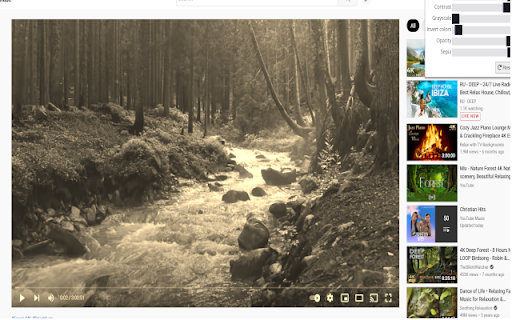
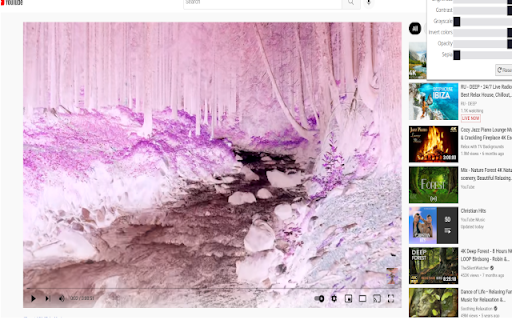

An easy to adjust youtube videos. This extensions allows users to change youtube videos properties such as color, brightness, contrast and so on as per users comfort.

Video Enhancer - Color Grading
Enhance your video on Youtube, NetFlix, Facebook, etc. Turn your normal video into a much cleaner, sharper and colorful form :) 🔹Video Enhancer, enhances your video by applying filter to it. 🔹You can easily switch on and off the extension 🔹Works best with outdoor views # Note: After installing the extension restart the browser or any other active tabs

Video Image Control ( new gamma )
The extension regulate sharpness, contrast, brightness, saturation and other settings for video and images on the all websites. The settings can be applied to video, pictures, flash players, as well as to any items you select. Opens the video in a separate window (picture in picture mode) Used Picture-in-Picture Web API Extension works in YANDEX BROWSER It supports GOOGLE MAPS, and YANDEX MAPS, 2D and 3D games, and many other other applications built on HTML5. Just press the FLASH button ;) ALLOWS YOU TO SHARE VIEWED PAGES IN SOCIAL NETWORKS!!! ADJUST VIDEO SETTINGS ✫ Sharpness ✫ Brightness ✫ Contrast ✫ Color Balance ✫ Saturate ✫ Gamma ✫ Grayscale ✫ Sepia ✫ Crazy mirror ✫ Decrease or increase the video speed (from 0.1x up to 4x) ✫ The ability to rotate or flip video, pictures, flash players, and any other content ✫ Connected smart sharpening allows more flexible editing of video and other graphics You can control the extension from both the extension panel and the player (the button is located in the upper left corner) The extension supports players based on both HTML5 and Flash. You improve video in this video editor. Enhance video will make clean and bright video color the picture. Correct video image in real time. Video correction settings are saved, all the parameters of the video effect stored. Edit quality sharpen video can in the range from 0 to 3 Speed control works in the range from 0.1x to 4x in increments of 0.1 You can control the speed by holding down the CTRL + ALT keys and pressing the ↑ ↓ arrows on the keyboard

Video Brightness Adjuster
Adjusts the brightness of the video to make dark scenes more visible. You can adjust the brightness when scenes in movies and the like are dark and difficult to see. It's possible to adjust three types: brightness, contrast, and saturation.

Video filters for YouTube [QVI]
Add filters to any YouTube video! Quickly apply filters like blur, brightness, grayscale and many more with simple sliders. 🎥 **Enhance your YouTube experience with video filters!** 🎥 This extension adds a variety of filters that you can apply to any YouTube video. In just a few clicks, you can adjust the image using the convenient sliders in the pop-up window. 🌀 **Blur**: Soften or blur the image. 🌞 **Brightness**: Brighten or darken the displayed video. 🎨 **Contrast**: Increase or decrease the contrast to bring out details. ⚫ **Grayscale**: Turn the video into black and white. 🌈 **Hue-rotate**: Change the colors of the video by rotating the colors. 🔄 **Invert**: Invert the colors to create a negative effect. ⚪ **Opacity**: Change the level of transparency. 🎨 **Saturation**: Increase the intensity of colors or make them more muted. 🧡 **Sepia**: Add a warm, sepia tint to the video. The operation is very intuitive – you can adjust the filters using sliders directly in the pop-up, allowing you to quickly adjust the appearance of the video to your preferences. ⚡ **Lightweight and fast** real-time filter handling. 🎛️ **Intuitive sliders** to instantly adjust the effects. 🆙 **Restore default settings** with one click. ❌ **Ability to disable** the extension at any time. 🎥 **Full control** over the appearance of any YouTube video! 🎯 **Perfect tool** for people who want to customize their YouTube video viewing experience. This extension is part of the Quality Viewership Initiative, a collaborative effort to enhance the understanding of audience engagement. It collects anonymous, aggregated viewing insights to support creators and studios in improving the quality of their content. You can stop sharing your information at any time by switching the toggle on the options page. ❗**Disclaimer:** All product and company names are trademarks or registered trademarks of their respective holders. This extension holds no association or affiliation with them or any third-party companies.❗
