
dlgoddfemnegemkogbfgchcpknnmnpod

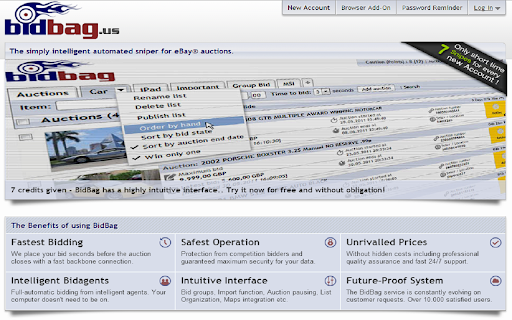

The remote control for your bidbag - Place your bid automatically in the closing seconds. bidbag Remote - eBay Auction Sniper Extension This extension allows to place bids via bidbag auction sniper at eBay pages from your browser. With bidbag your bid is placed automatically up to one second before the end of the auction. Bid automatically at the last moment without revealing your interest in an auction. Features: Intelligent offline sniping in the last second, auction group management, SMS messaging/bidding, forward thinking interface and many more. bidbag has a highly intuitive interface.. Try it now for free and without obligation! bidbag – The simply intelligent bid assistant - From now on never miss any auction. Snipe auctions in the last second with a fast backbone-connection. - Redundant server clusters in multiple locations on a high-speed connection for unsurpassed reliability. - Advanced interface technology with auction monitoring, push notifications and other realtime features. - Auction groups. Once you win one auction, all other snipes in the group are cancelled automatically. - State of the art development and highest data privacy with SSL encryption and use of licenced API's. With bidbag you only need to pay if a bid results in a winning auction! Only after a won auction we would charge a point from your bidbag account. If your given bids aren't successful, this service would be free of charge for this auction! While you create a new auction entry, the bidbag system would block one point as caution. This point would only be charged if this auction was won. Otherwise this point would credited back. To kick start using bidbag we would give you some points for free with your registration! * With the free points you can test our bid agents and win some auctions. Additional points can be ordered fast and cheap in our integrated shop starting at 19 cent** per point. The payment can be done with the established payment system PayPal, where you can do secure payments with choice for creditcard payment and bank transfer also for non customers of paypal. bidbag Remote – The remote control for your bidbag. With this browser addon you can add your auctions directly from within eBay worldwide. While you are browsing on eBay, there would be a new menu-option on search results, gallery results and item pages. With a click on bidbag Remote, a little layer window would be opened. Give now your maximum bid and optional a snipe puffer and a auction list. Save the auction to your bidbag. That's it! The bidbag team wishes you many successful auctions!

Amazon Discount Finder
Find hidden discounts on Amazon. Amazon Discount Finder helps you to find best deals upto 90% discount. Amazon is really the best online shopping site, and often it offers 75% and better reductions, yet it directs people to other areas, sending them to higher profit margin products instead. There's a geeky way to manipulate Amazon's web links to display all heavily-reduced bargains. All you need to do is fiddle with Amazon web addresses to bring up lists of knock-down prices. The problem is these are a faff to make yourself. So we built the Amazon Hidden Discount Finder. It creates your own bespoke super-specific pages in seconds, where you choose the discount. Our Discount Finder manipulates Amazon web-links to create customized bargain basement pages. Just select the percent off the list price & the category you want, eg, TVs 30%+ off or DVDs 90%+ off. We would love to hear any feedback on the answers it gives, any new categories you'd like added and other suggestions. It would also be fab if you could add any top Amazon discount links you find and other Amazon buying tips that we haven't included in the guide below the tool. -------------- * HOW TO USE * -------------- 1. Select the Amazon store (country) in which you want to search for the product; 2. Select a category, if you want to search for discounted products within a selected category; 3. Or enter a keyword (keyword) and find the best deals, by clicking the "Search" button. 4. The keyword is not really necessary if you want to explore only the products available in the selected category. --------- * Tips: * --------- • When searching for treasure, don't just look at the first page of bargains, try a few. Don't assume that just because it's discounted, it must be a good buy. Try higher percentage discounts for cheaper, smaller items and lower percentages for niche, expensive ones. Just because something is listed with a huge discount, it doesn't automatically make it a bargain (or worth buying). ------------- * Features: * ------------- 1. Provides advanced search options on Amazon. 2. Available for all countries: US, Canada, UK, Germany, France, Italy, Spain, Japan and China. 3. Research on the basis of a keyword inserted. 4. Search according to the range set off: you can search all products with discounts from 1% to 99%. 5. Search results optional sorted by: • Bestsellers • New and Popular • Price: Low to High • Price: High to Low • Average Customer Review 6. By price range: the user can set a range of prices for which you want to see results.

eBit: Your eBay Profit Calculator
Easily calculate the profit and expenses from an eBay sale. The ultimate companion for eBay sellers, designed to simplify the process of calculating your profit with ease and accuracy. Say goodbye to manual calculations and hello to streamlined profitability analysis. Features: - Instant Profit Calculation: With eBit, determining your profit from an eBay item is just a click away. Enter the purchase cost, selling price, shipping fees, and any additional expenses, and eBit will swiftly calculate your net profit. - Comprehensive Expense Tracking: Keep track of all expenses associated with your eBay sales effortlessly. eBit allows you to record shipping costs, eBay fees, PayPal fees, and other relevant expenses, ensuring accurate profit calculations. - Advanced Fee Calculation: eBit goes beyond basic profit calculation by factoring in eBay and PayPal fees. It provides you with a clear breakdown of all associated fees, enabling you to understand the true financial impact of your eBay transactions.

JustSnipe eBay Auction Sniper
We help you to place bid on eBay at the last seconds via JustSnipe.com. This extension is eBay auction sniper that helps you to place bid at the last moment before the auction on eBay ends. With our software application and powerful servers, you can setup the target items at any time and it will just snipe them for you. This extension is a browser extension from our online web service at http://justsnipe.com You will need to register at JustSnipe.com in order to use it. ************ Version: 1.9.4 - Bug fixes and performance improvements. ************ ************ How to use JustSnipe Chrome Extension https://blog.justsnipe.com/p/how-to-use-justsnipe-chrome-extension.html ************ If you have problem with this app, please send us email at support@justsnipe.com

Rapidcatch eBay auction sniper
This extension allows to place bids via Rapidcatch.com auction sniper right at eBay, Delcampe, Allegro, Aukro from your browser This extension allows to place bids via Rapidcatch.com auction sniper (https://rapidcatch.com) right at eBay, Delcampe, Allegro, Aukro pages from your browser while shopping. The extension adds an icon to the browser panel. When you visit an item page of supported auction platform, this icon gets activated and when you click on it you will see a form to enter a bid, and a button to place it into Rapidcatch sniper. Detailed usage instructions: 1. Install extension. An icon will appear at browser panel. 2. Go to auction item page. Extension icon will turn from gray to colorful. 3. Click extension icon, fill bid amount field, and click the placing bid button. 4. Your bid went to Rapidcatch sniper, and you can manage it there at https://rapidcatch.com once you need that. All transferred data is protected with secured protocols.
