
hdnljepgpemjmhehgjianajlblmbkgfn

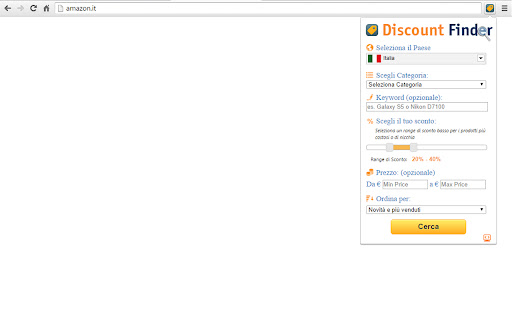
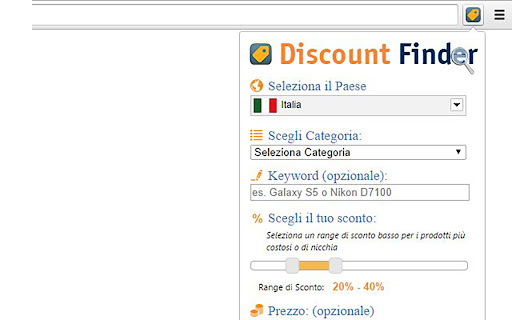

Find hidden discounts on Amazon. Amazon Discount Finder helps you to find best deals upto 90% discount. Amazon is really the best online shopping site, and often it offers 75% and better reductions, yet it directs people to other areas, sending them to higher profit margin products instead. There's a geeky way to manipulate Amazon's web links to display all heavily-reduced bargains. All you need to do is fiddle with Amazon web addresses to bring up lists of knock-down prices. The problem is these are a faff to make yourself. So we built the Amazon Hidden Discount Finder. It creates your own bespoke super-specific pages in seconds, where you choose the discount. Our Discount Finder manipulates Amazon web-links to create customized bargain basement pages. Just select the percent off the list price & the category you want, eg, TVs 30%+ off or DVDs 90%+ off. We would love to hear any feedback on the answers it gives, any new categories you'd like added and other suggestions. It would also be fab if you could add any top Amazon discount links you find and other Amazon buying tips that we haven't included in the guide below the tool. -------------- * HOW TO USE * -------------- 1. Select the Amazon store (country) in which you want to search for the product; 2. Select a category, if you want to search for discounted products within a selected category; 3. Or enter a keyword (keyword) and find the best deals, by clicking the "Search" button. 4. The keyword is not really necessary if you want to explore only the products available in the selected category. --------- * Tips: * --------- • When searching for treasure, don't just look at the first page of bargains, try a few. Don't assume that just because it's discounted, it must be a good buy. Try higher percentage discounts for cheaper, smaller items and lower percentages for niche, expensive ones. Just because something is listed with a huge discount, it doesn't automatically make it a bargain (or worth buying). ------------- * Features: * ------------- 1. Provides advanced search options on Amazon. 2. Available for all countries: US, Canada, UK, Germany, France, Italy, Spain, Japan and China. 3. Research on the basis of a keyword inserted. 4. Search according to the range set off: you can search all products with discounts from 1% to 99%. 5. Search results optional sorted by: • Bestsellers • New and Popular • Price: Low to High • Price: High to Low • Average Customer Review 6. By price range: the user can set a range of prices for which you want to see results.

Price Snoop - Smarter Shopping on Amazon(r)
Compare prices across the European Amazon(r) stores. Price Snoop activates whenever you visit an Amazon store, showing you just how much an item costs on other Amazon stores and allowing you to navigate between them with a single click. Even works for items that are unavailable on one store but which might be available on the other stores. ## Private Price Snoop only sends communicates with Amazon and European Central Bank’s currency conversion rates, and does all computations locally, on your computer. Nobody, including the author, has access to the items you browse and shop. ## Fast No clicks needed to check alternate prices, all you need is hover the cursor over Price Snoop’s icon and the magic happens. All price checks are done simultaneously to avoid any possible delays, they are then remembered for the duration of your shopping session. This way you can re-check the prices and not waste an extra second. ## Seamless Great care was taken to make Price Snoop look and feel right at home in Amazon’s interface - you’ll barely notice it’s there until you need it. ## Everywhere Works on the following European Amazon stores: UK, Germany, France, Italy, Spain, Belgium, Sweden, and Netherlands. In order for the price comparison to work as expected, you need to make sure amazon.de, amazon.se, and amazon.com.be all use English in the Language Settings.

Amazon Variation Price Checker
Shopping assistant for finding the lowest prices, price history, and filtering product variations on Amazon. 🎉 AmzVar: Amazon Variation Price Checker V1.0.2 is Here! ✅ Backend upgrade to Amazon Creators API (Offers V2) for improved offer accuracy and stability. ✅ Better availability messaging: “Currently unavailable” replaces $0.00 for missing prices. V1.0.0 is Here! AmzVar is back in 2025 with restored core functionality and revamped features to enhance your Amazon shopping experience. ✨ Core Features: • 🛒 Compare Prices: View product variations sorted by price. • 🔍 Filter Options: Narrow results by size or other attributes. • 🔗 Quick Links: Check shipping prices and explore offers from other sellers. • 📉 Price History: Explore historical prices to make informed decisions. • 🎯 Customizable Floating Action Icon: Click, hold, and drag the floating icon to reposition it if it blocks any page elements. 🛠️ Version 1.0.1 (1/16/2025) 1. Hotfix - Resolved the issue where the scrollbar kept appearing and disappearing. 🚀 Version 1.0.0 (1/10/2025) 1. Core functionality restored – variations are now sorted by price. 2. Renamed to Amazon Variation Price Checker to reflect its key purpose. 3. Support for Amazon.com (USA) only. 4. Explore products on Walmart, Target, eBay, and Google Shopping. 🔄 Version 0.5.0 (9/3/2022) 1 Renamed to Amazon Shopping Assistant. (Core Functionality Disabled) 2 New tools for price history, seller comparisons, and exploring alternatives. 🇨🇦 Version 0.4.0 (3/26/2018) 1. Renamed to Price Checker. 2. Support for Amazon.ca (Canada). 3. Added “Rate Us” icon for feedback. 🛠️ Version 0.3.4 (3/19/2018) 1 Minor fixes for toggle icons. ⏱️ Version 0.2.7 (2/7/2018) 1. Consistent behavior across pages. 2. Reduced delay for auto popover to 0.5 sec. 📚 How It Works: AmzVar simplifies shopping for products with variations like size and color. No more clicking through endless options—let AmzVar find the best price for you. 💡 Tip: Double-check shipping and tax before checkout. ✨ Before you buy, let’s do some research…

Amazon Price Compare
Compare prices across all Amazon european marketplaces. Save money by comparing prices of stores in the European Union. Amazon Price Compare allows you to compare prices from other european Amazon stores for any product by one click. Amazon offers many products in multiple countries at different prices. In Europe there are 5 different Amazon sites from where you can order. By comparing these offers and getting the lowest price you can safe money. Even though you have to pay shipping fees when ordering abroad the total price is often lower. For ordering on Amazon in another country you can simply use the login credentials you use in your own country and pay via credit card. This site compares the prices, calculates shipping fees and converts currencies to get you the lowest price in Europe. If you're shopping on Amazon in Europe, you might be able to find a better deal in another country. Use this extension to find out!

Juicy - Amazon Coupons Finder
Finds products with discounts in Amazon search results The extension was made to take the Juice out of Amazon and give it to you as easy as possible. If you are an Amazon buyer, Juice is for you. The extension will show you all of the available discounts on Amazon, based on your searches. No more random discounts that manipulate you to buy what you don't need. Get discount for what you are looking for. Juice allows you to sort the results by discount, price, reviews and rating and make smart decisions. Install Juice and find the best discounts on Amazon, it's simple and free!
