
dlbjchffggckhkkgfkkalhnadfmlbalj

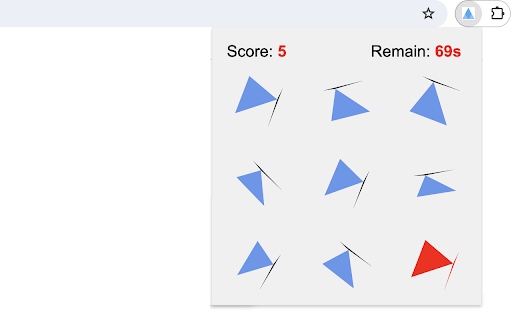
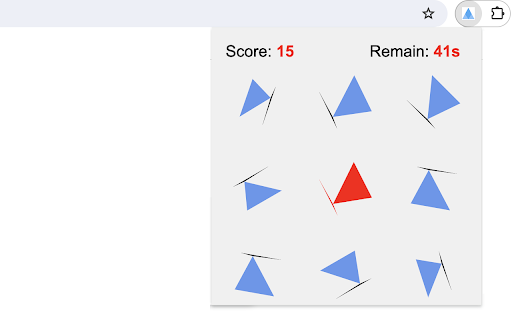
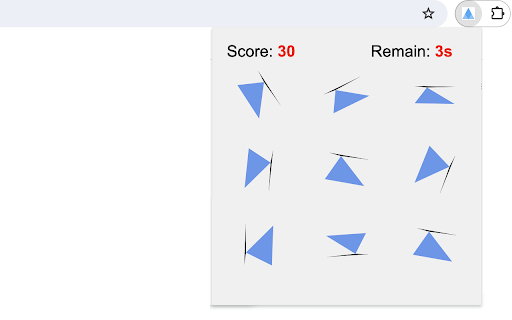
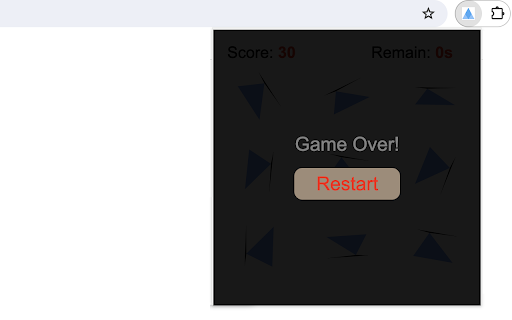
This game offers a fun and challenging way to test your observation skills under time pressure. The game area is a 3x3 grid filled with nine random triangles. Only one triangle has an identical clone in the grid, with the same shape and orientation. The goal is to find them as quickly as possible. To make the orientation easier to see, there's a black line under each triangle to show which way it's pointing. 1. Start Game: Just click on the triangle extension icon in the top right corner of your browser and the game will start immediately in a popup. 2. Select a Triangle: Click on a triangle you think has a matching pair in the grid. The selected triangle will be highlighted in red. 3. Find its Match: Click on another triangle you believe is identical. 4. Scoring: - If the second triangle matches the first, both will stay highlighted, and your score will increase by 5 points. - If they do not match, the highlight is removed from the first triangle, and the second triangle is highlighted. 5. Automatic Reset: Upon a successful match, the game board automatically resets for a new round, allowing continuous play within the time limit. 6. Game Ends: When the 100-second timeout occurs, it will show a 'game over' message and a restart button in an overlay. Tips for Success: - Quickly scan the grid to identify the triangles with the same orientation, and then compare their shapes. - Balance speed with accuracy to maximize your score. Good luck, and have fun! Plus, we've featured our other exciting game products after the game ends for even more fun! CHANGELOG ========== Version 0.1.1 - 0.1.7 - Add google analytics - Show featured games after game over - Dynamic update of featured game list - Prettify code and styles

Wall Smash Game
Bounce the ball to smash the falling wall. Welcome to Wall Smash Game, an exciting challenge that places you in control of a paddle, with the goal of bouncing a ball to destroy bricks and attain the highest score possible. 1) Click the extension icon in your Chrome browser to open Wall Smash Game. You'll be presented with a 480x480 game arena that has a paddle at the bottom, a ball starting in the middle, and a descending wall made up of bricks at the top. 2) Effortlessly glide your mouse horizontally across the game area to control the paddle's movements. The ball easily bounces off the paddle and the surrounding walls. 3) Every 4 seconds, the current bricks move down by their own height, and a new row of bricks is added at the top of the wall. 4) If the ball misses the paddle and hits the bottom wall, you lose. If any brick reaches the bottom wall, you also lose. 5) After each round, a "Restart" button appears, allowing you to easily begin again. Tips for Success: - Stay really focused, follow where the ball goes, and guess where it will bounce. - Put the paddle in the right spot to hit the hard-to-reach bricks just right. Give it a try and see how quickly you can smash the wall! Ready for a challenge? Additionally, we’ve highlighted some of our featured game extensions after game over to offer extra fun options. CHANGELOG ========== Version 0.1.3 - 0.2.1 - Remove animation for simple game over page - Remove the feature of saving earned points - Add the list of featured games - Dynamic update of featured game list - Prettify code and styles - Update google analytics Version 0.1.2 - Display cheerleader animation after game over - Add the feature of saving earned points Version 0.1.1 - Add google analytics - Show the list of new games Version 0.1.0 - Initial release of the game

Motion Card Match Game
It is a twist on the classic memory card game. Instead of flipping static cards on a board, cards with symbols (i.e. uppercase letters) will flow from the top of the screen. Match two cards with the same symbol consecutively to score points. Try to score as many points as possible before the cards slip away! 1) Start the Game: Click on the game Chrome extension icon in your toolbar. A popup window will appear displaying the game canvas. 2) Select Cards: Click on any card on the canvas to select it. The selected card will change its color to golden, signaling that it's been chosen. 3) Match Pairs: Once a card is selected, you must quickly find its matching pair from the cards on the screen. Click on the matching card. If you've found the correct match, both cards will disappear, and you'll earn points. 4) Continuous Flow: Cards will continue to flow from the top. If you don't match a card before it reaches the bottom, it will vanish, and you'll lose the chance to score with that card. 5) Score: For every successful match, you'll gain 10 points. The score is displayed at the top-left corner of the game canvas. 6) Endgame: The game doesn't have a set endpoint. The challenge is to see how high a score you can achieve. Have fun playing the card game! For a diverse gaming experience, feel free to explore our other featured game extensions on the Game Over page. CHANGELOG ========== Version 0.1.1 - 0.1.8 - Add google analytics - Show featured games after game over - Dynamic update of featured games - Prettify code and styles

Table Tennis
Control the game using the Up and Down Arrow keys or W/S on your keyboard. No internet connection is required! 1) After installing, simply click the game icon in the Chrome extension toolbar to launch it in a popup window instantly. 2) The game ends when either you or the computer reaches 5 points, and your best score is recorded in the top right corner. 3) Pause or start a new game at any time during your session. 4) When you leave the game and return, it will remember your progress and let you continue right where you left off. Enjoy a fast-paced table tennis arcade game with simple yet exciting gameplay! Looking for a challenge? Click "Play More Levels" below the restart button to try different difficulty settings. For more fun, check out our featured game extensions after your match ends. CHANGELOG ========== Version 0.1.7 - 0.2.8 - Display featured products after game over - Add the link of more game levels - Remove the section on new games - Enable dynamic update of featured games - Add W/S movement support - Prettify code and styles Version 0.1.3 - 0.1.6 - Add the section on new games - Update the game list with time - Rename the game

Math Flashcard Game
Math Flashcard Game is a captivating, single-player challenge designed to enhance your mathematical expertise. Ideal for students, educators, or arithmetic enthusiasts! In this game, players tackle various math problems within a set time frame, aiming for the maximum score. Game Interface: - The math question appears at the screen's center. - An input field for typing your answer is located below the question. - Displays include your current score, the highest score and the time left. Problem-Solving Mechanics: - The problems include addition or subtraction of multiple numbers. - Choose from three number ranges: 1-9, 10-99, or 100-999. - Choose the quantity of numbers: 2, 3, 4. - Input your answer and submit by clicking 'Submit'. Game Rules: - Score increments are based on the range and quantity of numbers in each problem, indicating difficulty. - The highest score is updated whenever your current score surpasses it. - Each problem allows a single answer attempt without score penalty for incorrect answers. - Skip to the next problem if you're unable to solve the current one promptly. - Restart the game at any time by clicking the 'Restart' button. Time Constraint: - The total game duration is 150 seconds, after which the game concludes. - At the end of the game, your final score along with the counts of correct and incorrect answers are displayed, followed by an automatic restart of the game after 3 seconds. Begin the challenge now and enjoy the fun of testing your skills! Additionally, you can enjoy even more fun with our featured game extensions showcased after the game ends. CHANGELOG ========== Version 0.1.1 - 0.1.5 - Add google analytics - Add featured games after game over - Dynamic update of featured game list - Prettify code and styles
