
djecijdiikggekgohjffnccifchfdmim

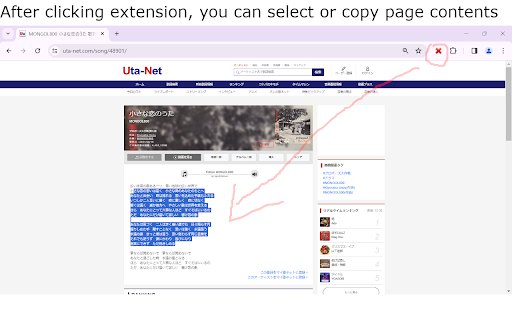
** Yet Another "allow copy" extension ** This extension stops JavaScript execution of current page by preventing any further DOM event being dispatched to registered handlers. It is mainly designed to remove any limitations that prevent the copy / context menu functions from working. Usage: click the "red cross" button in Chrome toolbar.

Simple JavaScript Disabler
Disables JavaScript on the current tab Description: JavaScript Toggler is a lightweight and efficient Chrome extension that empowers users with the ability to quickly enable or disable JavaScript execution on the webpage they are currently viewing. With a simple click of the extension icon, users can toggle the state of JavaScript, enhancing their browsing experience by improving page load times, reducing data usage, and increasing security on demand. This extension is perfect for users who frequently encounter websites overloaded with scripts that slow down their browser, consume excessive data, or pose security risks. JavaScript Toggler is also an invaluable tool for web developers and testers who need to check the functionality of web pages with JavaScript turned off. Features: One-Click JavaScript Toggle: Instantly enable or disable JavaScript on the current tab with a single click on the extension's icon. Per-Site Setting Persistence: The extension remembers the JavaScript setting for each site, applying your last choice every time you visit. Lightweight and Fast: Operates smoothly without affecting browser performance, ensuring a seamless user experience. Enhanced Privacy and Security: Helps protect against malicious scripts and enhances privacy by disabling JavaScript on sites known for tracking or intrusive ads. Easy to Use: Designed with a straightforward user interface, making it accessible for users of all skill levels. Developer-Friendly: A handy tool for developers and testers to quickly simulate environments where JavaScript is disabled. How It Works: Upon clicking the extension icon, JavaScript Toggler evaluates the JavaScript setting for the current webpage. If JavaScript is enabled, the extension disables it for the domain of the currently active tab and vice versa. After toggling the setting, the extension automatically refreshes the page to apply the new setting, ensuring that users can immediately see the effect of their action. Privacy and Permissions: JavaScript Toggler is designed with user privacy in mind. It operates strictly on the active tab, without requiring broad permissions or collecting any user data. The extension uses the activeTab permission to modify content settings exclusively for the site you are visiting when the action is initiated, minimizing its access to your browsing activity. Ideal Users: Privacy-Conscious Individuals: Users looking to enhance their privacy and security on the internet will find JavaScript Toggler a useful addition to their browsing toolkit. Web Developers and Testers: Professionals who need to test web applications with and without JavaScript can greatly benefit from the quick toggle functionality. Everyday Users: Anyone looking to improve their web browsing experience by managing JavaScript execution on-demand, especially on heavy-script sites. Summary: JavaScript Toggler stands out as an essential Chrome extension for managing JavaScript execution, providing users with control, security, and an improved browsing experience. Its simplicity, combined with powerful functionality, makes it a must-have tool in the digital age.

Enable JavaScript
Use a single button to turn javascript on or off on the Google Chrome Tab you are in. You might want to turn off javascript to help debug a webpage/check your website code errors. Turn javascript on/off with a button. To begin using the software, you need to install the extension first. Once you are on the website you wish to turn javascript off, just click on the software extension to switch it off . You can turn javascript back on for that webpage by clicking on the extension icon again. Disclaimer: Please note this extension is NOT made by Google and is made by an independent development team. All copyrights belong to their respective owners. Google doesn’t endorse or sponsor this Chrome extension. Enable Javascript is not owned by, is not licensed by and is not a subsidiary of Google Inc.

JavaScript Toggle On and Off
Toggle JavaScript engines (inline, data URL, remote, and external) on and off the easy way The "JavaScript Toggle On and Off" extension provides a reliable method to switch JavaScript execution. After installation, you can still run JavaScript. Whenever you need to block, click on the action button. Exception Lists: The domains listed will allow JS execution, even when it is globally forbidden or vice versa. Auto Reload: The extension auto-refreshes the current tab after the JavaScript execution state changes. This is a forced refresh to bypass browser caches (similar to pressing Shift + F5 keyboard combination). Supported Types: 1. Inline JavaScript on top and frame elements 2. Data URI JavaScript on top and frame elements 3. External JavaScript on top and frame elements 4. Inline events 5. "javascript:" URIs 6. setTimeout evaluation 7. "document.write" execution Notes: By default, the extension is not available in incognito mode. Activate it by opening the extensions manager page (chrome://extensions) and checking the "Allow in incognito" option.

Script Blocker Ultimate (NoScript,Disable JS)
While using blocking Java Scripts, you might encounter some irregular behavior in web pages which can be solved by white listing said web page. I suggest to blacklist News sites that are full of ads and only their texts is important for us. You can use '*' character in whitelisting and blacklisting domains (e.g., *.google.com). If you have any suggestions or found bugs/errors, please feel free to contact us on MojtabaDaneshi@Gmail.com We look forward to your feedback.
