
egljjlhdimceghlkloddalnlpgdgkboj
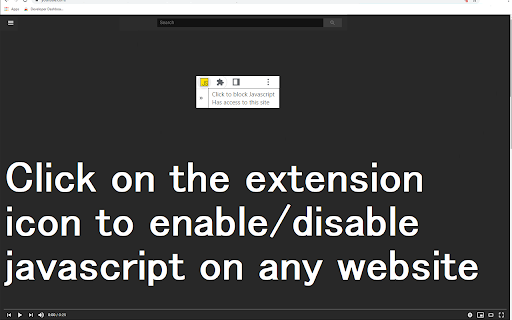
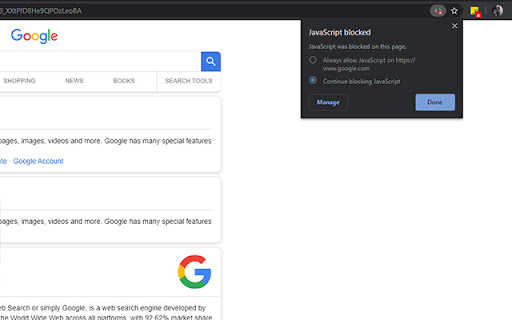
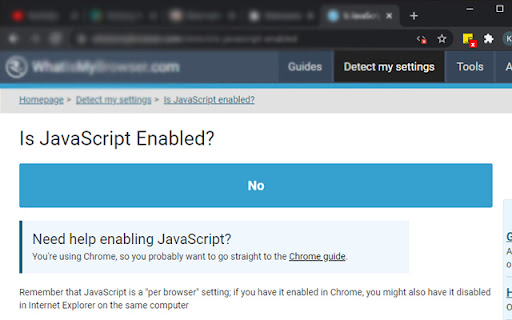
Use a single button to turn javascript on or off on the Google Chrome Tab you are in. You might want to turn off javascript to help debug a webpage/check your website code errors. Turn javascript on/off with a button. To begin using the software, you need to install the extension first. Once you are on the website you wish to turn javascript off, just click on the software extension to switch it off . You can turn javascript back on for that webpage by clicking on the extension icon again. Disclaimer: Please note this extension is NOT made by Google and is made by an independent development team. All copyrights belong to their respective owners. Google doesn’t endorse or sponsor this Chrome extension. Enable Javascript is not owned by, is not licensed by and is not a subsidiary of Google Inc.

JavaScript disable Chrome
Quickly toggle JavaScript on/off in the Chrome Browser. JavaScript disable extension. 🔒 Disable JavaScript for Chrome - your assistant for managing JavaScript on websites. Allows you to disable JavaScript execution for convenient content viewing without intrusive pop-ups, ads, and other unwanted elements. 🛡️ Key Features: 👉 JavaScript Management ✔️ Disable JavaScript on selected sites with a single button press. ✔️ Enable and disable JavaScript on individual tabs for greater control. ✔️ Automatically disable JavaScript on selected sites when opening tabs. 👉 Operating Modes ✔️ Manual mode: manually control JavaScript execution on sites. ✔️ Automatic mode: default disabling of JavaScript on sites for a more comfortable viewing. 👉 Custom Settings ✔️ Adding and removing exceptions for sites where you want to keep JavaScript running. ✔️ Saving exception settings between browser sessions. 👉 Reviews ✔️ "Excellent extension! Now I can read news without annoying ads." - Alexey ✔️ "Very convenient, Disable Javascript Chrome disables js on specific sites, thank you!" - Elena ✔️ "With this extension, I no longer worry about pop-up windows. Highly recommend!" - Ivan 💻 How to Use: 🔸 Click the "Add Disable Javascript for Chrome" button and pin it to the toolbar. 🔸 Go to the site where you want to disable JavaScript. 🔸 Click the extension button to enable or disable JavaScript on the current page. ❓ Frequently Asked Questions: 📌 How can I tell if JavaScript is disabled on a site? The extension will show an icon on the toolbar indicating the current status. 📌 Can I enable js for a specific element on the page? Yes, you can add exceptions for sites or specific elements on pages. 📌 Will some site functions be unavailable due to JavaScript being disabled? Yes, some functions may be unavailable when the Disable Javascript Chrome extension is disabled, but you can always temporarily enable it for the necessary sites.

User JavaScript and CSS
User JavaScript and CSS on any website Userscript's and userstyle's — simple extension to inject own JavaScript or CSS rules to any page. Change log: Version 3.1.0 - Starting from Chrome version 138, the method for allowing user scripts in the browser has changed - Fixed a bug where styles weren't removed when a rule was deleted - Fixed a bug where not all rules applied to the page were shown in the rules popup Version 3.0.5 beta - the mode of injection of styles into the DOM has been returned - minor fixes Version 3.0.3 beta - modules are now in the same scope - CSS injection improvement - and other minor fixes Version 3.0.2 beta - hotfix: fixed bug with registration and deletion of scripts - added feature to change start scripts before page loading - added feature to strictly read URL patterns Version 3.0.0 beta - The extension has been moved to MV3 - Added option to inject scripts and styles in iframe - Added the feature of live CSS - Added the One Dark theme and a few other improvements Version 2.0.0 - 90% of the code has been rewritten; - Improved UI; - Added SASS support; - Added Prettier formatter - Other minor improvements Version 2.0.0 - 90% of the code has been rewritten; - Improved UI; - Added SASS support; - Added Prettier formatter - Other minor improvements Version 1.2.8 - Added function for naming rules - Updated translations Version 1.2.7 - Updated all extension libraries to current versions Version 1.2.6 - Fixed error in console "Unchecked runtime.lastError: The message port closed before a response was received" - Improved domain getter from URL - Updated Ace Editor and jQuery to latest Version 1.2.5 - Resolved bug with '@import' and "Auto-important css" feature - "Auto-important css" feature now disabled by default - Added feature to exclude URL's by '!' symbol at start - Updated jQuery and Ace editor to last versions - Other small fixes Version 1.1.5 - Returned old method injection and added option to toggle this. Alternative method has feature to avoid CORS issues, but has only DOM access to site (no JS context). Old and now primary method is injecting by tag on site bottom. - Added scroll past end in editor Version 1.0.0 - Full redesign of extension - Added more settings - Added toggleable counter on extension icon Version 0.96 - Full redesign of extension interface - 80% code of extension core has been rewritten - New feature: change URL field and mask with "*" symbol (eg *.expample.com) - Editor window opens in new tab in split layout - Disabled autosave feature - Configurable editor in settings - New icon Version 0.93 - Fixed a bug where JavaScript is not always inserted in a page - Outdated processes are disabled Beta test. If you find any problem or have a question contact me on email.

Javascript Chrome
Quickly disable/enable JavaScript for the Chrome browser in 1 click. Works on any website. ❗❗❗ After installation, pin the extension to the Google Chrome panel as shown in the screenshot: 1. Click on the extensions icon (looks like a square). 2. Find the JavaScript Chrome extension and click on the "Pin" icon. ❗❗❗ 🔥 Introducing the Javascript Chrome extension, your go-to solution for swift JavaScript control on the Chrome browser. With just one click, you can seamlessly disable or enable js, providing unparalleled convenience on any website. 💪 Experience the power of Javascript Chrome, the ultimate tool for efficient management. Toggle js settings with ease, empowering you to debug webpages, check code errors, and enhance your overall browsing experience. Install Javascript Chrome today, and let us handle the rest. ✅ Easy Install: Get started hassle-free with a simple installation process that takes seconds. ✅ Quick Use: Experience instant control with a swift, one-click toggle for JavaScript preferences. ✅ You Will Like It: Embrace a user-friendly interface and a seamless browsing experience that you're sure to enjoy. ✅ My Friends Using It: Join a community of satisfied users as your friends already trust and use Javascript Chrome. ✅ One Simple Thing: This extension focuses on doing one thing exceptionally well – providing quick and efficient control for a tailored browsing experience. 🕹️ On any given Chrome tab, a single click on the Javascript for Chrome extension icon is all it takes to enable or disable js. It's the quickest and most straightforward way to take control of your preferences with ease. 🔄 Javascript Chrome - Say goodbye to complex settings and tedious navigation. Once installed, this extension becomes your reliable companion, ready to serve whenever you need to manage JavaScript on any website. Click on the Javascript Chrome icon when you want to disable it for a specific site, and click again to re-enable it. 🌐 The simplicity of our extension makes it the preferred choice for users who value a hassle-free browsing experience. Install the extension, and you'll find yourself effortlessly toggling JavaScript on or off in no time. 🎉 With Javascript Chrome, the name speaks for itself. Take advantage of the quick and easy control it provides, ensuring a seamless experience on the Chrome browser. Trust in Javascript Chrome for reliable JavaScript management on any website, and enjoy the freedom to customize your browsing environment. 🌈 Don't settle for complicated solutions. Choose Javascript Chrome for a straightforward, one-click solution to enable or disable JavaScript on the Chrome browser. Elevate your browsing experience today! Javascript for Chrome, the name you'll be clicking on again and again for effortless js control.

Advanced Java Launch
Java desktop launcher. Requires compatible web pages, native application and Java. The extension uses downloads API and native application API to mediate between browser and Java.
