
dhghddapjaemcpdfnfgpmgcjojfmhbak

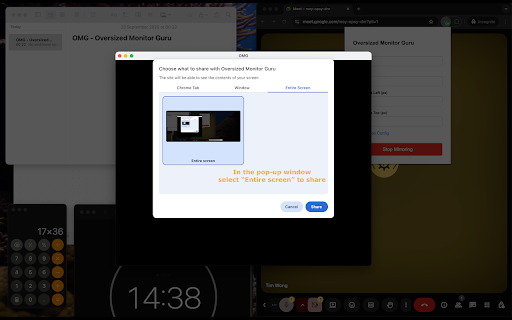


Transform your large monitor into a professional screen sharing experience! Oversized Monitor Guru (OMG) solves the frustrating problem of sharing content from massive displays in video conferences. When you have a large monitor, sharing your entire screen makes content appear tiny and unreadable for meeting participants. - Creates a customizable mirror window of any portion of your screen. - Allows you to share only the relevant content area instead of your entire display. - Works seamlessly with Google Meet, Microsoft Teams, Slack, and other conferencing apps. - Provides precise control over mirror size, position, and quality settings. 1. Click the OMG extension icon. 2. Set your desired mirror area (width, height, position). 3. Start mirroring to create a dedicated window. 4. Share the mirror window in your video conference instead of your full screen. Perfect for developers sharing code, designers presenting mockups, analysts showing data, or anyone who needs to share specific content from a large display. Stop making your audience squint - make your presentations crystal clear!

KioskKast
Control KioskKast tablets for interactive displays and presentations Transform any tablet into a wireless display with KioskKast! KioskKast lets you instantly stream content from your computer to Android tablets on your local network - perfect for digital signage, presentations, retail displays, or interactive kiosks. What KioskKast does: Automatic Discovery - Finds all KioskKast-enabled tablets on your network in seconds Screen Mirroring - Stream your entire screen, specific windows, or browser tabs to tablets wirelessly Web Content Sharing - Send any webpage directly to tablets for native display Remote Control - Control tablet content with your mouse and keyboard from your PC Multi-Tablet Support - Manage multiple tablets and switch between them easily Perfect for: ✓ Retail & Restaurants - Update menu boards and promotional displays instantly ✓ Offices - Turn tablets into wireless presentation screens or information displays ✓ Education - Share content to tablet stations in classrooms ✓ Events - Create dynamic information kiosks or wayfinding displays ✓ Home - Use old tablets as smart displays or digital photo frames Why choose KioskKast: No cables needed - Everything works over your WiFi network Use existing tablets - Repurpose any Android tablet (requires KioskKast app) Simple setup - Connect in 3 clicks: discover, select, stream Local & secure - All communication stays on your local network Real-time streaming - Low-latency WebRTC technology for smooth presentations Install this extension and the KioskKast app on your Android tablets Click the extension icon to discover tablets on your network Select a tablet and choose to mirror your screen or share a webpage Control everything from your computer - it's that easy!

EShare
EShare Chrome Extension - Professional Wireless Screen Mirroring Solution Transform your screen sharing experience with EShare, a powerful Chrome extension that enables seamless wireless screen mirroring and content sharing across devices. Whether you're presenting in meetings, delivering educational presentations, or extending your workspace, EShare provides a reliable and intuitive solution. Compatibility: Works seamlessly with EShare-enabled devices including IFPDs, smart TVs, projectors, and wireless display terminals. Requires ESharePro receiver version 7.6.1010 or later (please update your receiver if needed). Experience the future of wireless connectivity with EShare Chrome Extension - where sharing content is as simple as clicking a button.

Mirroring360 Sender for Chrome
Cast your Chromebook or Computer Screen to Another Computer (PC or MAC) Mirroring360 is a collaboration tool suite for your 1:1 or BYOD classrooms and boardrooms. Mirroring360 Sender Chrome App enables any presenter to cast his/her Chromebook or computer screen to another PC or Mac, wirelessly; You will need install a separate Mirroring360 Receiver software on the receiving computer, available at www.mirroring360.com Mirroring360 is designed for teachers,students, and business presenters with ease-of-use and fast-to-share as the top design goals. Setup in 2 easy steps: 1. Add this Mirroring360 Sender Chrome App to your Chromebook or Chrome browser on your computer 2. Install the Mirroring360 (receiver) software on the receiving computer (www.mirroring360.com). Mirroring360 Sender Chrome App allows you to: * Cast your Chromebook or computer to another computer, instantly and wirelessly! * Up to 4 Chromebook or computer screens can be casted simultaneously * Real-time share ANY application, files, or multi-media content from your Chromebook or computer * Complementary Mirroring Assist capability enables you to cross subnets and VLANs, even if the computers are on different VLANs “Using Mirroring360 in an instructional setting has shown a direct increase in engagement among our students.” – Matt Penner, Director of Information and Instructional Technology, Val Verde Unified School District

LightCast Sender
Mirror your device to any computer screen any time LightCast provides you the ability to wirelessly mirror your device’s screen to InFocus LightCast enabled devices such as Mondopad and JTouch. This app is a must for meeting rooms and classrooms. It allows you to wirelessly share your desktop and applications. Once connected, participants can view the shared content on the InFocus devices. Requires: InFocus LightCast enabled devices such as Mondopad 2.0 and JTouch 65C
