
dgfgnhlcalihgnemejfldncmedabhfna
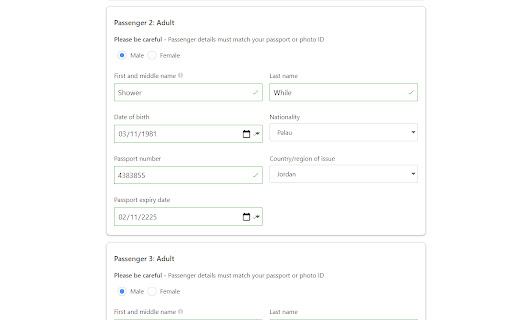

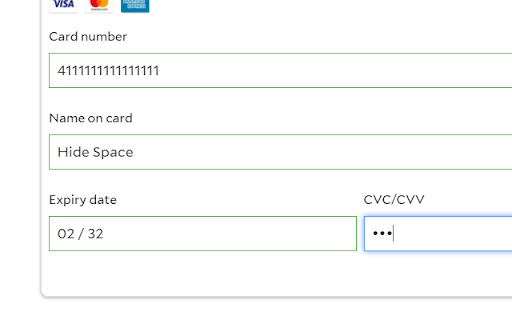
Automatically fill the form on the website. This extension is to fill the input box on any form automatically. Its purpose is to fill the valid input to the form such as expired data, birthdate. If you found that the data it filled doesn't correct, please send a message to me. I'm more than happy to fix that for you.

QuickForm - Autofill & Form Filler
QuickForm is a free form autofill Chrome extension and form filler that lets you fill out any online form in one click. Unlike browser autofill or other auto fill extensions, QuickForm works on complex web apps: React, Angular, Vue, dynamic SPAs, internal tools, staging environments, and enterprise portals. 🔴 How It Works: 1. Activate Record Mode on any web form 2. Fill it out naturally - QuickForm saves every field automatically 3. One click to autofill that form anytime, instantly and accurately 🔥 Record Mode - Automatically detect and capture form fields. No manual configuration needed. 🖱️ Auto-Click - Automate clicks between form steps, buttons, and navigation. ⏳ Smart Delays - Set timed pauses for pages with loading states or dynamic content. ✅ All Field Types - Input, textarea, checkbox, radio buttons, select dropdowns, date pickers, and more. 🏎️ Multiple Profiles - Create different profiles for different forms or environments. 📄 Duplicate Profiles - Clone and modify profiles for similar forms. 🔗 URL-Specific Profiles - Link profiles to specific websites for automatic form filling. 📥📤 Import/Export - Backup, share, and transfer profiles between devices. 🎨 Autofill Animation - Customize the speed of form filling. ⚡ Fast Access - Fill forms from the toolbar icon or right-click context menu. 🎯 Built For: - QA testers who fill the same test forms hundreds of times - Developers working with admin panels, staging forms, and internal tools - Job seekers filling out repetitive application forms across multiple sites - Data entry teams who need fast, accurate, repeatable form filling - Anyone who's tired of typing the same information into forms - Works where others fail - Supports React, Angular, Vue, and dynamic web apps that break generic autofill tools. - Record Mode means zero setup - No CSS selectors, no field mapping, no technical knowledge needed. - 100% free - No premium tier, no paywalled features, no usage limits. - No account required - Install and start using immediately, no sign-up. Note: Profiles are stored in plain text locally, so ensure your device is secure to prevent unauthorized access. Automate form filling in Chrome today. Download QuickForm, the fast, free, and private form filler and autofill extension trusted by 30,000+ users 🌟

Form Filler
Automate form filling, extract and generate JSON data, and simplify QA testing with Form Filler Elevate your QA testing efficiency with Form Filler Assistant, the ultimate Chrome extension designed to revolutionize the way you interact with web forms. Tailored for developers, QA engineers, and professionals seeking to optimize their testing workflows, Form Filler Assistant offers an intelligent, user-friendly solution for managing form data. Key Features: Automated Form Filling: Seamlessly populate forms with data, using either JSON input directly in the extension or from an external file, saving you time and reducing manual entry errors. Effortless Data Extraction: Convert form inputs into structured JSON format with a single click. Export this data to a file for easy sharing, analysis, or future use, streamlining your testing and development processes. Dynamic DOM Interaction: Intuitively select input elements directly from the webpage's DOM. Generate and modify JSON templates based on actual form structures, enhancing the accuracy and relevance of your testing data. Customizable Workflow: Whether you're conducting detailed QA tests, developing web forms, or managing data entry tasks, Form Filler Assistant adapts to your needs, offering flexibility and precision. Empower your testing and development with Form Filler Assistant—where convenience meets functionality. Simplify your form interactions, enhance data accuracy, and boost your productivity with just a few clicks.

Form Filler
Save your time by prefilling any form on the internet with your information. Form Filler is a chrome extension that will automatically fill forms on websites. User will save their information (name, phone no, email, country etc.) by giving it a profile name. User can select any profile from a drop down and turn on the software. If the software is turned on it will auto populate any form on the internet by matching form elements name, email phone etc. with saved forms data depending on which profile they have selected.

AutoFill Forms
One-click form filler that supports multiple profiles and regular expression rules The "AutoFill Forms" extension is a user-friendly tool for automatically filling web forms, supporting multiple profiles. Features: 1. Easily create or update profiles by detecting user-inserted data in filled forms. - This feature simplifies the process of creating multiple profiles or updating stored data. 3. Request the extension to generate a random password, conveniently stored on your clipboard. 4. Manage multiple profiles. - Duplicate or modify existing profiles on the options page. 5. Import and export preferences. 6. Locate element positions based on their physical location within the form. 7. Supports both dark and light themes. Notes: Your profile data is securely stored in your browser's profile directory, with no backup created by the extension for security reasons. --- Changes (0.3.0) 1. The extension now operates in event background page mode, consuming no resources when not in use. 2. The extension is enhanced to fill forms that don't perfectly match the predefined fields. --- Changes (0.3.2) 1. Resolved the issue where multi-line text was not being inserted from the context menu.
