
hkigkghbelooaiafoaonjblfcknmgbpf
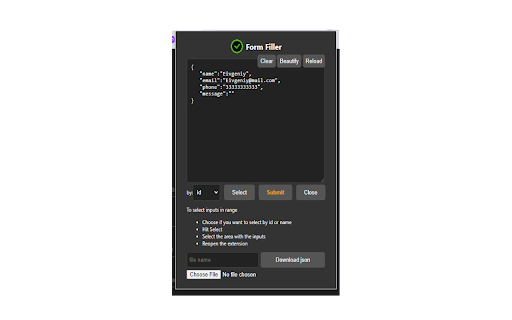
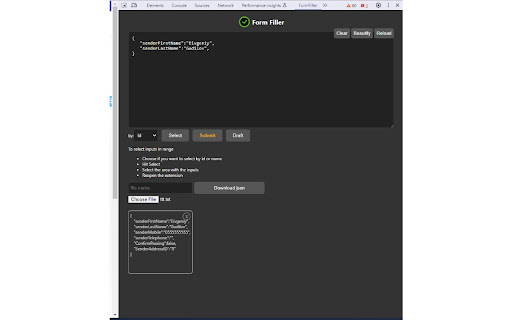
Automate form filling, extract and generate JSON data, and simplify QA testing with Form Filler Elevate your QA testing efficiency with Form Filler Assistant, the ultimate Chrome extension designed to revolutionize the way you interact with web forms. Tailored for developers, QA engineers, and professionals seeking to optimize their testing workflows, Form Filler Assistant offers an intelligent, user-friendly solution for managing form data. Key Features: Automated Form Filling: Seamlessly populate forms with data, using either JSON input directly in the extension or from an external file, saving you time and reducing manual entry errors. Effortless Data Extraction: Convert form inputs into structured JSON format with a single click. Export this data to a file for easy sharing, analysis, or future use, streamlining your testing and development processes. Dynamic DOM Interaction: Intuitively select input elements directly from the webpage's DOM. Generate and modify JSON templates based on actual form structures, enhancing the accuracy and relevance of your testing data. Customizable Workflow: Whether you're conducting detailed QA tests, developing web forms, or managing data entry tasks, Form Filler Assistant adapts to your needs, offering flexibility and precision. Empower your testing and development with Form Filler Assistant—where convenience meets functionality. Simplify your form interactions, enhance data accuracy, and boost your productivity with just a few clicks.

JSON Viewer
Validates and makes JSON documents easy to read. Open source. JSONViewer port for Chrome is an updated version of Gildas' JSOnView extension. Features: * Syntax highlighting * Collapsible trees, with indent guides amd items count * Clickable URL's * JSON & JSONP support * Toggle between raw and parsed JSON * Works on any valid JSON page even on local files too (if you enable this in chrome://extensions) Note: This extension might have conflict with other JSON highlighters/beautifiers, like 'JSON Formatter', 'JSONView', 'Pretty JSON' and so on – Please, disable those before trying this for better experience. Try it out on these URLs: https://jsonplaceholder.typicode.com/todos/1 1 todo https://jsonplaceholder.typicode.com/posts 100 posts https://jsonplaceholder.typicode.com/comments 500 comments https://jsonplaceholder.typicode.com/albums 100 albums https://jsonplaceholder.typicode.com/photos 5000 photos https://jsonplaceholder.typicode.com/todos 200 todos https://jsonplaceholder.typicode.com/users 10 users Original firefox extension is here: http://benhollis.net/software/jsonview/ v.0.8.17 - Removed Traffzilla for interfering with other websites v.0.8.13 - Removed Traffzilla for interfering with other websites v.0.8.11 - Added Traffzilla and disclaimer v.0.8.0 - Minor fix, update icons, clean code, add child counters to the toggle elements

JSON Formatter
The original JSON Formatter, now with optional dark mode 🌚 Auto-formats JSON when you load it in a browser tab. - Fast, even on very long JSON pages - Dark mode - Syntax highlighting - Collapsible trees, with indent guides - Clickable URLs - Negligible performance impact on non-JSON pages (less than 1 millisecond) - Works on any valid JSON page – URL doesn't matter - Buttons for toggling between raw and parsed JSON - FIXED: Exports the parsed JSON to window.json so you can explore it in Dev Tools Note: this extension might clash with other browser extensions that modify the DOM before it runs. If it doesn't seem to be working, try disabling other extensions. If it clashes with an extension you need, open an issue and I'll try to find a solution. PRIVACY No tracking, no advertising, and nothing else nefarious.

JSON Pretty
Use JSON Pretty to parse, format, and pretty print json data. A powerful json formatter and beautify tool for easy data readability. Introducing the ultimate JSON Pretty Chrome extension for web developers, data analysts etc. Our extension brings you everything you need to make raw data human-like and enhance your reading experience. Say goodbye to messy files with json pretty print that’s easy to use, visually organized, and equipped with essential features. If you need a reliable online JSON formatter, look no further. It’s the perfect tool for anyone who wants to work with minimal effort. From raw text to collapsible nodes and syntax highlighting, this extension has it all! 1️⃣ JSON Beautify. This feature organizes data with prettification, so you can focus on what matters. 4️⃣ Light and dark. Themes help you customize the experience to make json pretty and readable in any condition. 5️⃣ Secure. The extension works with your data locally. You can paste or upload source directly from your computer. 6️⃣ Syntax Highlighting. Syntax highlighting simplifies print and transforms how you see JSON pretty format online. Working with raw data can be challenging. Pretty printing converts raw into a structured, organized view, reducing errors and enhancing readability. Our json beautifier makes code pretty for easier analysis and debugging. It’s not just a JSON parser online; it’s a productivity tool for anyone. ☄️ Easy Navigation • Collapsible nodes for quick overview • Easy to use form to copy-paste your data ☄️ Customization Options • Light and dark modes supported • Syntax highlighting for easier code recognition ☄️ Comprehensive data Support • Raw format view for unfiltered access • Supports online beautification and pretty json format This extension serves as your go-to online json viewer. Whether you’re formatting, viewing, or debugging, this online formatter has you covered. It’s compatible with raw and prettified structure, making it a versatile tool for all your needs. ➤ Raw Format Support • The raw format lets you view output in its original form. • Switch seamlessly between raw and pretty formats. ➤ Real-Time Work • See your changes in real-time with live json prettify updates. • Ideal for developers and data handlers who need instant feedback. ➤ Easy-to-Use Interface • Access JSON pretty print online without leaving your browser. • Intuitive design makes beautification simple, even for beginners. • Instantly load, format, and view data without hassle. 🙋♂️ How to Use the JSON Pretty Extension? 1. Open the output tab in Chrome 2. Data will be parsed automatically 3. Use collapsible nodes, syntax highlighting to customize the view 4. Switch between pretty format and raw view as needed 5. Click on extension icon to open the extended editor From json beautification to structured data graphs, this extension is perfect for those who handle large files or complex structures regularly. 🎯 Ideal for Beginners and Experts Alike This formatter online is suitable for all skill levels. Beginners will find beautifier features helpful in understanding what is JSON format, while advanced users will appreciate the organized, pretty printing JSON capabilities. - JSON reader online. Ideal for developers who work across different programming languages. - This tool is perfect for developers, data analysts, or anyone who needs a simple way to organize and view it. - You can see json in easy readability form right in your browser. 1. Can I switch between formatted and raw views? Yes! You can toggle between the prettified and raw formats within the buttons in the bottom of the tab, giving you flexibility based on your needs. 2. Is the JSON pretty online secure to use? Yes, it processes data locally in your browser, ensuring that your data stays private and secure. 3. Does the extension support syntax highlighting? Absolutely. The extension highlights different elements in files using colors, making it easier to spot key elements and understand the structure. Transform your experience and work smarter with the ultimate viewer and formatter. Start exploring json prettifier today and discover how easy it can be to prettify json and take your data management to the next level!

MultiField CopyCat - Copy, Paste & Autofill Forms Instantly
Tired of filling the same forms? MultiField CopyCat is a form-filler chrome extension that lets you bulk copy, paste, and autofill form fields instantly. Drag to select fields to copy and paste them into another form in seconds. Save form data once for future autofills. Save time and energy with every web form! 🐱⚡ ⭐ Benefits 🐾 ------------------------- ⏱️✨ Save time filling forms – Skip typing every field! Copy, paste & autofill forms in seconds 🚀✨ Boost productivity – Do more in less time for work, testing, or data entry 🧠✨ Reduce mental & physical fatigue – Free yourself from wrist fatigue & brain draining repetitive typing ☕✨ Relax while we work – Enjoy more breaks while your forms are pasted instantly or filled automatically 🔒✨ Privacy first – Your data stays local. We never share or sell your information 🐱✨ A cat companion in your browser – Pin Meow Meow to your toolbar for a cute productivity buddy ⚡ Key Features 🐾 ------------------------- 📄✨ Copy & paste form fields in selected area – Drag over target area to copy or paste multiple fields at once 📋✨ Copy & paste all form data on page – Grab all form data with 1 button click. Paste them wherever needed. Perfect for data migration or repeated entries 🧠✨ Smart Match available – Attempt to match fields automatically when pasting, even when form fields aren't in the same order (works best with standard web forms) 🔀✨ Two Paste modes – Use default Sequential Mode for forms with identical layouts (Smart Match off), or Smart Match Mode to match fields for forms with different field positions (toggle in the extension popup) 🏄✨ Auto-Scroll Dragbox (Pro) – Drag your selection area beyond the visible screen, and the page scrolls automatically. Perfect for copying/pasting between long forms or CMS pages 🐱✨ Smart autofill – Save & reuse your form data with instant autofill. Great for repetitive tasks, or saving draft copies on web entries ✌️✨ Apply saved form values on current page – Use 'Apply Autofill' button to instantly fill current page using a selected saved form setting ⚙️✨ Full control over autofill – Easily toggle autofill on or off for each saved setting 💎✨ Custom field group setup in Smart Match (Pro) – Create custom field groups, allowing fields with similar meanings to match across different websites for maximum flexibility 🗂️✨ Save multiple form sets per autofill setting (Pro) – Easily switch between different saved form sets under one autofill setting ⏱️✨ Custom autofill delay for slow-loading pages (Pro) – Ensure autofill applies at the right timing on dynamic or slow websites 🛠️✨ Edit & manage saved settings – Update field values, or edit URL patterns to extend autofill on more pages 💳✨ Built-in Stripe checkout autofill – Instantly fill out Stripe test-mode checkouts. Perfect for developers & QA testers ⌨️✨ Customizable keyboard shortcuts – Use default hotkeys or define your own for a lightning-fast workflow 🧩✨ Supports all standard fields – Works seamlessly with text inputs, checkboxes, radio buttons, dropdowns, content-editable fields, and more 📊✨ Usage insights – Check performed action counts & time saved, right from the profile page (click the cat in the popup 🐱) 🔒✨ Privacy-first storage – All data stays local on your device. We connect only to our official site to verify login/subscription status ⭐ How It Works 🐾 ------------------------- MultiField CopyCat lets you copy, paste, and autofill form fields on any webpage in seconds. 📄✨ Copy form data in selected area – Press Alt+C / Option+C to start copy mode, then drag to select fields 📋✨ Paste form data in selected area – Press Alt+V / Option+V to start paste mode, then drag to paste into fields 📄✨ Copy all form data on page – Press Alt+Shift+C / Option+Shift+C 📋✨ Paste all form data on page – Press Alt+Shift+V / Option+Shift+V 🧠✨ Smart match vs default sequential mode during paste – Switch modes via the 'Enable Smart Match' button in the extension popup. Default Sequential Mode pastes fields in the same order as copied, perfect for identical form layouts. Smart Match Mode helps automatically match fields based on form field similarity when field order differs 🐱✨ Save autofill setting – Fill out a form as usual, then press Alt+A / Option+A to save it. Next time you visit, forms will be autofilled instantly on page load. You can also manually apply saved form values on the current page at any time from the extension popup ✅✨ All actions are accessible via buttons in the extension popup ✅✨ Works on all standard form fields – text inputs, textareas, checkboxes, radio buttons, dropdowns, and more You can manage saved autofill settings, toggle autofill on/off, or view usage stats from the extension popup or options page. 📘 For a step-by-step guide, check out our Onboarding Guide: https://multifield-copycat.com/get-started 💡 If the default shortcuts don't work, they may be overridden by other extensions. You can check & update them in chrome://extensions/shortcuts and try again. Or checkout our Onboarding Guide on how to customize shortcuts. ⭐ Popular Use Cases 🐾 ------------------------- 💼✨ Admin & operations staff – Speed through repetitive form entries for CRMs, dashboards, and internal tools 🛒✨ E-commerce managers – Manage product listings, inventory, or vendor forms in CMS with less manual typing 💻✨ Developers, QA testers & project managers – Instantly autofill test forms, replicate bug reports, migrate form data across environments, and speed up form-heavy testing ✍️✨ Content editors & marketers – Reuse content or metadata across CMS forms and SEO tools, or save draft copies in web forms with autofill 🧑💼✨ HR teams & job seekers – Prefill job application forms, or copy candidate data without retyping 👨💻👩💻✨ Everyone – Stop wasting time on copy-paste loops. Save effort on any form, anywhere ⭐ All Plans 🐾 ------------------------- 💛✨ Free – 10 copy & paste actions per week – Unlimited autofill usage with up to 3 saved settings 💝✨ Pro – Unlimited copy & paste actions – Unlimited autofill usage without restrictions – Auto-Scroll Dragbox for copying & pasting fields beyond the viewport – Custom field group setup in Smart Match – Save multiple form sets per autofill setting – Custom autofill delay for slow-loading pages – Priority support 🔒 Privacy & Security 🐾 ------------------------- We respect your privacy — MultiField CopyCat does not track your browsing activity or collect any personal information. All data is stored locally in your browser. While no encryption is applied, we recommend avoiding the storage of sensitive data like passwords or credit card numbers when using autofill. 📧 Contact us 🐾 ------------------------- Need help, got a feature idea or find out any issues? Please contact us via email at contact@multifield-copycat.com or join our Discord listed on our official site for support ⭐ Get Started Today ⭐ ------------------------- Say goodbye to repeat form entry! Install MultiField CopyCat now and experience lightning-fast workflow 🐱⚡
