
focmhibpdifbdjacabpgnifhdalgfogg
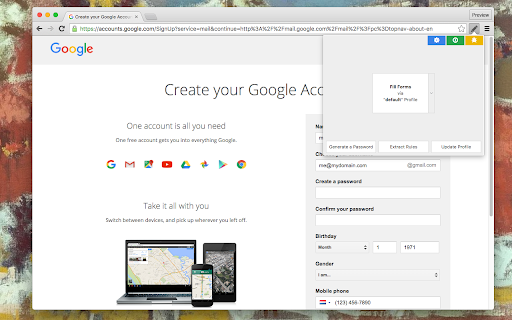
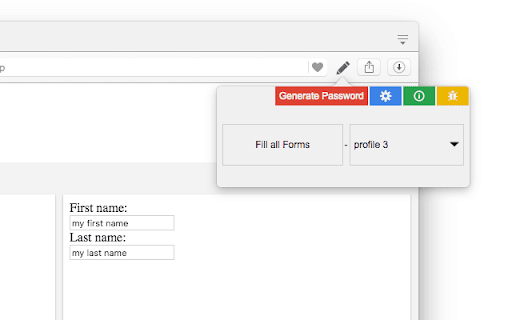

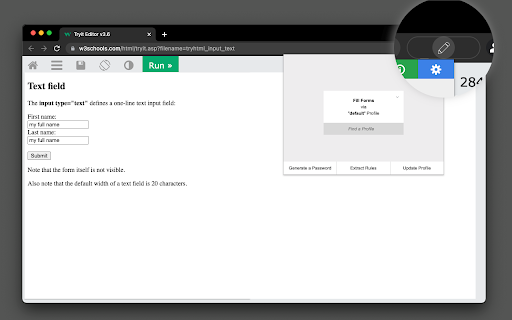
One-click form filler that supports multiple profiles and regular expression rules The "AutoFill Forms" extension is a user-friendly tool for automatically filling web forms, supporting multiple profiles. Features: 1. Easily create or update profiles by detecting user-inserted data in filled forms. - This feature simplifies the process of creating multiple profiles or updating stored data. 3. Request the extension to generate a random password, conveniently stored on your clipboard. 4. Manage multiple profiles. - Duplicate or modify existing profiles on the options page. 5. Import and export preferences. 6. Locate element positions based on their physical location within the form. 7. Supports both dark and light themes. Notes: Your profile data is securely stored in your browser's profile directory, with no backup created by the extension for security reasons. --- Changes (0.3.0) 1. The extension now operates in event background page mode, consuming no resources when not in use. 2. The extension is enhanced to fill forms that don't perfectly match the predefined fields. --- Changes (0.3.2) 1. Resolved the issue where multi-line text was not being inserted from the context menu.

Easy Custom Autofill
Save time and skip the repetition! Fill annoying fields instantly with a click. All data is kept locally for your privacy. 😉 Save time and avoid repetitive typing with our extension! Easily save any text, then right-click on an input field to access a context menu with your saved items. Perfect for filling in custom fields like LinkedIn profiles, portfolio URLs, and more. Just hover over the menu, select your saved text, and you're done! All data is kept locally for your privacy. Simple, convenient, and efficient.

Easy Autofill: Secure Profile-Based Fill Out and Form Filling
Effortlessly auto-fill your form data across websites. Secure, easy to use, and free to try. Tired of manually filling out the same forms over and over? Whether it's signing up for accounts, checking out from shopping carts, or completing job applications, Easy Autofill is the autofill app that saves you time by securely saving your form data and filling it in with just one click. If you're looking for a reliable and secure way to autofill forms in your Chrome browser, this is the extension for you. 💳 One-Time Payment: Pay once, enjoy forever—no monthly fees. 🔒 Secure Storage: Your data is encrypted, and password fields are never saved unless you allow it. 📂 Multiple Profiles: Easily switch between personal, work, and other profiles. With Easy Autofill, you get an easy-to-use autofill software designed specifically for autofill web forms across any site. 📑 Unlimited Profiles: Save and manage different sets of data for various form-filling needs, perfect for automatic form filler tasks. 🔐 Encrypted Storage: Your information is always safe with us, secured by advanced encryption. 🆓 Free Plan with 10 Autofills: Try the free plan, which allows 10 autofill actions per day. Upgrade to unlock unlimited automatic fill capabilities! Whether you need an autofill chrome extension for personal use or for frequent form submissions at work, Easy Autofill is the perfect chrome extension for your needs. ⚡ Lightning Autofill alternative: Many users were disappointed when Lightning Autofill moved to a subscription model. With Easy Autofill, you pay once and enjoy unlimited autofills with no recurring fees. Your data is encrypted, and we don’t store or track sensitive information. 🧠 Magical alternative: While Magical is a more comprehensive automation tool with additional features like AI-driven workflow automation, Easy Autofill is designed for users who want a simple, fast, and reliable chrome extensions autofill solution without the complexity. 🆓 Free Trial: Get started with 10 autofill actions per day. 💎 Premium Plan: For just $9.50, unlock unlimited autofill web forms and premium features. No subscriptions, just a one-time payment. It’s one of the most cool chrome extensions available for simplifying your fill out form tasks. 🔒 Privacy & Security Your privacy is our priority. Easy Autofill does not track your browsing activity or share any personal data. All your information stays local to your device, and password fields are never saved unless you explicitly allow it. Whether you’re working on a form fill up online or filling out a checkout form, your data is always secure. 🤔 Isn’t browser autofill enough? Browser autofill is limited to certain fields like addresses and passwords. Easy Autofill goes beyond, saving and auto-filling text fields, checkboxes, and more across any form. It's a more robust solution for autofill in Chrome browser users who need workflow automation for repetitive tasks. 🛡️ Are you tracking my data? No, Easy Autofill does not track, share, or store your data externally. Your data remains private and secure on your device, making it the perfect autofill software for privacy-conscious users. 🎉 Stop wasting time on repetitive data entry. Install Easy Autofill today and take control of your form fill up tasks with the ultimate autofill chrome solution. Changelog: 1.4: Add feature: deletion of profiles from settings page 1.5: Improve support of more google form fields: Multiple choice, Checkboxes, Rating, Linear Scale

SimpleFill - Autofill Forms
Browser extension that fills out forms with smart auto-suggestions in dropdowns and right-click menu. This is the simplest form filler ever—period. Feature Highlights • Auto-suggestions in dropdowns as you start typing. • Autofill any field using your context menu. • Add, edit, remove, and reorder your data as you wish. • Organize your data in folders. • All data is stored locally in your browser storage. • Import/export your data to a file. Why Use SimpleFill • On average, it takes 12 seconds to type out a name, email, and address. With SimpleFill, it takes a maximum of 3 seconds. • The default browser autofill isn't accurate most of the time, and browsers don't allow you to edit the saved information. • Without SimpleFill, you can't fill out forms using your right-click context menu, which is super handy. • The default browser autofill do not work with large blocks of text, such as emails. Some Use Cases • Marketers: Quickly fill out campaign sign-up forms, lead gen tools, and demo requests. • Customer Support: Auto-fill repetitive ticket forms, canned responses, or internal tools. • Sales Teams: Speed through CRM entry, contact forms, and follow-up request pages. • Recruiters: Autofill job board listings or candidate submission forms across platforms. • QA Engineers: Instantly populate test forms with dummy data during website testing. • Freelancers & Consultants: Save time filling proposals, invoices, and registration forms. • Product Managers: Quickly submit feedback or bug reports across multiple tools. • HR Teams: Fill internal employee forms or vendor onboarding forms effortlessly. • Job Seekers: Apply faster by autofilling job applications, profile info, and cover letter fields. Getting Started • It's quite simple (no pun intended) to use SimpleFill. • Install the extension by clicking the 'Add to Chrome' button. • Right-click on any input field and select SimpleFill > Add form data... • Enter your details and click on the "Add" button. • As you type in any input field, SimpleFill will automatically suggest relevant entries. Alternatively, right-click on an input field and select your saved data directly from the SimpleFill context menu to instantly fill the form. Note: To import your form data from older versions of SimpleFill, go to https://simplefillapp.com/tools/data-converter.

MultiField CopyCat - Copy, Paste & Autofill Forms Instantly
Tired of filling the same forms? MultiField CopyCat is a form-filler chrome extension that lets you bulk copy, paste, and autofill form fields instantly. Drag to select fields to copy and paste them into another form in seconds. Save form data once for future autofills. Save time and energy with every web form! 🐱⚡ ⭐ Benefits 🐾 ------------------------- ⏱️✨ Save time filling forms – Skip typing every field! Copy, paste & autofill forms in seconds 🚀✨ Boost productivity – Do more in less time for work, testing, or data entry 🧠✨ Reduce mental & physical fatigue – Free yourself from wrist fatigue & brain draining repetitive typing ☕✨ Relax while we work – Enjoy more breaks while your forms are pasted instantly or filled automatically 🔒✨ Privacy first – Your data stays local. We never share or sell your information 🐱✨ A cat companion in your browser – Pin Meow Meow to your toolbar for a cute productivity buddy ⚡ Key Features 🐾 ------------------------- 📄✨ Copy & paste form fields in selected area – Drag over target area to copy or paste multiple fields at once 📋✨ Copy & paste all form data on page – Grab all form data with 1 button click. Paste them wherever needed. Perfect for data migration or repeated entries 🧠✨ Smart Match available – Attempt to match fields automatically when pasting, even when form fields aren't in the same order (works best with standard web forms) 🔀✨ Two Paste modes – Use default Sequential Mode for forms with identical layouts (Smart Match off), or Smart Match Mode to match fields for forms with different field positions (toggle in the extension popup) 🏄✨ Auto-Scroll Dragbox (Pro) – Drag your selection area beyond the visible screen, and the page scrolls automatically. Perfect for copying/pasting between long forms or CMS pages 🐱✨ Smart autofill – Save & reuse your form data with instant autofill. Great for repetitive tasks, or saving draft copies on web entries ✌️✨ Apply saved form values on current page – Use 'Apply Autofill' button to instantly fill current page using a selected saved form setting ⚙️✨ Full control over autofill – Easily toggle autofill on or off for each saved setting 💎✨ Custom field group setup in Smart Match (Pro) – Create custom field groups, allowing fields with similar meanings to match across different websites for maximum flexibility 🗂️✨ Save multiple form sets per autofill setting (Pro) – Easily switch between different saved form sets under one autofill setting ⏱️✨ Custom autofill delay for slow-loading pages (Pro) – Ensure autofill applies at the right timing on dynamic or slow websites 🛠️✨ Edit & manage saved settings – Update field values, or edit URL patterns to extend autofill on more pages 💳✨ Built-in Stripe checkout autofill – Instantly fill out Stripe test-mode checkouts. Perfect for developers & QA testers ⌨️✨ Customizable keyboard shortcuts – Use default hotkeys or define your own for a lightning-fast workflow 🧩✨ Supports all standard fields – Works seamlessly with text inputs, checkboxes, radio buttons, dropdowns, content-editable fields, and more 📊✨ Usage insights – Check performed action counts & time saved, right from the profile page (click the cat in the popup 🐱) 🔒✨ Privacy-first storage – All data stays local on your device. We connect only to our official site to verify login/subscription status ⭐ How It Works 🐾 ------------------------- MultiField CopyCat lets you copy, paste, and autofill form fields on any webpage in seconds. 📄✨ Copy form data in selected area – Press Alt+C / Option+C to start copy mode, then drag to select fields 📋✨ Paste form data in selected area – Press Alt+V / Option+V to start paste mode, then drag to paste into fields 📄✨ Copy all form data on page – Press Alt+Shift+C / Option+Shift+C 📋✨ Paste all form data on page – Press Alt+Shift+V / Option+Shift+V 🧠✨ Smart match vs default sequential mode during paste – Switch modes via the 'Enable Smart Match' button in the extension popup. Default Sequential Mode pastes fields in the same order as copied, perfect for identical form layouts. Smart Match Mode helps automatically match fields based on form field similarity when field order differs 🐱✨ Save autofill setting – Fill out a form as usual, then press Alt+A / Option+A to save it. Next time you visit, forms will be autofilled instantly on page load. You can also manually apply saved form values on the current page at any time from the extension popup ✅✨ All actions are accessible via buttons in the extension popup ✅✨ Works on all standard form fields – text inputs, textareas, checkboxes, radio buttons, dropdowns, and more You can manage saved autofill settings, toggle autofill on/off, or view usage stats from the extension popup or options page. 📘 For a step-by-step guide, check out our Onboarding Guide: https://multifield-copycat.com/get-started 💡 If the default shortcuts don't work, they may be overridden by other extensions. You can check & update them in chrome://extensions/shortcuts and try again. Or checkout our Onboarding Guide on how to customize shortcuts. ⭐ Popular Use Cases 🐾 ------------------------- 💼✨ Admin & operations staff – Speed through repetitive form entries for CRMs, dashboards, and internal tools 🛒✨ E-commerce managers – Manage product listings, inventory, or vendor forms in CMS with less manual typing 💻✨ Developers, QA testers & project managers – Instantly autofill test forms, replicate bug reports, migrate form data across environments, and speed up form-heavy testing ✍️✨ Content editors & marketers – Reuse content or metadata across CMS forms and SEO tools, or save draft copies in web forms with autofill 🧑💼✨ HR teams & job seekers – Prefill job application forms, or copy candidate data without retyping 👨💻👩💻✨ Everyone – Stop wasting time on copy-paste loops. Save effort on any form, anywhere ⭐ All Plans 🐾 ------------------------- 💛✨ Free – 10 copy & paste actions per week – Unlimited autofill usage with up to 3 saved settings 💝✨ Pro – Unlimited copy & paste actions – Unlimited autofill usage without restrictions – Auto-Scroll Dragbox for copying & pasting fields beyond the viewport – Custom field group setup in Smart Match – Save multiple form sets per autofill setting – Custom autofill delay for slow-loading pages – Priority support 🔒 Privacy & Security 🐾 ------------------------- We respect your privacy — MultiField CopyCat does not track your browsing activity or collect any personal information. All data is stored locally in your browser. While no encryption is applied, we recommend avoiding the storage of sensitive data like passwords or credit card numbers when using autofill. 📧 Contact us 🐾 ------------------------- Need help, got a feature idea or find out any issues? Please contact us via email at contact@multifield-copycat.com or join our Discord listed on our official site for support ⭐ Get Started Today ⭐ ------------------------- Say goodbye to repeat form entry! Install MultiField CopyCat now and experience lightning-fast workflow 🐱⚡
