
dfpjfjpfpjjgoeackldilanadoeaciam
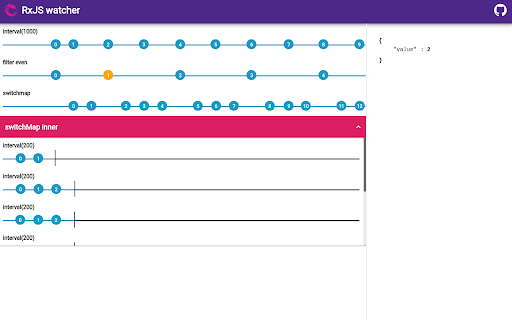
Devtools panel to visualize rxjs observables More info here https://github.com/xripcsu/rxjs-watcher

MobX Developer Tools
Dev-tools for MobX and React Inspect mobx-react observers. Edit values in observable objects (Doesn't support editing react props/state, use react-devtools for that) Track changes in MobX observables MST support

VisBug
Open source web design debug tools built with JavaScript: a FireBug for designers. - Point, click, move, resize & tinker - Edit or style any page, in any state, like it's an artboard - Inspect styles, spacing, distance, accessibility and alignment - Nitpick layouts & content, in the real end environment, at any device size - Leverage adobe/sketch skills - Edit text, replace images - Design within the chaos: use production or prototypes and the odd states they produce, as artboards and design opportunities - Design while DevTools simulates latency, i18n, media queries, platform constraints, CPUs, screensize, etc - Make more decisions on the front end of your site/app (a11y, responsive, edge cases, etc) - No waiting for developers to expose their legos, just go direct and edit the end state (regardless of framework) and execute/test an idea Give power to designers & content creators, in a place where they currently feel they have little to none, **by bringing design tool interactions and hotkeys to the browser**

Moesif Origin/CORS Changer & API Logger
Allow cross-domain requests by override Origin and CORS headers. Log/capture XmlHttpRequest API calls for debugging and analytics. This plugin allows you to send cross-domain requests directly from browser without receiving Cross Origin Errors. You can override the Request Origin header with this plugin and also have Access-Control-Allow-Origin set to *. Update: We removed email list signup and added ability to log and capture API calls. Migrated from Chrome Manifest V2 to V3, due to the new V3 "storage" api, your old settings may need to be reentered. You can override: Request Headers: Origin Response Headers: Access-Control-Allow-Origin, Access-Control-Allow-Methods, Access-Control-Allow-Headers, Access-Control-Allow-Credentials, Access-Control-Expose-Headers Guide on CORS: https://www.moesif.com/blog/technical/cors/Authoritative-Guide-to-CORS-Cross-Origin-Resource-Sharing-for-REST-APIs/ You can capture any Ajax, XmlHttpRequest, or fetch API requests made by any page, and send to your Moesif account for analytics and debugging. DISCLAIMER: This tool circumvents CORS security rules baked into every browser and is intended for testing your own website during development. Some production websites like Google Docs or Facebook may complain if they detect something that isn't expected. You can use the whitelist feature to only turn on for some domains. To avoid security issues, it is recommend to turn off after debugging. About Moesif API Monetization and Observability: Moesif (https://www.moesif.com) enables API teams at UPS, You.com, Deloitte, and others to deeply understand customer API usage and ship better API products with user-centric API analytics and monetization, which enables you to: - Understand customer API usage with user behavior analytics. - Debug issues quickly with high-cardinality API logs and metrics. - Get alerted of problems that impact customers. - Track API KPIs with custom dashboards. - Meter API usage and set up billing meters with integrations with Stripe, Chargebee, and custom billing platforms. By using this extension, you agree to Moesif's terms of use (https://www.moesif.com/terms) and privacy policy (https://www.moesif.com/pravicy).

Angular Inspector
Detect Angular apps and javascript libraries Use this tool to detect what is running under the hood on the webpages you visit. Now contains the ability to OPT-IN to contribute Angular sites you find to a central repository.
