
dfobejficjaelohpjceiicphofmmglop
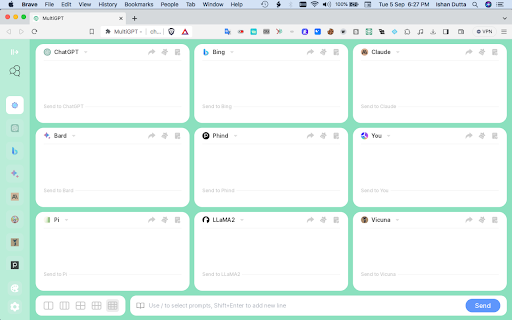
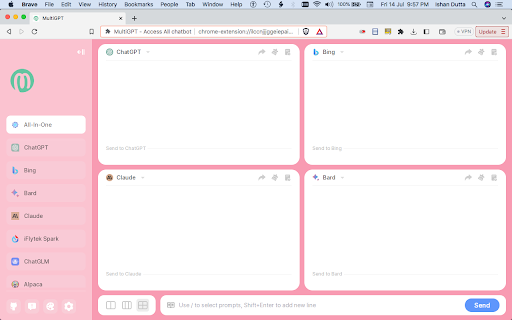

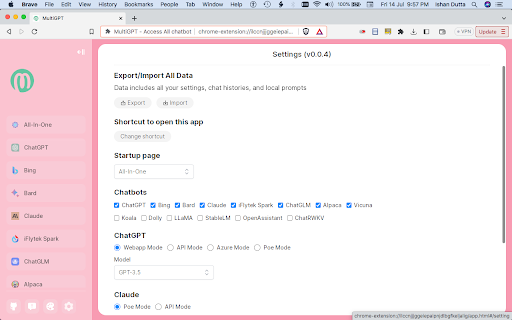
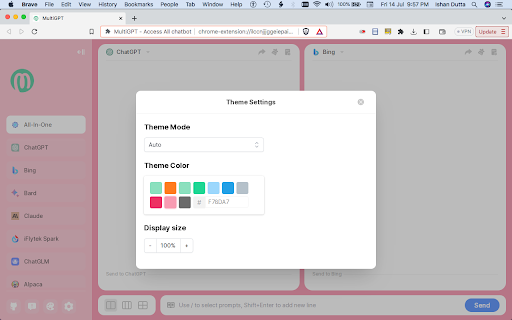
Multiple AI/LLM(Large Language Model) Chatbots like ChatGPT, Bing Chat, Bard, Claude and many more are consolidated here in one place for FREE. PLEASE MAKE SURE YOU ARE LOGGED INTO EACH OF THESE WEBSITES BEFORE INSTALLING THIS EXTENSION . WE ARE WRITING IT CLEARLY IN BOLD, SO THAT YOU DON'T COMPLAIN LATER. * Engage in conversations with multiple chatbots simultaneously, simplifying the process of comparing their responses. * More than 15 bots available. * You can chat with 9 bots simultaneously * It can access the Web * It is free and without any usage limit. * No API keys are required. * No ChatGPT Plus plan required. * [9/1] Added Pi, Phind and You chatbots. * No need of Edge Browser to access Bing Chat, MultiGPT can access Bing via Chrome or Brave Browser * [9/9] Added bots via Poe like Perplexity, Assistant (formerly Sage), Google PaLM2. * Multiple ways to access GPT4(limited) for free If you know of any chatbot which is available in public domain for free but not included here please send us a request here: https://github.com/SingularityLabs-ai/MultiGPT-mini/issues

ChatGPT Automation - Auto ChatGPT on chatgpt.com
Auto ChatGPT for your prompts at scale. Batch generate and auto-download responses and images on ChatGPT.com. ChatGPT Automation is an Auto ChatGPT tool built to fully automate your workflow on OpenAI's chatgpt.com. No more manually typing prompts one by one — let ChatGPT run automatically. This extension turns ChatGPT into a batch-processing engine, allowing you to auto-submit prompts, auto-generate content, and auto-download results at scale. 🔥 What ChatGPT Automation does Auto ChatGPT prompts continuously without manual interaction Batch generate AI text, images, and visual content Automatically download results with smart file naming Handle long prompt queues safely with smart random delays 🤖 Auto ChatGPT Batch Processing Queue dozens or hundreds of prompts and let ChatGPT Automation automatically: - Submit prompts to ChatGPT - Wait for generation to complete - Move to the next prompt No clicks. No babysitting. 🎨 Image to Image Transformation Batch transform and enhance images using AI with text prompts Chain mode: automatically use the previous generated image as input for the next prompt 🧩 Ingredients to Text Mode Upload reference images and batch-process them with prompts Auto-add character images based on filename matching ⚙️ Professional Automation Controls - Smart Random Delay System to avoid rate limits - Configurable min/max delay between prompts - Auto Download once generation completes with custom folder organization - Auto-rename files based on prompt content - Max Retries on failure — automatically retry failed prompts 📊 Real-time Queue Monitoring - Live prompt queue with per-prompt status (Queued → Running → Completed) - Visual progress tracking inside the Side Panel - Retry counter per prompt ✅ Perfect for - Content creators and copywriters - AI image and visual producers - Automation & productivity users - Anyone who wants to Auto ChatGPT at scale

ChatGPT - Snack Prompt
Discover the best AI prompts right inside ChatGPT from the top prompters on the internet Introducing Snack Prompt for Google Chrome: The Ultimate AI-Powered Prompt Companion for Everyone Unlock the full potential of AI with Snack Prompt, the game-changing extension designed to simplify and optimize your ChatGPT experience. With Snack Prompt, you'll have access to an extensive library of top prompts curated daily, as the community upvotes the best prompts for each industry, surfacing them to the top. This makes Snack Prompt the perfect partner for anyone looking to harness the power of AI. 🚀 ⚡ One-Click Prompts: Instantly access a wide array of expertly curated prompts with just a single click. 🏆 Top Prompts of the Day: Stay up-to-date with the best and most popular prompts, right at your fingertips. 🗳️ Community Upvote System: Much like Product Hunt or Reddit, our community-driven platform surfaces the best prompts to the top. 💾 Save Prompts: Easily organize and manage your favorite prompts for future use. 🔍 Discover the Best Prompts in Seconds: Find the perfect prompt for your needs in no time, as the top prompts are surfaced to the top daily. 🤝 Follow Top Prompters: Stay connected with the leading minds in the prompt community and never miss their latest creations. 🌐 Share Prompts with Others: Collaborate and inspire others by sharing your favorite prompts. 💼 Prompt Market: Monetize your expertise by selling your custom prompts directly to your followers on Snack Prompt. 🌟 Unlockable Prompts: Gain exclusive access to premium prompts by following your favorite prompt creators on Snack Prompt. 👥 Collaboration & Team Features: Work together with your team by creating and sharing prompt lists for seamless collaboration on projects. 🔧 Customizable & Organizable Prompt Lists: Personalize your prompt experience by creating and organizing your own custom lists, ensuring you have the right prompts at your fingertips. 🏢 Prompts for Teams: Enhance collaboration and productivity within your team by sharing and managing prompts specifically designed for team projects. Get started with Snack Prompt for Google Chrome today and explore the limitless possibilities AI has to offer! Transform the way you interact with ChatGPT and unleash your productivity like never before. Please note: Snack Prompt is an independent extension and is not affiliated with other ChatGPT extensions. For the best experience, please uninstall all other ChatGPT extensions before installing Snack Prompt.

Multi AI Sidebar
Access to all AI apps like OpenAI ChatGPT, Bing AI, Microsoft Copilot, Google Gemini and more in a single Sidebar. Get the best AI. ★★★★★ Access to many Artificial Intelligence Apps and many more in a single Sidebar with OpenAI ChatGPT, Microsoft Bing AI - Copilot or Google Gemini - Bard, xAI Grok, Anthropic Claude 😱 See this link for a full list: https://jitt.wwevents.fun/project/multi-ai-sidebar/ 🚧 This Multi AI Sidebar allows to fast switch between all the AI Apps 🚨 You can enable/disable the AI Apps that you want to be active 🔥 Explore the amazing possibilities of AI, such as generating text, images, music, code and more in real time 🏆 Non-intrusive, by showing the number of active AI Apps in the Sidebar icon on the Browser Toolbar 🥊 FEATURES ★ ChatGPT: Allow to chat with the lastest GPT iteration from OpenAI. ★ Microsoft Copilot: Copilot and Bing AI have can read text and files and provide real-time web serach and information. ★ Google Gemini: Chat with the latest AI from Google that was upgraded from Google Bard to Gemini Nano, Gemini Pro, and Gemini Ultra. ★ xAI Grok: Check the latest AI for X, called Grok. Developed by xAI. It's one of the most advanced in the world. ★ Anthropic Claude: Now available the latest Claude LLM, give it a try! ★ For image and video manipulation the extension also provide easy access to Microsoft Designer, Microsoft Image Creator and Magic Studio. ★ Sidebar shows as a slide-out panel and runs the web versions of the available AI Apps meaning less CPU/RAM/Internet consumption 👑 ★ Your computer will run faster with more resources available without having to sacrifice functionality. ★ Choose your preferred AI App from a wide number of available options 😍 ★ Combine all the cutting-edge AI Apps into one simple panel! ★ Multi AI Sidebar is a wrapper for worldwide AI Apps. It allows you to have access to the official services quickly from a standalone sandboxed panel 🔥 ✔ Best extension for Artificial Intelligence 🔧 You can fast-switch between all AI Apps 🎓 ✔ Clean and simple interface 💻 ✔ Very Low CPU/RAM/Bandwidth consumption. ✔ HTTPS and on official platforms for maximum security 🔑 No share of credentials to third party 🔓 💎 Building Apps and Extensions for Google Chrome and Android 🔥📣 📔 Available on the product page: https://jitt.wwevents.fun/project/multi-ai-sidebar/#changelog Multi AI Sidebar is a trademark of WWEvents. All websites are a trademark of their own company's, registered in the U.S. and other countries. This is an independent project developed by WWEvents and has no relationship to them. By installing this product you agree to our privacy policy & terms of service: https://jitt.wwevents.fun/privacy-policy/ You may consult the list of permissions and the reason why they are required on the product page: https://jitt.wwevents.fun/project/multi-ai-sidebar/#permissions “notifications” – Used to send desktop notification. For example when a new message arrive or App is updated. “contextMenus” – Allow to add more settings when right click in the App icon in the browser toolbar and browser context menu. “storage” – Used to save settings on your local computer. “scripting” – Used to be able to insert JS or CSS on the required host/domains. “system.display” – Used to detect the display size and position the Extension window. “unlimitedStorage” – Storage is limited to 5MB of data that may not be enough to store all configs. “host_permissions” – Permission to access to some hosts/domains that we must modify in order to provide the desired functionality detailed in the functionality. It also allows that you can share content (links or text) from other pages directly to inside the App and send it as a message to a friend for example. Also used to allow intercommunication with other Apps (i.e. Emojis). “activeTab” – Permission to access the window that the extension is running and is show to the user. “all_urls” – Permission required for users be able to take screenshots of the current window – captureVisibleTab. “declarativeNetRequestWithHostAccess” - Used to get the iframe version of the websites. Only impact the Extension Window. “declarativeNetRequestFeedback” - Used to get the iframe version of the website by changing the iframe requests. “alarms” - Used to update App icon badge. This information is also available inside the App: Options -> About

ChatbotsPlace: All-in-One AI Sidebar (ChatGPT, Claude & Gemini)
Access ChatGPT, Claude, Gemini, and Grok in one sidebar. Chat with multiple top-tier AI models without switching tabs or accounts Stop juggling multiple subscriptions and tabs. ChatbotsPlace is the ultimate all-in-one AI sidebar that integrates the world's most powerful LLMs directly into your browser workflow. Whether you need to write code, generate art, or summarize articles, do it instantly without leaving your current webpage. 🚀 Why ChatbotsPlace? We act as a unified interface (wrapper) for the best AI tools, giving you the freedom to switch between models instantly to get the best answer every time. 🔥 Powerful Features: - 🤖 Multi-Model Access: Chat with GPT 5.5, Claude 4.7, Google Gemini 3.1, and Grok 4.2 in a single window. - 🌎 No VPN Required: Access restricted AI models from anywhere in the world. No country blocks. - 🎨 AI Image Generation: Turn text into stunning visuals instantly using integrated diffusion models. - ⚡ Lightning Fast Shortcut: Open your AI sidebar instantly with Ctrl+M (Cmd+M on Mac). 💡 Who is this for? - Writers: Compare output from Claude vs. ChatGPT to find the best tone. - Developers: Debug code snippets without switching windows. - Researchers: Summarize long articles instantly. 🎁 Start for Free: Enjoy a generous free trial with no payment required. Experience the future of browsing today. Disclaimer: ChatbotsPlace is an independent interface and is not affiliated with OpenAI, Anthropic, or xAI.
