
ddejlbfddlhkoaomiocpbjmpnjkbcnkj

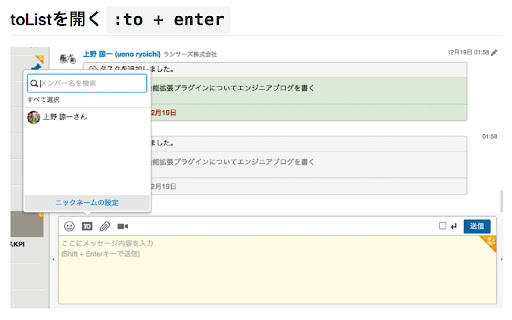

チャットワーク(chatwork)に全て既読ボタンとメッセージエリアで幾つかのショートカット機能を追加するプラグインです。 マウスに手を移動しなくても様々な操作が可能になるのでより効率よくコミュニケーション出来ます 詳しい使い方はこちら… チャットワーク(chatwork)に全て既読ボタンとメッセージエリアで幾つかのショートカット機能を追加するプラグインです。 マウスに手を移動しなくても様々な操作が可能になるのでより効率よくコミュニケーション出来ます 詳しい使い方はこちら https://github.com/ryoichi-u/chatwork_helper 更新情報 2.4.0 manifest v3に変更 2.3.0 全員toの仕様をtoallタグに変更 2.2.1 ブラウザが決める拡張機能実行タイミングの変化に伴う不具合修正 2.1.0 UIが変更されたのでベータ版UIをデフォルトに昇格 2.0.4 ディスプレイ幅が小さい時の崩れ緩和 2.0.0 ベータ版UIでのすべて既読ボタンに対応 1.5.5 chatworkAPIの仕様変更に伴う既読ボタンの未動作を修正

Gyazo - Share new screenshots. Instantly.
Gyazo for Chrome is an easy-to-use extension that lets you capture anything in your browser, share it instantly, and keep it as a visual bookmark. Use it to capture a specific image, page element, free selection, or entire web page in 2 clicks. You can also get instant previews of all Gyazo links posted online simply by hovering with your mouse. Everything you capture is saved together with the site and page title, link, and date so you can easily search and find it later. With Gyazo anything you see can be instantly saved, shared, and bookmarked. — Capture any image on the web with a right click Right click any image then hover 'Capture' and left click 'This image.' The full size image will be uploaded and a preview shown to confirm. — Capture with the Gyazo icon in your toolbar - Page Element Captures individual elements of a page such as an image, a text box, or other subsection of a page. - Free Selection Captures any part of a page you want freely, similar to the Gyazo desktop app. - Page Captures the entire visible area of the page. - Whole page Captures the entire page from the very top to the very bottom. - Home This button opens your captures page in a new tab so you can browse, search, and collect your captures. — Hover Previewing When you hover over a Gyazo link you can see an instant preview below the link, no click required. Anything you capture is instantly uploaded to https://gyazo.com with a unique link. The link is copied to your clipboard so you can paste it instantly to share. By default all Gyazo links are unlisted and only visible by people who have the unique link. — Browse, search, and collect easily On your captures page you can browse, search, and collect your captures. When you capture the app also saves metadata so you can find things more easily such as the site name, page title, link, and date so you can search your captures without needing to manually add tags or descriptions. This data is saved privately by default and you can choose to share it with viewers by clicking a button. This is very useful for creating visual bookmarks and for easy recall of your ideas. Note: We do not use this metadata except to provide convenient search and organization features for you. — Create collections to organize and even share together It's easy to add captures to a collection and give it a new title. This way you can organize your captures and share a set of captures at once. You can also invite other people and add captures to a collection. You get all this with the new Gyazo extension. You can also use Gyazo for Windows, Mac, iOS, Android, Firefox, and Edge. This extension and Gyazo Teams are the only official extensions for Chrome made by Gyazo.com. To provide the functionality listed above, there are certain permissions required. Please read on to see these details. activeTab - To capture the full web page or to capture an area defined by the bounding box of a DOM element. contextMenus - To add options to the context menu so you can capture different parts of the page or to upload a given image when you right click it. tabs - To get the page title and URL so it can be saved privately and used to help you find and organize your screen captures. clipboardWrite - To copy an uploaded capture's new link to the clipboard so you can paste it without an extra step. clipboardRead - To add support for direct embedding on github.com by converting the gyazo.com URL in the clipboard to a markdown style automatically. storage - To save and sync the extension's settings. Host Permission - To allow the extension to run on any website where you may want to capture. Please also see our linked privacy policy for more details about how your data is collected, stored, and processed.

Alt & Meta viewer
This extension show alt and meta.

Calendar Selector for Google Calendar
Save and restore groups of calendars selected Version 0.1.7 - Bug fix: More resilient finding of calendar in the left panel, will skip list items that do not appear to be built-in Google calendar entries Version 0.1.6 - Enhancement: quick fix for Chrome deprecating Manifest v2, upgraded to v3. Some keyboard shortcuts for preset management don't work, but functionality is available in the UI. Version 0.1.5 - Bug fix: Breakage introduced by Google Calendar changing the page HTML structure Version 0.1.4 - Bug fix: Agenda view displays items correctly - Enhancement: Added a license file to the repository (MIT), and provided privacy policy and data practices in the store listing (no data is ever shared or leaves the user's browser). See https://gitlab.com/bluenexa/google-calendar-selector for all version updates This extension creates a set of buttons in the Google Chrome UI that allow you to easily create, save, and display groups of calendar presets. If you have many calendars and often need to switch between which calendars are shown (such as colleagues and teams), this extension is for you. Your presets are stored in your local browser storage and sync across devices automatically (using Chrome's built in syncing mechanism). Keyboard Shortcuts: Press Ctrl+Alt and the highlighted key for the main functions (highlighted key is one of e, s, r, c, i, x, or p). Except Chrome's built-in sync mechanism, the extension functions completely offline in the browser and no data leaves the user's computer. Local storage in the browser is used to persist saved calendar groups and to sync saved groups across computers via Chrome's built-in sync mechanism (tied to the logged in Chrome user). All software is fully open source and available at https://gitlab.com/bluenexa/google-calendar-selector. Built by the team at Bluenexa.

教えてURL
- 特長 ✓ 独自調査による1,900種類以上のサービスを42カテゴリに分類・検出 ✓ 検出履歴機能:閲覧したサイトの検出結果を自動記録(ローカル保存) ✓ ランキング表示:よく検出されるサービスを一目で把握 ✓ 高度なフィルター:AND/OR条件、除外条件を組み合わせた検索 ✓ グループ管理:競合サイトやクライアントサイトをお気に入り登録 ✓ バブルアラート:指定カテゴリが検出されたらページ上に通知 ✓ ライトモード・ダークモード対応
