
dcogaokailjmbdkdejjgackbjflmeihb
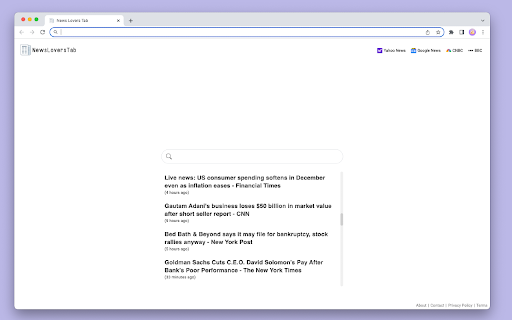
News Headlines On Your New Tab Page Stay on top of the latest headlines throughout your day with this extension dedicated to those who love to follow the latest headlines. Scroll through the latest news directly from you new tab page. This extension replaces your default Chrome new tab page and replaces it with a new tab page that includes a web search powered by Yahoo! and a module that contains the latest news headlines. Storage: News headlines are temporarily stored and displayed on the new tab page. Hosts: Host permission is requested for Google news rss feed.

Insta Speed Tester Plus
Speed dial with internet speed test. Insta Speed Tester Plus creates a colorful new tab where you can easily view your bookmarks, most visited sites and any site you'd like to add to your speed dial. Insta Speed Test Plus also includes a link to an internet speed tester so you can test your internet speed at any time from any location. Please note: This extension creates a new default tab. It features a link to the Internet Speed Tester a search bar with New Tab search powered by Yahoo®! By clicking on the "Add to Chrome" button, I accept and agree to installing the ‘Insta Speed Tester Plus’ Chrome extension and setting Chrome™ New Tab to that provided by the service, New Tab search powered by Yahoo!®, and to the Terms of Use and Privacy Policy. Terms Of Service: https://instaspeedtester.com/terms-of-service/ Privacy Policy: https://instaspeedtester.com/privacy-policy/ Contact Us: https://instaspeedtester.com/contact How to Uninstall: https://instaspeedtester.com/extension-uninstall/ About Us: https://instaspeedtester.com/about-us Required Permissions: The following permissions are requested as necessary to perform the various functions the extension provides. Top Sites Needed to display the top sites on the user's new tab. Bookmarks Needed to display bookmarks on the new tab page. Context Menus Adds a right click menu option so the user can add a web site like to their new tab page. Host Permission The host, instaspeedtester.com is the home for the extension which includes references to images and scripts on the host site.

Faro
Save pages with highlighted taglines - Bookmark manager ⨯ web highlighter Chaos in your bookmarks? Can't find what you want? They end up gathering dust? Or you don't even try and end up with 100s of open tabs? Faro is made to fix that! It's the simplest way to save & keep track of pages. With it, even thousands of saves don't get overwhelming. When saving, you highlight a sentence to act as a tagline. It helps you remember what the page is about and why you saved it. If unsure - just save whatever sentence you're reading. All saves appear on your dashboard. They come most-recent-first by default, so you don't forget what you recently saved. You can pick up your reading where you left off - no need for a separate reading list. You can also pin & archive to further arrange it. Organize them with tags. Since you're reminded what you saved and why, you can do it later. It makes your saves much easier to manage than bookmarks. Faro supports nested tags (eg: recipes/vegan), so combines the best of tags and folders. Clicking a save takes you right back to your highlight - especially useful for longer articles. Also: ➣ export to bookmarks to keep them if you uninstall Faro ➣ copy links to highlights and share them or paste into Notion, Obsidian, etc. ℹ️ About your data: When installing you can read: "it can read and change all your data on all websites" The only information that ever gets uploaded (when signed in) when you use it to save: ➣ Open page address ➣ Saved highlight/quote - what's visible in the sidebar ➣ Timestamp ➣ Debug info e.g. errors The extension also keeps track the currently open tab for each window - to update the sidebar as you navigate - but doesn't save or upload that data.

News Hub kiosk
Google News, Google Play Newsstand and BuzzFeed. News aggregator for every country. Weather forecast for Chrome. MSN News. ★★★★★ Stay updated with the latest News 📰 with this extension. Google News give you a summary updated to the minute of the most recent news in your country 🌍 Buzzfeed on the other side will give you the most trending 🔥 news and hot topics for the day. As extra you will also have access to MSN News from Microsoft, available in over 10 languages 😵 This is the very best extension for your Browser 💻 FEATURES ★ Notifications 📣 let you stay updated with the latest news. ★ Google News provides the latest news for all over the world and available to many countries 🌍 ★ Buzzfeed is the Internet trending news source 🚨 ★ MSN is the very best Microsoft News service updated with local TV news from each country 📺 ✔ Small window well positioned for texting. ✔ Auto-Start when Browser starts. ✔ Configurations in a Options 🔧 section. ✔ Quickly see your profile and news feed. ✔ Very Low CPU/RAM/Bandwidth consumption 📌 ANDROID APP 📱 Also available as a Android App for Smarthphone/Tablet devices. Get it on Google Play: https://jitt.wwevents.fun/project/hub-for-google-news-buzzfeed/#download 💎 Building Apps and Extensions for Google Chrome and Android 🔥📣 📔 Available on the product page: https://jitt.wwevents.fun/project/hub-for-google-news-buzzfeed/#changelog Google News™, Buzzfeed™ and™ MSN are a trademark of Google Inc., MSN Inc. and Buzzfeed Inc., registered in the U.S. and other countries. This is an independent project developed by WWevents and has no relationship to Google News™, Google Inc., MSN™, MSN Inc., Buzzfedd™ or Buzzfeed Inc. By installing this product you agree to our privacy policy & terms of service: https://jitt.wwevents.fun/privacy-policy/ You may consult the list of permissions and the reason why they are required on the product page: https://jitt.wwevents.fun/project/hub-for-google-news-buzzfeed/#permissions “notifications” – Used to send desktop notification. For example when a new message arrive or App is updated. “contextMenus” – Allow to add more settings when right click in the App icon in the browser toolbar and browser context menu. “storage” – Used to save settings on your local computer. “scripting” – Used to be able to insert JS or CSS on the required host/domains. “system.display” – Used to detect the display size and position the Extension window. “unlimitedStorage” – Storage is limited to 5MB of data that may not be enough to store all configs. “host_permissions” – Permission to access to some hosts/domains that we must modify in order to provide the desired functionality detailed in the functionality. It also allows that you can share content (links or text) from other pages directly to inside the App and send it as a SMS/Android message to a friend for example. Also used to allow intercommunication with other WWEvents Apps (i.e. Emojis). “activeTab” – Permission to access the window that the extension is running and is show to the user. “all_urls” – Permission required for users be able to take screenshots of the current window – captureVisibleTab. “declarativeNetRequestWithHostAccess” - Used to get the mobile version of the websites. Only impact the Extension Window. “declarativeNetRequestFeedback” - Used to get the mobile version of the website by changing the User-Agent. This information is also available inside the App: Options -> About

The News Tab
A new tab extension for chrome that allows you to view the latest news Want to view the news while browsing the web, or love the Microsoft News Tab but hate the adverts or weird articles it recommends? Then The News Tab extension is for you! A simple new tab that provides you with the news you want to see! The News Tab extension was inspired by the new tab page for Microsoft Edge and their extension, Microsoft News Page. However this extension allows you to choose what RSS feeds are shown and doesn't display adverts! This projects is in constant development and updates will keep coming. If there is a feature you would like to see don't hesitate to get in contact.
