
dcdhimjnicocbcjhmfcjlooncidccanl
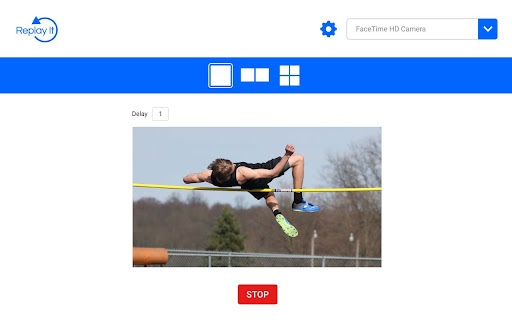


Time-delayed video feedback for sports coaches and PE teachers. Introducing Replay It, the first-ever video delay application designed specifically for Google Chrome. This user-friendly yet robust real-time video analysis tool empowers you to evaluate and enhance your own performance, as well as that of your students or athletes, in various sporting activities. With Replay It, you can record videos and play them back seamlessly after a short time delay, enabling immediate, hands-free visual feedback. Effortlessly review your performance or that of your students on your laptop or Chromebook, without having to press any buttons. Our multiscreen support feature allows you to set varying delay values and watch a performance multiple times, making Replay It an invaluable resource for sports coaches, physical education instructors, dancers, students, and more. Looking for training, support, and inspiration for your PE program? Visit replayitapp.com to access a wealth of teacher and student resources tailored to help you make the most of our cutting-edge video delay application.

Audio Delay
Delays audio with WebAudio API. Similar to other extensions, this extension intentionally delays and desyncs audio from linked video with the Web Audio API for compatibility with other extensions Licenced under the MIT Licence Source code at https://github.com/mchangrh/audio-delay v0.2 - Added support for more than just YouTube, fixed edge cases where audio would not attach.

Video Loop Extension
Easily loop a fragment of a video on any page Easily loop a video on any page, setting starting time and end time to loop over and over until stopped.

Are You Watching This?!
Live Scores and Excitement Alerts for NFL, NBA, NHL, MLB, NCAA Basketball, NCAA Football, and Soccer. Never miss an Instant Classic! This is a Chrome Extension that has Sports Scores, TV Listings, and Excitement Ratings.

Onlyshortcuts - Quick access to links with shortcuts
Reach frequently used web links faster by using pre-set, easy-to-remember shortcuts instead of typing out the full URL. Sometimes typing a URL is faster than opening a bookmark. ⚡️Onlyshortcurs extension is built for people who often access some websites this way. The extension makes it even quicker, more reliable & predictable. 1. Set the shortcut and the link it should open (like "e" = example.com); 2. Type the shortcut into the browser search bar and hit ↵Enter; 3. Instead of your search engine page, the extension opens the page you defined. ✅ Extension RUNS LOCALLY on your device. No data/request is ever sent or received. Note: to achieve a natural feel, and due to technical limitations, the search results page actually opens. Then the extension reads your search request. If it matches one of the shortcuts, the page gets immediately replaced with the set page. This is why the extension requests access to your search engine page. 💻 Browsers: Chromium browsers, FF and Safari 1. Get straight to the needed page (avoid home, welcome, and other pages on your way to your everyday content). Example: Open your project management application boards bypassing the home page 2. Open the same pages with different accounts. Example: Google uses different URLs to open different accounts for Gmail, Calendar & other products. You can set 'g1' to open your personal Gmail and 'g2' - for the work one. 3. Open your company page without typing the exact URL. Example: Usually, organizations have multiple pages on their domain. SaaS companies can additionally have app subdomains. Because of this, when you type http://company.com/ or http://app.company.com/, many suggestions appear, which do not always match what you need. Set 'app' for your SaaS app page, 'ccom' for the company home page. It makes entering the page quick and reliable, just type the shortcut and you're guaranteed to open that exact page. 1. To avoid coincidence with your real search requests use short text for your shortcuts that is unlikely to ever become the word you search for. 2. You may use special characters at the beginning of the shortcuts to make it even less likely to be your search request. For example, you can use a dash '-ccom'.
