
dbppkkjmaloclihjakcpnionomlidbhk

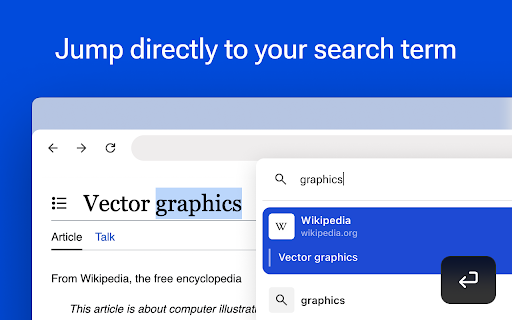
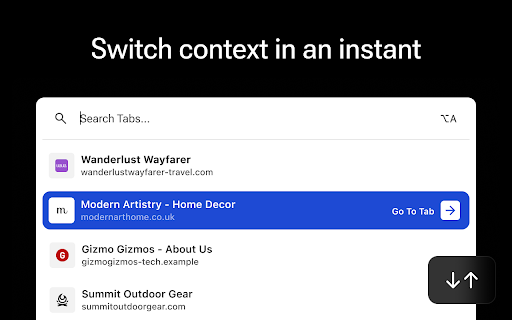
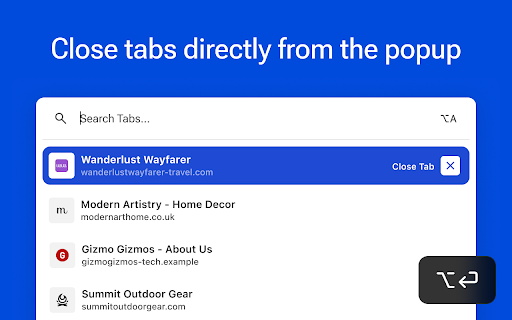

Tab manager, tab switcher and search. Fast navigation through open tabs and quick access to information. Deep Tab Search is a Chrome extension that helps you search through and efficiently switch between all your open tabs. Deep Tab Search is the perfect solution for those who work with multiple tabs open and want to find information quickly without the hassle of manually searching through each tab. - Content Search: Search across all your open Chrome tabs. - Relevant Results: Search results are sorted be relevance. - Blazing Fast: Instantly searches every open tab in the blink of an eye. - Jump to Search Terms: Open tabs and go directly to your search term. - Tab Management: Close tabs from the extension popup. - Web Search Integration: Perform web searches directly from the extension. - Intuitive Ordering: Tabs are listed by most recently used. - Search History: Access your recent search history. IDEAL FOR: - Professionals, Researchers and Students. - Multitaskers. - Power Users. Install Deep Tab Search and click the icon in Chrome's extension tray, or use the shortcut Option/Alt + A to activate the extension. Start typing to instantly see results from all your open tabs. Click on a search result to switch to that tab and find your search term highlighted. Alternatively, navigate through results with arrow keys and press Enter to select. Hold the Alt/Option key while selecting a tab to close it. Browse your recent search history by holding Shift and pressing the Up and Down arrow keys. For optimal performance, it's recommended to use Deep Tab Search with Chrome's memory saver feature turned off. This is because the extension needs to access the content of all tabs, and the memory saver feature might unload some tabs to conserve resources. However, Deep Tab Search will still work as expected with memory saver on, it just means that if it encounters any unloaded tabs, it will automatically reload them when you invoke the extension and show an "Indexing tabs..." message during this process.

Search all Tabs
A powerful offline indexing and searching tool to find matching terms in tab's title and content This extension provides a powerful content searching tool for you to easily find the relevant tab among many open ones. Like all search engines, this extension supports search operators like "AND" and "OR". You can use this extension to find the relevant content when there are many open tabs like a normal tab manager extension. It is also possible to index local files as well. This extension supports parsing content from around 30 languages and displays a preview (snippet) for the matching result. You can click on each search entry to directly activate the container tab. Notes: 1. Make sure to read the FAQs page to get yourself familiar with the search operators and keywords. 2. This extension works offline and stores the indexing database in your browser memory. There is no server-side interaction whatsoever. 3. This extension supports two different indexing engines: Xapian (a C++ engine) and Lunr (a pure JavaScript engine). Features: 1. Copy all URLs to the user's clipboard 2. Group all matched tab as a new window 3. Keyboard-only controls 4. Supports dark theme 5. Do not search on duplicated tabs 6. Search inside PDF tabs 7. Supports deep search: display more matching snippets for a single tab 8. Close the selected tabs from the search results

Extension Manager
A simple way to manage your browser extensions A simple way to manage your browser extensions Actions: Enable when match, Close when match, Enable only when match, Disbale only when match, Custom; Support automatically refreshing the page after enabling or disabling extensions. * Bulk Export/Import and Share Extensions Bulk export extension information, support sharing text, json, custom markdown format; share or record your extension installation information. Bulk import extensions from shared text or json, simplifying the process of migrating or installing multiple extensions. * One-click enable or disable extensions. * Batch enable or disable extensions through grouping. * Quick search extensions by extension name, description, alias, or note. * Extension management: Quickly navigate to settings page, homepage, uninstall extensions. * List view and grid view. * One-click launch for app-type extensions. * Set custom aliases and notes. * History: Extension installation, update, uninstall, enable, and disable. - Rich configurable options for customizing style and functionality. - Open-source code with no collection of any user privacy data. github: https://github.com/JasonGrass/auto-extension-manager

Link Map
Link Map is a browser tab sidebar that is designed for heavy information consumers. With Link Map, even if you have a large number of tabs and windows, you can manage and classify them in a logical and clear way using the tree view structure, forming your own link collection. Have you used Tabs Outliner before? Now you can import your data to Link Map and start a new journey. **What can Link Map do?** 🌲 Tree-shaped vertical tab sidebar, but with more levels: you can use drag-and-drop to quickly complete more tab operations 💾 Close and save for later reading: clear your workspace and focus on current work, they will remain in the list 🔒 Backup/restore: backup and restore your data in a universal format (JSON) 🔧 Tabs Outliner import: supports importing data from Tabs Outliner We do need to operate more tabs and windows, but at the same time, we can also keep them organized. Install Link Map and start building your tag collection to make your information consumption more efficient.

Quick Tab Search
Quickly search and switch between open tabs Quick Tab Search: Effortlessly Navigate Your Browser Tabs Are you drowning in a sea of open tabs? Quick Tab Search is your lifeline to efficient browsing. This powerful extension allows you to instantly search and switch between your open tabs with just a few keystrokes. Key Features: • Lightning-fast tab search: Find any open tab in seconds by searching titles or URLs. • Keyboard-friendly navigation: Use arrow keys to browse results and Enter to switch tabs. • Visual tab list: See favicons and titles for easy identification. • Dark mode support: Toggle between light and dark themes for comfortable viewing. • Keyboard shortcut: Open the search with Ctrl+Shift+F (Cmd+Shift+F on Mac). • Cross-window functionality: Search tabs from all your Chrome windows. How it works: 1. Hit Ctrl+Shift+F or click the extension icon. 2. Start typing to search your tabs. 3. Use arrow keys or mouse to select a tab. 4. Press Enter or click to switch to the selected tab. Quick Tab Search is perfect for: • Power users juggling multiple projects • Researchers with numerous reference tabs • Anyone who wants to boost their browsing efficiency Say goodbye to tab overload and hello to streamlined browsing. Download Quick Tab Search now and take control of your tabs!
