
dbanahlbopbjpgdkecmclbbonhpohcaf

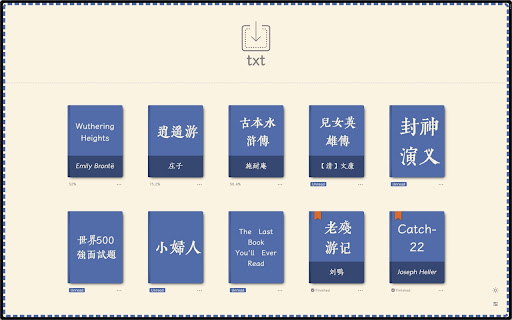
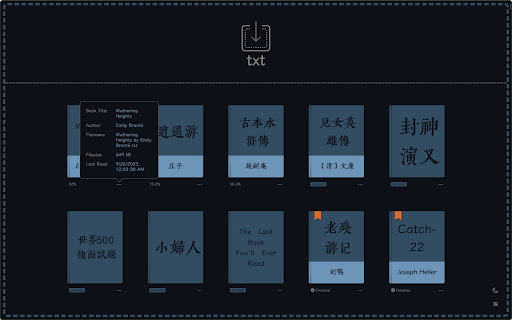

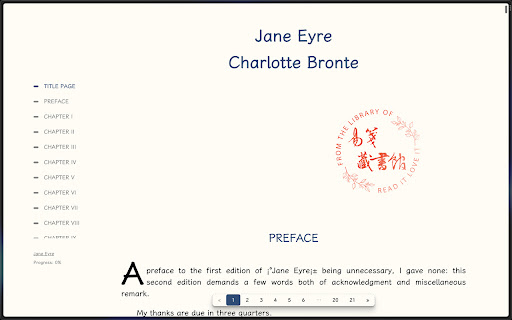

txt(小说)阅读器:支持秒开本地的所有txt文件,自动排版,自动分页,自动生成目录,记录阅读进度。 最新更新: 1. 全新的设置菜单 2. 支持使用自定义字体!拖拽字体文件(ttf 或 otf)进主界面即可 3. 支持十二款网络字体(需联网使用):黄令东齐伋复刻体、上图东观体、全瀨體、匯文明朝體、匯文仿宋、匯文正楷、仓耳与墨、仓耳渔阳体、屏显臻宋、霞鹜新晰黑、寒蝉半圆体、寒蝉正楷体 4. 支持浏览器历史导航 使用: 点击插件图标打开界面,拖拽任意文本文件进主界面中即可。 特性: 1. 百兆文件秒开,支持自动识别文件编码 2. 中英文小说名、作者名自动识别: 《书名》作者:作者名.txt 书名.[作者].txt Bookname by author.txt 3. 中英文标题正则自动识别 —— 自信的说,标题抓取几乎很少有超过易笺的了,看官们可以自行和别的阅读器对比 4. 支持自动抓取小说中的脚注 5. 界面语言随着拖进来的文件而改变(中英自动切换,别的语言咱也不会……) 6. 自动去除文字中的一些广告 7. 自动制作扉页,显示识别出的标题名和作者名,再戳上一个藏书章(中英文藏书章是不同的哦!) 8. 自动储存阅读进度,精确到每一行! 9. 书架功能,自动生成书籍封面 10. 可添加最多 3 种自定义字体(支持 TTF 或 OTF 格式) 11. 颜值高,颜值高,颜值高

Aria2 Explorer
Speed up your downloads with Aria2, manage your download tasks easily. Aria2-Explorer captures browser's download task and exports it to Aria2 via JSON-RPC interfaces to complete download task. Aria2 is a lightweight multi-protocol & open-source command-line download utility. It supports HTTP/HTTPS, FTP, SFTP, BitTorrent and Metalink. 1. For Windows, please install Aria2 Manager: https://apps.microsoft.com/detail/9p5wq68q20wv?cid=cws Other platform, please download Aria2 utility: https://github.com/aria2/aria2/releases/latest. 2. For Windows, please run Aria2 Manager . Other platform, please run Aria2 in the Terminal with typing aria2c --enable-rpc. 3. Install this Chrome extension. 4. Enable auto-capture on the extension options page and configure others as you need. (For Motrix user, please use http://localhost:16800/jsonrpc as the RPC URL) After these steps, you could enjoy the multi-threads and BT download experience inside the Chrome. Warning: Please turn off auto-capture function, when you are using other extension to download network resources. Otherwise, there will be conflict and exception arisen. Features: [ ZERO collection of user data and privacy ] 1. Auto capture browser download tasks - Capture notification - Support magnet links - Toggle auto-capture by shortcut (Default: Alt + A) - Set all Aria2 options manually before download - Filter task by the domain, file extensions or file sizes Filter priority: domain > file-ext > file-size, white-list > black-list 2. Auto-select Aria2 RPC server by matching the preset download URL pattern 4. Synchronize and store all settings on the cloud 5. Support for zh-CN/zh-TW/en/fr/it/ja/ko/ru/uk languages 9. Support shortcuts in the options page (Save: Alt + S Reset: Alt + R Download: Alt + J Upload: Alt + U)

KISS Translator
A minimalist bilingual translation extension that supports webpage, text selection, and video subtitle translation. - [x] Keep it simple, smart - [x] Open source - [x] Adapt to common browsers - [x] Supports multiple translation services - [x] Custom translation interface - [x] Covers common translation scenarios - [x] Web bilingual translation - [x] Input box translation - [x] Seletction translation - [x] Open the translation box on any page - [x] Favorite Words - [x] Mouseover translation - [x] YouTube subtitle translation - [x] Support for various translation effects - [x] Customizable text recognition and full-text translation - [x] Customizable translation styles - [x] Support for rich text translation and display - [x] Support for displaying only the translated text (hiding the original text) - [x] Advanced translation API features - [x] Aggregate and send translated texts in batches - [x] AI contextual conversation memory - [x] Customizable AI terminology dictionary - [x] AI-powered subtitle segmentation and translation - [x] Customizable hooks and parameters - [x] Cross-client data synchronization - [x] KISS-Worker(cloudflare/docker) - [x] WebDAV - [x] Custom translation rules - [x] Rule subscription/rule sharing - [x] Customized terminology - [x] Custom shortcut keys - `Alt+Q` Toggle Translation - `Alt+C` Toggle Styles - `Alt+K` Open Setting Popup - `Alt+S` Open Translate Popup / Translate Selected Text - `Alt+O` Open Options Page - `Alt+I` Input Box Translation

小电视空降助手
恰饭?桌子都给你掀了(/= _ =)/~┴┴ 带你精准空降到赞助广告结束或者高能时刻,自动跳过视频中的赞助广告、订阅提醒等片段。你也可以亲自标记视频中的广告并上传,所有人都会从您的贡献中受益。 目前插件还在开发中,如果您在使用中遇到了任何问题,或者有任何建议,欢迎到我们的交流群或者开发主页讨论~(https://github.com/hanydd/BilibiliSponsorBlock) 本插件移植自Sponsor Block。

Circle Reader
An extension that provides immersive reading to make you fall in love with reading on the web The best free reading assistant (reader mode) that enhances the web page reading experience. Ads are too distracting, the colors are too ugly, the fonts are too small to see clearly, the typography is too messy to find the text, does it really need to be so difficult to read the web? With just one click, Circle gives you the purest reading experience, escorting you to better reading. Circle reading assistant can extract the content of the webpage and rearrange the layout into a more suitable interface for reading. Using self-developed analysis engine and typesetting engine, the recognition effect and typesetting ability are smarter, faster and more friendly. If you are looking for a lightweight and intelligent reading aid product, you might as well try Circle Reading Assistant-the best reading aid of its kind! The reading assistant browser extension Circle, which is more powerful than the Safari reading mode, is an extension and improvement of the browser's own reading mode; it is the only magical tool for computers to read web pages, read novels, and watch news; it has shortcut key support, custom styles, Custom fonts, custom themes, automatic scrolling, automatic loading of the next page, reading aloud, article outline (outline), back to the top, reading by column, printing the formatted webpage in reading mode, supporting browser translation, etc. Reading auxiliary functions. The self-developed analysis engine provides faster analysis and smarter analysis capabilities. The self-developed typesetting engine automatically blocks advertisements and noise on html, and says goodbye to the format escape. The Circle reading assistant browser extension developed by pure js has been launched on Google Chrome browser, Firefox browser, Edge browser, 360 browser, Opera browser, etc. ★ Several distinctive functions of Circle Reading Assistant: ➤ Self-developed recognition engine: With the help of self-developed recognition engine, Circle's recognition effect is smarter and the recognition speed is faster. ➤ Self-developed typesetting engine: With the help of self-developed typesetting engine, Circle's typesetting effect is more friendly and the typesetting speed is faster. ➤ Letter paper effect: a reading experience like reading a letter. ➤ Multi-page analysis: On a page with a link to the next page, the content of the next page is automatically parsed and displayed on the current page. ➤ Reading by column: Originally read the webpage by column, the welfare of large-screen users, without wasting every inch of screen space. ➤ Read aloud: Tired of reading? Why not try the content! Free your hands to do other things. With the help of "multi-page analysis", what kind of bicycle is needed for listening to novels? ➤ Preset 5 colorful themes: simple white, eye-protecting green, elegant dark gray, and deep dark. Circle has always been what you like. ➤ Custom gradient background or picture background: The preset theme is not on your aesthetic point? It's ok! Customize themes as you splash ink. ➤ Customize various styles: Just reading is not possible, I have the final say on the style of the web page! The font size is bigger, the font is thicker, and the line spacing is higher. Circle does everything for you to read. ➤ Follow the system to switch themes: only support custom themes? nonexistent. How about switching different themes at different times? . ➤ Custom css: You don't have the effect I want, you are awesome ugly! Customize css to help you, understand that css Circle is your person. ★ Keep abreast of the trends of Circle's reading assistant ➤ Subscription account 👉🏻 Senior Ranhe ★ Description of required permissions ➤ contextMenus: Use this permission to implement the right-click menu module, you can quickly access the function of Circle in the right-click menu ➤ : This permission allows Circle to access webpages, thereby realizing the recognition and layout of webpage content, as well as access to screenshots and exporting as pictures and other functions ★ Contact and discussion ➤ Contact me by email 👉🏻 wenguang.fe@gmail.com If you approve of my work, please have a cup of coffee to show encouragement and support 👉🏻 https://circlereader.com/donate The source code is hosted on github 👉🏻 https://github.com/hewenguang/circle Installing Circle means you accept our user agreement (https://circlereader.com/docs/agreement.html) and privacy policy (https://circlereader.com/docs/privacy.html)
